
Introduction
Search for “BrainPOP AI” and you’ll find a muddle. Some pages treat it as a chatbot. Others treat it as a new course. Neither is accurate.
BrainPOP, the animated learning company founded in 1999, hasn’t built one product called “AI.” It has put artificial intelligence into its platform in three separate ways, and each carries different benefits and different questions about student data. A teacher who treats them as one thing will either over-trust it or ban all of it.
I spent time in BrainPOP’s own documentation, help center, and blog posts, and cross-checked the outside statistics. This guide separates the three pieces, flags a few inconsistencies I noticed, and gives you a checklist to use before turning anything on in a classroom.
What Is BrainPOP AI? (Quick Answer)
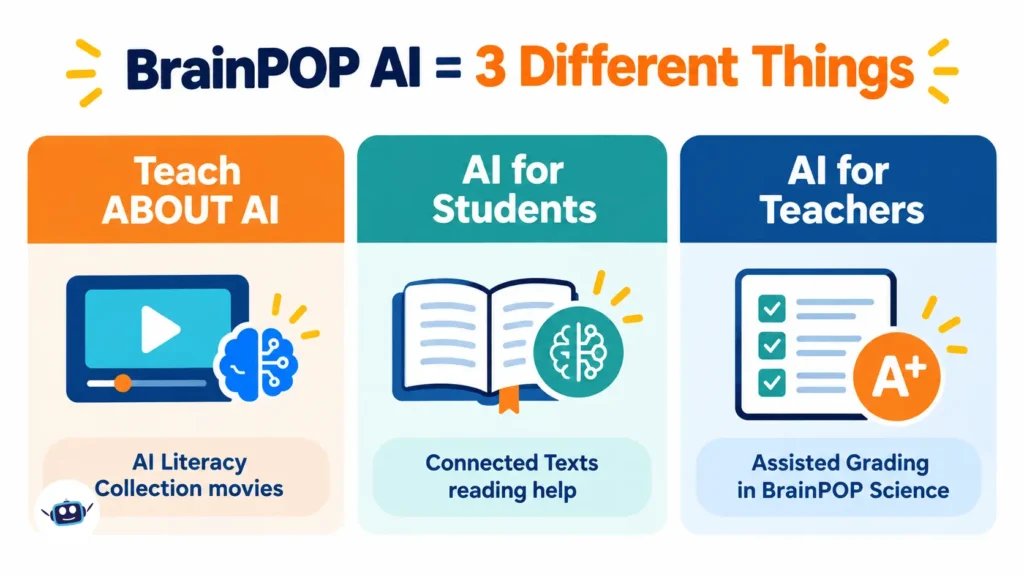
BrainPOP AI refers to the artificial intelligence content and features in BrainPOP’s K-8 learning platform. They fall into three groups:
- Teaching about AI: the AI Literacy Collection, a set of short animated “AI Spotlight” movies.
- AI that helps students read: optional reading scaffolds inside Connected Texts.
- AI that helps teachers grade: Assisted Grading in BrainPOP Science.
Only groups two and three involve software that processes student work. Group one is simply content. That distinction matters for privacy and for school approvals.
The AI Literacy Collection: Teaching Students to Question AI
What it is
According to BrainPOP’s AI Literacy page, the collection was developed with the nonprofit Digital Promise and is built around a deliberate idea: most resources teach what AI can do, while this one teaches students how to think about it.
Each movie answers a question students already ask. Examples from the collection page include “Is it cheating to use AI for schoolwork?”, “Is it okay to treat AI like it’s a friend?”, and “Can I trust the information AI gives me?”
How many movies are there? (A discrepancy worth knowing)
BrainPOP’s Back to School 2026 post says the collection covers eight topics: Plagiarism, Chatbots, Personal Data, the Environment, Misinformation, Bias, Ethics, and Probability. The AI Literacy page now lists ten, adding “AI and Real-World Problems” and “AI and Study Skills.” Most likely the collection grew after launch and the blog post wasn’t rewritten. When you plan units, trust the live collection page over older articles, mine included.
Why it’s built into existing topics
Each AI Spotlight movie sits on an existing topic page instead of a separate AI course. The “AI and The Environment” movie, for example, appears in BrainPOP’s own bookmarks screenshot alongside regular topics. BrainPOP says the movies include Pause Points, and the collection ships with discussion guides for teachers and conversation starters for families.
That fits the argument in a BrainPOP post by learning chief Deb Rayow, Beyond the Prompt. It separates AI fluency (operating the tools) from AI literacy (understanding that AI predicts patterns rather than knowing things). The post also notes that more than half of U.S. states have issued or are drafting AI guidance, though that figure is BrainPOP’s own characterization.
The older, free-to-try starting point
Before the collection, BrainPOP’s Hour of AI post (tied to Code.org’s global initiative) offered a 60-minute lesson for grades 3-8+ called “AI Dilemma: Helper, Hinderer, or Hero?” Students sort real-world AI examples into those three categories and defend their choices with evidence from the Artificial Intelligence movie. The post offered that topic free for a limited time, so check whether that’s still open.
AI Reading Support in Connected Texts
Connected Texts are short nonfiction passages that pair with BrainPOP movies. Each topic has up to three passages written at two or more reading levels.
The AI piece is narrow. While reading, a student can click a word or sentence and get a simplified or grade-appropriate definition. BrainPOP states that these AI scaffolds are optional and that AI functionality across its products is configurable and can be turned off to meet local policy.
The Reading Heatmap: the most overlooked feature
Every click feeds a Reading Heatmap that shows teachers which words and sentences students needed help with. This is the angle almost nobody covers. The AI tool is a support for students, but the heatmap turns it into a diagnostic for teachers. If thirty students click the same vocabulary term, that’s your reteaching list.
Assisted Grading in BrainPOP Science
What it does
BrainPOP’s Assisted Grading help article (last updated May 29, 2026) describes an AI tool that analyzes student Claim-Evidence-Reasoning (CER) responses against the BrainPOP Science rubric. It suggests scores and written rationales for each section.
It was tuned using responses scored by BrainPOP’s own learning designers, including science education doctorates and former science teachers. BrainPOP says it checked agreement between human and automated scores using the quadratic weighted kappa statistic.
How the workflow runs
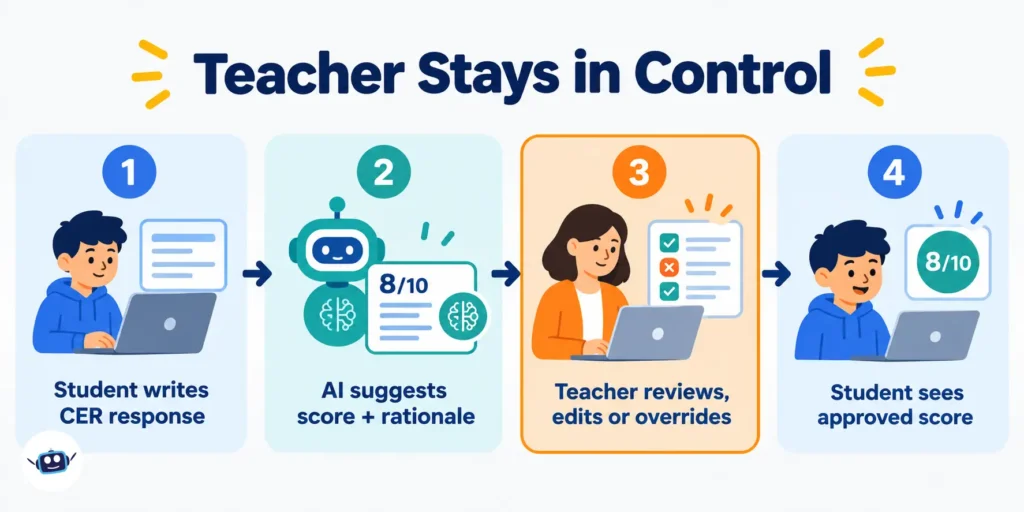
- A student submits a CER response.
- The model compares it to the rubric and suggests scores with rationales.
- The teacher reviews each suggestion and accepts, edits, or overrides it.
- Students see only teacher-approved scores.
Students never interact with the AI directly, and the article states the tool doesn’t replace teacher judgment.
The fine print most reviews skip
Three details from the help article deserve attention:
- The toggle doesn’t stop all processing. Teachers can switch Assisted Grading off in Settings, but BrainPOP notes that de-identified student responses continue to be processed by the model in the backend. To block that, a school or district administrator must request an opt-out through support. An admin opt-out disables the tool for all teachers.
- Bulk accept doesn’t exist yet. Teachers must approve suggested scores one at a time, so time savings are real but partial.
- It’s English-only for now.
On data, BrainPOP says it uses a custom model built on Google’s Vertex AI, sends no personally identifiable student information to the model, and may use de-identified data to improve its own grading model. Its plans FAQ adds that it doesn’t use student records to train third-party AI models.
Benefits: What the Evidence Supports
Teacher time. A Gallup–Walton Family Foundation survey found that teachers using AI weekly reported saving 5.9 hours per week, roughly six school weeks a year. That’s a general-AI figure self-reported by teachers, not a measurement of BrainPOP. Gallup also found that only 19% of teachers worked in schools with an AI policy.
Honest framing. In a guest post on BrainPOP’s blog, Digital Promise researchers argue that general chatbots haven’t delivered on their promise as tutors and warn about cognitive offloading, meaning students handing off thinking they actually need to do. BrainPOP’s approach (teach understanding first, keep teachers in the loop) matches that caution. It’s still BrainPOP publishing a partner’s view, so weigh it accordingly.
Evidence base for BrainPOP generally. BrainPOP says BrainPOP and BrainPOP Science hold ESSA Level 3 designations. That claim is about the platform’s learning design, not about the newer AI features, which have no independent efficacy studies I could find.
Common Mistakes to Avoid
- Treating all of it as one tool. Approving “BrainPOP AI” without asking which feature leads to confused permission forms.
- Assuming the toggle is a full opt-out. For Assisted Grading, it isn’t.
- Accepting AI scores in bulk. There’s no bulk option, and you shouldn’t create one in practice. Spot-check the rationales.
- Using the collection as a one-off lesson. The design intent is embedding, so reuse the movies inside science, ELA, and social studies units.
- Overlooking licensing. Per the plans page, classroom licenses cost $330/year for BrainPOP 3-8 and give front-of-class access only. Student accounts, assignments, and progress tracking require a school subscription. Prices change, so confirm before budgeting.
My Personal Experience: Review Notes and Lessons Learned
A disclosure first: I’m an AI, so I haven’t run a classroom and I won’t invent anecdotes. What follows is what I observed reviewing BrainPOP’s materials side by side, which is the same exercise an administrator would do.
The marketing and the documentation disagree slightly. The eight-versus-ten movie count was my first clue to cross-check everything. Dates also matter: the AI Literacy page and several posts say “Back to School 2026,” while BrainPOP’s own social post from late June described the collection as available in BrainPOP 3-8. Always verify current availability in your account.
The help center is more informative than the blog. The most useful facts (the backend processing caveat, the English-only limit, the one-at-a-time approval) came from the help article, not the promotional posts. If you evaluate any edtech AI product, read the help center first.
The public reaction was more nuanced than I expected. Comments under BrainPOP’s launch post included people worried the company was “pro-AI,” and another commenter pointing out those critics hadn’t watched the whole clip. The product is about questioning AI, which is why previewing a movie before judging it is worth the five minutes.
Lesson learned: the strongest use case isn’t the grading tool or the reading helper. It’s pairing an AI Spotlight movie with a teacher-led discussion, the way the Hour of AI lesson does. Everything else is a convenience layer.
(If you’re a teacher who has used these features, adding two or three sentences about your own class here will strengthen this section for readers.)
Best Practices Checklist
- Preview each AI Spotlight movie and the discussion guide before assigning.
- Ask your administrator whether district policy covers AI features, then document the settings you chose.
- Request an admin-level opt-out if your district doesn’t want any student responses processed by an AI model.
- Use the Reading Heatmap weekly to plan vocabulary instruction.
- Review a sample of Assisted Grading rationales each unit and report corrections to BrainPOP.
- Revisit settings at the start of each school year, since features and policies change.
Frequently Asked Questions
Is BrainPOP AI a chatbot students talk to?
Based on BrainPOP’s documentation, no. The AI features are Connected Texts reading scaffolds and teacher-facing Assisted Grading. The AI Literacy Collection is animated video content about AI.
What grades is the AI Literacy Collection for?
BrainPOP says it is available in BrainPOP 3-8. The Hour of AI lesson is listed for grades 3-8+.
Can I turn BrainPOP’s AI features off?
BrainPOP states its AI functionality is configurable. Teachers can toggle Assisted Grading in Settings, but fully blocking backend processing of de-identified responses requires an administrator opt-out.
Does BrainPOP use student data to train AI?
BrainPOP says it doesn’t share personally identifiable student data or use student records to train third-party AI models. Its Assisted Grading article says de-identified data may be used to improve BrainPOP’s own grading model. Read the current privacy policy for details.
Which AI model powers Assisted Grading?
BrainPOP says it uses a custom model built on Google’s Vertex AI.
Does Assisted Grading replace teacher grading?
No. Teachers accept or override each suggestion, and students see only approved scores.
Is there a free way to try the AI content?
BrainPOP has offered a free Sneak Peek for educators and has made the Artificial Intelligence topic free for a limited time. Availability changes, so check the site.
How much does BrainPOP cost?
Individual classroom licenses were listed at $330/year for BrainPOP (3-8) at the time of writing. School and district pricing requires a quote.
Conclusion
BrainPOP AI is best understood as a teaching resource first and a software feature second. The AI Literacy Collection helps students ask whether to trust AI, the Connected Texts scaffolds support independent reading, and Assisted Grading speeds up science feedback while leaving the final call with the teacher.
Actionable takeaways:
- Decide which of the three AI categories you actually want.
- Check the live AI Literacy page for the current movie list.
- Confirm settings and opt-outs with your administrator before students log in.
- Anchor the content in discussion, not just viewing.
- Verify any claim here against BrainPOP’s current documentation.
Disclaimer: This article is independent and not affiliated with or endorsed by BrainPOP. Product features, pricing, and data policies are as published on BrainPOP’s website and help center as of October 3, 2026, and may change. Statistics from third parties reflect the cited studies, not BrainPOP’s products. This is general information, not legal or compliance advice. Confirm privacy and procurement questions with BrainPOP and your district.