
Short answer: Liven is a subscription self-care app with mood tracking, journaling, short lessons and an AI chat companion called Livie. Public ratings are good: 4.4 on the US App Store, 4.0 on Google Play and 4.3 on Trustpilot, as of October 17, 2026. The most common complaints are about billing, not the content. Weekly plans, auto-renewal and website purchases that don’t appear in your phone’s subscription list catch people out. Liven is not therapy, and no published trial of the app itself turned up in research for this article.
What Liven is, and what it isn’t
Liven is made by Chesmint Limited, based in Limassol, Cyprus. The Google Play listing shows the developer as “LivenTech” with the same company details. Liven describes itself as a “self-discovery companion.” Its site lists these tools:
- A mood tracker with daily check-ins
- Guided journaling
- Livie, the AI companion
- Short courses and well-being tests
- A to-do routine builder
- Calming sounds
- Role-play for hard conversations
- 1-on-1 coaching
The company says the app has 5 million downloads in 162 countries and more than 300,000 five-star reviews. It also says 15+ licensed therapists and psychologists co-create the content. These are company claims, not independent findings.
The legal wording matters. Liven’s store listings say the app is not intended to diagnose, treat, cure or prevent any health condition. They also say Livie is not a substitute for professional advice. Liven’s own Livie page calls the app a self-regulation tool, not a crisis service, and points to the 988 line for immediate support.
Check you have the right app. Other apps use similar names. One App Store listing, “Liven up,” comes from a different developer and is marketed as a habit tracker. The Chesmint app is listed as “Liven: AI Life Coach” in the US App Store. Our explainer on Flipped AI and why two unrelated products share a name shows how easily this confusion happens.
What the ratings say
| Source | Rating | Volume | Notes |
|---|---|---|---|
| US App Store | 4.4 / 5 | 52K ratings | Age rating 18+ |
| Google Play | 4.0 / 5 | 55.5K reviews | 1M+ downloads; rated 12+ |
| Trustpilot | 4.3 / 5 | 34,811 reviews | 62% five-star, 13% four-star, 9% three-star, 3% two-star, 13% one-star |
Checked October 17, 2026.
Three details change how to read these numbers.
- The split is lopsided. Thirteen percent of Trustpilot reviewers gave one star, the same share as four stars. Few people sit in the middle: they either liked it or felt badly treated.
- Most Trustpilot reviews are recent and invited. Of the 34,811 reviews, 22,817 were posted in the last 12 months. The profile is a claimed one on a paid Trustpilot plan, and the company invites customers to review. Many recent reviews carry an “Invited” label. Trustpilot says it screens reviews with software but does not fact-check them.
- The stores disagree on age rating. Apple lists 18+, while Google Play lists 12+ (“Sexual Innuendo”). That is a small discrepancy, but a real one if a teenager might use it.
What reviewers like and dislike
Positive reviews tend to say the same few things:
- The daily check-in is quick.
- Lessons come in small pieces, which helps when you feel overwhelmed.
- Breathing and “reset” exercises are calming.
- AI-generated journal reflections feel insightful.
- Support staff respond quickly, including when people cancel.
Critical reviews cluster around other points:
- Price. Several reviewers liked the app but found the renewal cost too high.
- Depth. One recent Trustpilot reviewer said the lessons felt like free social-media videos and wanted deeper psychology.
- Missing features. Multiple reviewers on Google Play and Trustpilot say saved journal entries can’t be edited.
- Screen size. An App Store reviewer said the app is not tablet-friendly.
- Rating prompts. A January 2025 App Store reviewer complained about repeated requests to rate the app.
Each of these is one person’s report, but several recur across platforms.
Why many Liven reviews deserve a second look
Search results for “Liven app reviews” are crowded with promotional material, and some of it is hard to spot.
- The Everygirl review is labeled a sponsored post by Liven. The editors say the opinions are their own. The article still includes promotional links and a discount offer. Liven’s homepage lists it under “Reviews in media.”
- Liven runs an affiliate program on the Awin network, so some review sites may earn a commission on sign-ups.
- Several forum posts praising the app appear on developer-discussion boards unrelated to wellbeing. They are brief, upbeat and unlabeled.
None of this proves a particular review is dishonest. It means a review is more reliable when it discloses sponsorship, names the plan the writer paid for and says what the writer did not like. Our editorial process explains how we handle sourcing and corrections.
Liven pricing in the US
Liven doesn’t publish web prices on its help pages. The clearest price list is the US App Store, checked October 17, 2026.
| Plan (App Store, US) | Price |
|---|---|
| Weekly (3-day trial available) | $7.99 per week |
| Yearly (listed offers) | $49.99, $59.99 or $89.99 |
| Yearly with 7-day trial | $89.99 |
| Lifetime | $99.99 |
| Bundle with 2 workbooks | $19.99 |
Liven’s help center says the app is not completely free. Store subscribers may get a 3-day trial on the weekly plan or a 7-day trial on the yearly plan, and the trial converts to a paid plan unless it is canceled first. Website subscribers don’t get a free trial. They may get a discounted first billing period, then the regular rate.
Website plans follow a different menu: a weekly intro offer that rolls into monthly billing, a monthly plan, or a 3-month plan billed every three months. Prices appear at checkout.
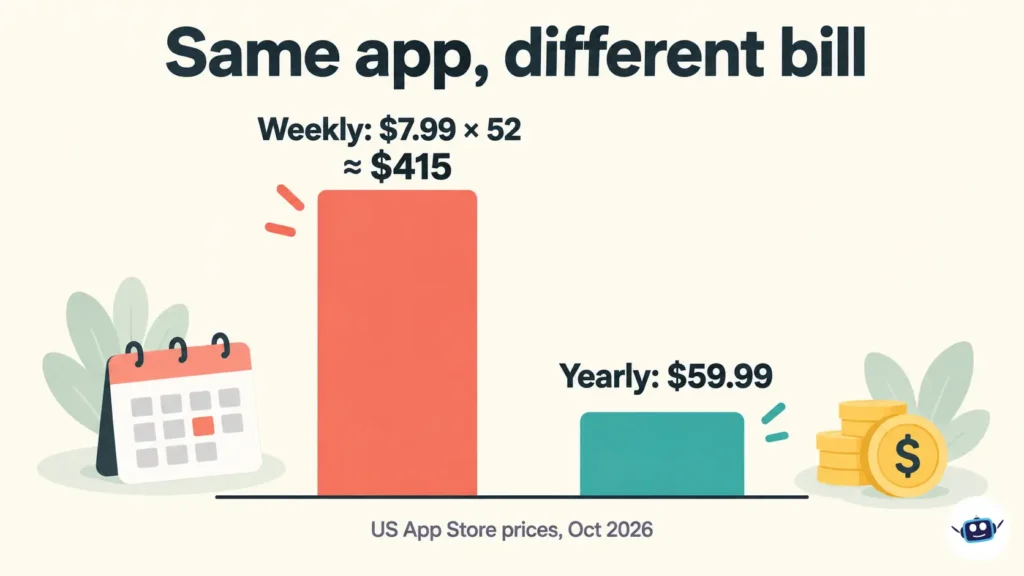
The weekly plan is the expensive one. At $7.99 a week, a full year costs about $415, roughly seven times the $59.99 yearly option.
Billing, cancellation and refunds
Billing causes most of the one-star reviews. Liven’s help center spells out how it works.
- Subscriptions renew automatically unless canceled before the next billing date.
- Website subscriptions don’t show up in your iPhone or Google Play subscription settings. They are managed in your Liven account or by contacting support@theliven.com.
- Store subscriptions can only be managed through your Apple or Google account.
- Most plans run on a 30-day cycle. In a 31-day month, a renewal can land on the 30th. Liven says this is not an extra charge.
- Canceling stops future renewals but keeps access until the current period ends.
- Deleting the app does not cancel anything, as Liven itself says in public replies to reviewers.
How to cancel, by purchase channel
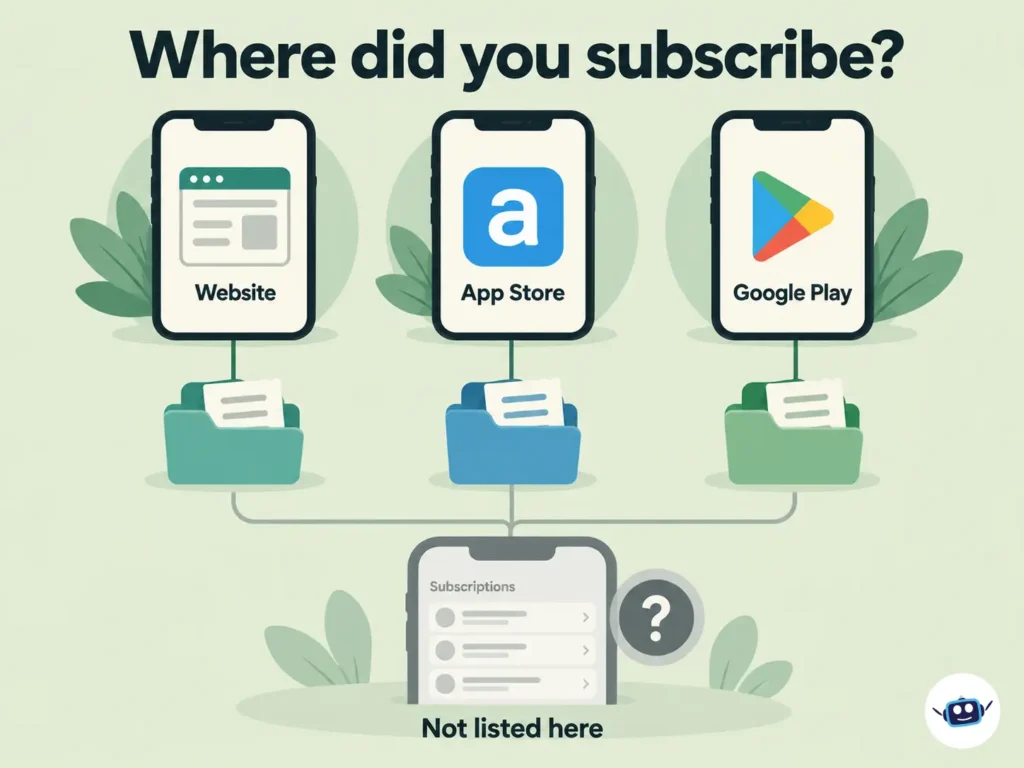
- Find out where you subscribed. An Apple or Google receipt means a store subscription. A receipt from Liven, or a Liven name on your card statement, suggests a website purchase.
- App Store: iPhone Settings → your name → Subscriptions → Liven → Cancel subscription.
- Google Play: Play Store → profile icon → Payments & subscriptions → Subscriptions → Liven → Cancel.
- Website: log in, open Profile, choose Manage Subscription, tap Cancel, then scroll down and confirm. Liven’s pages describe slightly different menu paths (Profile → Manage Subscription, or Settings → Membership), so follow whichever your app version shows.
- Get confirmation. Save the on-screen message or email.
Refunds
Liven says refund requests are reviewed individually under its money-back policy. Email support@theliven.com with the address used to purchase and details of the charge. Reviewer experiences vary widely. Some Trustpilot reviewers report fast full refunds, while others describe refusals after auto-renewal.
What US law says
Under the Restore Online Shoppers’ Confidence Act, the FTC says online sellers using recurring charges must do three things:
- Clearly disclose all material terms before taking billing information.
- Get the customer’s express informed consent.
- Provide simple ways to stop recurring charges.
The FTC’s broader 2024 “click-to-cancel” rule was vacated by the Eighth Circuit in July 2025, and the agency began a new rulemaking process in 2026. The 2010 statute still applies, as do many state auto-renewal laws. This does not mean Liven has broken any rule. It describes the standard a customer can point to if a charge was not clearly disclosed.
Does Liven work? What the evidence supports
Two points need to be kept apart: what research says about apps in general, and what it says about Liven.
Apps in general. The National Institute of Mental Health says there are no national standards for evaluating the effectiveness of mental health apps, and that it does not endorse any app. A 2024 meta-analysis in World Psychiatry pooled 176 randomized controlled trials. It found small but statistically significant benefits for depression symptoms (g = 0.28) and generalized anxiety (g = 0.26) compared with control groups. Effects were larger for apps with cognitive behavioral therapy (CBT) features, mood monitoring or chatbot elements. The number needed to treat was about 12, meaning roughly 12 people would need to use an effective app for one extra person to benefit. A separate analysis in BMJ Mental Health found little improvement in the quality of these trials over time.
Liven itself. Liven markets CBT-informed content and mood tracking, which are the features linked to larger effects. Searches for this article turned up no peer-reviewed trial of Liven. The research supports the category, not this product. The “300K+ five-star reviews” figure measures popularity, not clinical results.
The AI companion
Livie is a generative-AI chat. In November 2025, the FDA’s Digital Health Advisory Committee met to discuss generative-AI mental health devices. At the time of the meeting, the FDA had not authorized a generative-AI device for mental health treatment. Illinois now prohibits AI from providing therapy, under a law signed in August 2025. That law excludes self-help materials that don’t claim to offer therapy, which fits how Liven positions Livie. The practical reading is that Livie is a reflection tool and not a clinician. For more on this area, see our AI policy and ethics coverage.
Privacy: two store labels, two stories
Both store labels are filled in by the developer, and Apple says its version is not verified.
- Apple says contact info (email), identifiers and usage data may be linked to you, and that usage data may be used to track you across other companies’ apps and websites.
- Google Play shows “No data shared with third parties,” says data is encrypted in transit and says you can request deletion.
The two labels read differently. Liven’s full privacy policy sits on its quiz subdomain, so read it before typing sensitive details into the journal or chat. Our guide to DreamGen AI’s pricing, privacy and features shows how we compare these details for another AI app.
Is Liven good for ADHD or motivation problems?
Liven does not claim to treat ADHD, and its store listings say it is not intended to diagnose or treat any condition. Its site does market tools for procrastination and getting started. Some reviewers find the check-ins helpful for routine, while others find the recommendations generic.
ADHD is diagnosed and treated by clinicians. Trials of adult ADHD psychosocial treatment, such as a randomized trial of DBT-based skills training published in Behaviour Research and Therapy in 2011, used structured group programs in outpatient psychiatric settings. A phone app can support routine, but it isn’t that.
Who Liven suits
| Likely a fit | Likely not a fit |
|---|---|
| People who want a short daily check-in | Anyone seeking therapy, diagnosis or crisis support |
| Readers who like text-based, bite-size lessons | People who want a free app |
| Users comfortable tracking a subscription renewal | People wary of sharing sensitive data with an app |
| Those who treat it as a supplement to other support | Users who want deep psychological content or ADHD-specific design |
Practical Insights
These points come from the verified details above, plus reasoning about them.
- Choose the plan by how often you’ll use it, not by the headline discount. The weekly plan costs about seven times the $59.99 yearly option over a year.
- Pick the purchase channel deliberately. A store subscription can be seen and canceled in one place on your phone, and refunds go through Apple or Google. A website subscription is invisible there.
- Set a reminder before the trial ends. Trials run 3 days (weekly) or 7 days (yearly), and the charge follows automatically.
- Screenshot the plan screen at checkout. If a charge is disputed later, you have proof of what was disclosed.
- Know your billing frequency. A 3-month plan bills four times a year, which can surprise someone who assumed annual billing.
- Run a two-week test with one measurable goal, such as completing a daily check-in on 10 of 14 days. If the habit doesn’t stick, cancel before renewal.
- Keep names and identifying details of other people out of AI chat entries unless you’ve read the privacy policy.
- Treat ratings as a direction, not proof. A U-shaped rating, invited reviews and sponsored write-ups all argue for checking the billing terms yourself.
Common mistakes
- Deleting the app and assuming billing stopped
- Looking for a website subscription in phone settings
- Assuming “free trial” means no payment will ever be taken
- Taking Livie’s replies as clinical advice
- Relying on reviews that don’t disclose sponsorship
FAQs
Is the Liven app legit?
Yes. It is a real app from Chesmint Limited in Cyprus, with large store ratings. The recurring complaints concern billing and refunds, so read the plan terms and know how to cancel before subscribing.
How much does Liven cost?
On the US App Store, the weekly plan is $7.99, yearly options run from $49.99 to $89.99, and lifetime is $99.99. Website prices appear at checkout and can differ. Check the screen before you confirm.
Does Liven have a free trial?
Store subscribers may get a 3-day trial on the weekly plan or a 7-day trial on the yearly plan. Website subscribers don’t get a free trial but may get a discounted first period. Both convert to paid plans automatically unless canceled.
How do I cancel Liven?
Cancel in the same place you subscribed: your Apple or Google account for store purchases, or your Liven account for website purchases. Deleting the app does not cancel anything. Keep the confirmation message.
Can I get a refund from Liven?
Liven says requests are reviewed individually under its money-back policy. Email support@theliven.com with your purchase email and charge details. For store purchases, Apple’s and Google’s own refund processes also exist.
Is Liven good for anxiety or depression?
Research on mental health apps in general shows small benefits for mild symptoms, but no published trial of Liven itself turned up. It is not a treatment. If symptoms are affecting daily life, speak to a doctor or licensed mental health professional.
Is Livie a real therapist?
No. Livie is a generative-AI companion, and Liven says it is not a substitute for professional advice or a crisis service. In the US, the 988 line offers immediate support.
Is Liven good for ADHD?
Liven doesn’t claim to treat ADHD, and users report mixed results. It may help some people keep a daily routine, but ADHD assessment and treatment belong with a clinician.
Is my data safe in Liven?
Developer-supplied store labels differ: Apple’s mentions usage data that may be used to track you, while Google’s says no data is shared with third parties. Read the full privacy policy before entering sensitive information. You can request data deletion.
Conclusion
Liven is a polished, low-pressure daily check-in app with solid public ratings, and plenty of people clearly get value from it. The risk sits in the details around the subscription. If you try it, take these steps:
- Pick a plan on purpose, and avoid the weekly option unless you’ll use it all year.
- Subscribe through a channel where you can see and cancel the plan.
- Set a reminder before the trial ends.
- Screenshot the terms at checkout.
- Use Livie for reflection, not for clinical decisions.
- Treat sponsored and unlabeled reviews with caution.
- Seek a qualified professional for anything beyond everyday stress.
For more reviews of AI-powered apps, browse our AI tools and reviews section. If AI companion apps are a concern, our piece on Character AI’s bankruptcy and what users should do covers what can happen when one of these services runs into trouble.
Disclaimer
This review is general information about a consumer app. It is not medical, mental health or legal advice and doesn’t replace a qualified clinician. If you are struggling or in crisis, contact a healthcare professional or, in the US, call or text 988. Prices, plans, features and refund terms change often, so confirm them with Liven, the App Store or Google Play before you pay. Information current as of October 2026.