
Joyland AI is a character-chat and roleplay platform for talking with fictional personalities, creating original characters and developing interactive stories. It is available through a website and linked iPhone and Android apps, with free access and paid memberships.
Its main appeal is creative conversation: you define a character, enter a scenario and help shape what happens next. Before subscribing, understand the published pricing offers, how memory tools work, and the difference between a private character and private data. Its website registration wording and app-store age ratings also need to be read separately.
Joyland AI at a glance
| Question | What the official material shows |
|---|---|
| Main purpose | AI character chat, roleplay, virtual companionship and text adventures |
| Access | Website, iPhone app and Android app |
| Memberships | Free, Standard and Premium |
| Creative tools | Character creation, personas, model selection, memory tools and supported image features |
| iPhone age rating | 18+ on the U.S. App Store listing |
| Google Play age rating | Mature 17+ on the listing retrieved for this guide |
| Main buying consideration | Confirm the actual billing period, renewal price and feature allowances in the purchase screen |
The official service uses the domain joyland.ai. Its website terms name MINDZEN PTE. LTD.; the linked Google Play listing also identifies MINDZEN, while the linked iPhone listing names ELDORIA PTE. LTD. These are the names displayed for those channels; the listings alone do not explain their corporate relationship.
Use the official website’s store links to identify the intended apps. A similar name in a directory or search result is not enough to establish that another website or download belongs to the same service.
What can you do with Joyland AI?
Create characters and define your own persona
Joyland’s creation guide describes character setup through details such as personality, scenario, greeting and example dialogue. It also documents importing character information using JSON or PNG files.
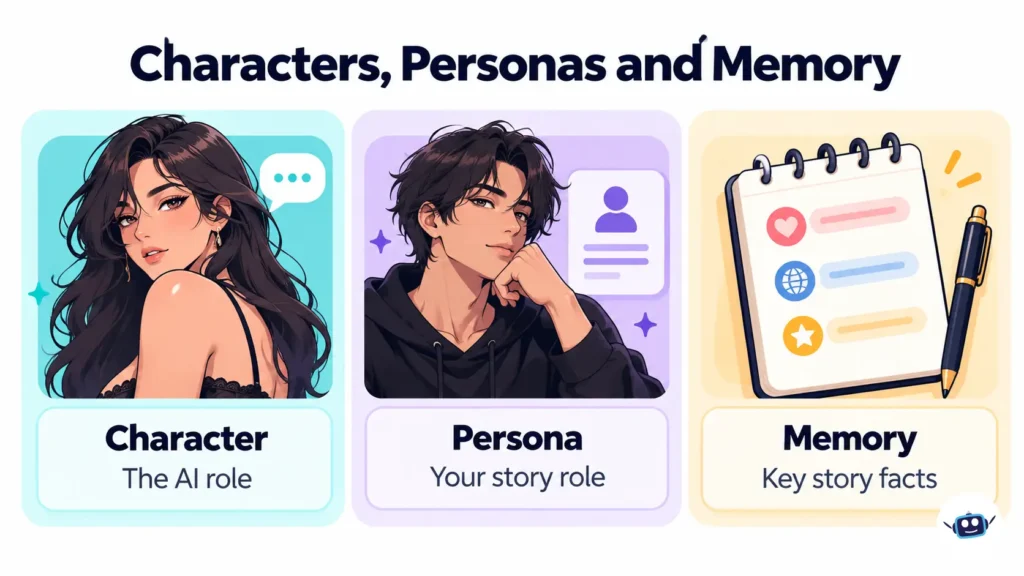
A character and a persona serve different purposes:
- Character: The fictional role played by the AI.
- Persona: The identity you use within the conversation.
- Memory: Facts the AI should carry forward as the story develops.
For example, the AI character could be an adult museum investigator, your persona an adult curator, and a memory entry the fact that a painting disappeared before a power outage.
This gives writers a practical way to explore dialogue and character motivation. It also lets roleplayers establish a setting without putting real personal details into a profile.
Choose between documented model options
Joyland’s official help center names five conversation options:
| Model label | Intended use described by Joyland |
|---|---|
| Free | Casual conversation and basic roleplay |
| Roleplay | Acting within specific scenarios |
| StoryStream | Developing ongoing narratives and character growth |
| Lifelike | Natural conversational flow |
| Vividtale | Expressive, descriptive storytelling |
These are Joyland’s product labels. The guide does not map them to named external foundation models, so the labels should not be treated as proof that a particular OpenAI, Anthropic or other provider’s model is running underneath.
Use the descriptions to choose a starting point, then assess the replies available to your account. A model name does not establish writing quality, accurate recall or factual reliability.
Use supported visual and conversation tools
Joyland documents image generation, character voice customization, interactive stories and conversation-sharing features. Its image guide identifies image-capable characters, so visual functionality should be checked for the particular bot.
The chat guide also describes editing, copying, deleting, regenerating and saving conversations. These controls can help you revise a scene or preserve an alternative storyline.
Joyland AI pricing: free access and paid plans
Joyland’s membership guide publishes the following prices:
| Plan | Regular monthly price shown | Early-bird monthly price shown | Annual total shown |
|---|---|---|---|
| Free | $0 | — | — |
| Standard | $19.99 | $9.99 | $107.99 |
| Premium | $39.99 | $19.99 | $191.99 |
The same guide lists 10 daily credits for Free and 5,000 monthly credits for Standard. These are help-center descriptions; confirm the allowance and available features displayed in your account before relying on a fixed quota.
The U.S. App Store separately lists purchases named Standard at $9.99 and Premium at $19.99. Its public purchase list does not clearly identify the billing period.
A displayed price without its billing period and renewal terms is incomplete buying information. The help guide’s regular and early-bird rates should not be combined into a claim that every user can obtain one particular price.
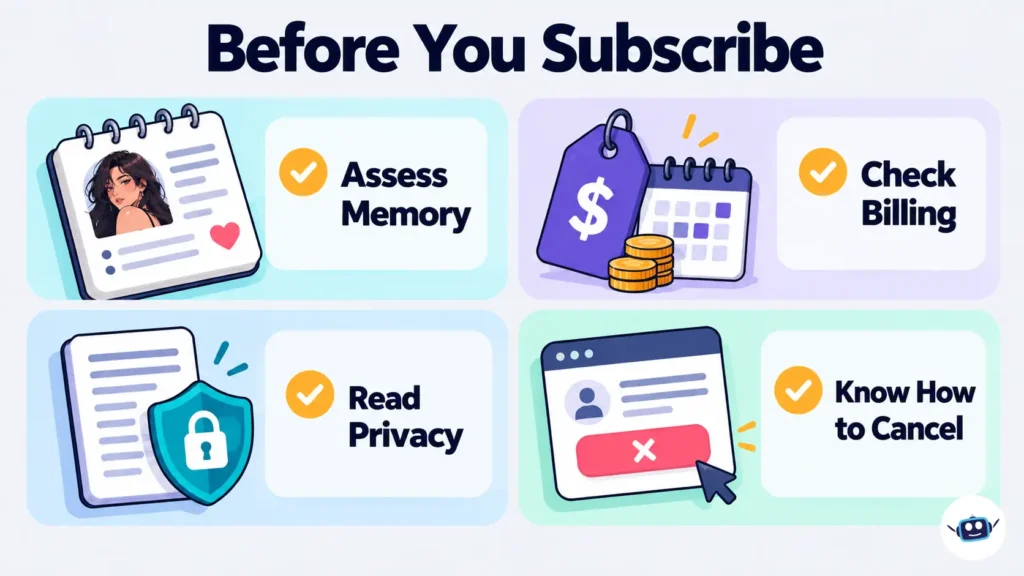
Before subscribing, establish the amount due now, the subscription length, the renewal amount and whether the features you want consume additional credits. An unlimited-text description does not automatically include unlimited images or customization features.
Cancellation and refunds
Cancel through the channel that billed you:
- Apple purchase: On an iPhone, open Settings, tap your name, choose Subscriptions, select the subscription and use Cancel Subscription.
- Google Play purchase: Open the subscriptions section in Google Play, select the subscription, choose Cancel subscription and complete the instructions.
- Website purchase: Use the billing controls or support route associated with that purchase, rather than assuming the app store manages it.
Google explicitly states that uninstalling an app does not cancel its subscription. Keep your cancellation confirmation and check the renewal status.
Joyland’s terms generally describe fees as non-refundable, subject to stated exceptions and applicable law. Review the rules for your purchase channel rather than assuming that cancellation automatically produces a refund.
How Joyland AI memory works
Membership descriptions are not memory benchmarks
Joyland’s official memory guide describes three levels:
| Membership | Memory described by the provider |
|---|---|
| Free | Context-based memory within the current conversation |
| Standard | Short-term memory that can preserve details across sessions |
| Premium | Long-term memory intended to preserve details over extended use |
The reviewed guides do not publish a numerical token window or measured recall rate for these tiers. They describe intended capabilities, so a Premium label should not be interpreted as a guarantee that every earlier detail will be remembered correctly.
A context window and a saved-memory feature also describe different things. Our Janitor AI guide to token budgets and memory explains why the amount of text available to a model matters during longer roleplay sessions.
Customized memory and pinned messages
Joyland documents two controls for preserving story information: writing a customized memory entry and pinning a message into memory.
Keep entries brief and factual within the fictional world. For example:
The curator is named Lena. The investigator has not discovered the hidden staircase. The painting disappeared before the power outage. Neither character knows who took it.
Review a generated message before pinning it. If the AI has invented a clue you do not want in the story, saving that message may preserve the wrong version of events.
For a broader explanation of selecting useful information for an AI, read our context engineering guide.
How to assess memory without sharing personal information
Use a few invented story facts, continue the conversation and ask about those facts later. Separately assess what happens after reopening the chat and after adding a customized memory.
Record which model and membership you used. Results from a free model should not be presented as a benchmark for a paid option you have not tried.
Individual store reviews can identify concerns worth investigating, but they do not establish a typical failure rate or prove how the current version performs for everyone.
Privacy: read the settings, labels and policy together
Private, Unlisted and Public describe bot access
Joyland’s creation guide defines these visibility options:
| Visibility | Who can chat with the character? |
|---|---|
| Private | Only the creator |
| Unlisted | Users who have the link |
| Public | Everyone, with discovery and homepage placement subject to platform review |
An unlisted link can be forwarded. Use Private when a personal character should remain restricted to your account.
Public character access and publishing a conversation are separate actions. Joyland also documents Share and Share Story tools, so review what you are making available before sharing a conversation.
The app-store disclosures differ
| Source | Disclosure displayed when checked |
|---|---|
| Google Play Data safety | No data collected; no data shared with third parties; encryption in transit; deletion requests supported |
| Apple App Privacy | Email address linked to identity, plus other categories including purchases, user content, search history, identifiers, usage data and diagnostics not linked to identity |
| Website privacy policy | Collection of technical and usage information, possible monitoring of submitted content, and specified sharing with service providers and other parties |
Apple says its privacy information is supplied by the developer and has not been verified by Apple. Google likewise describes its Data safety section as information developers provide.
There is another distinction: Google explains that some transfers, including processing by a service provider on the developer’s behalf, do not have to be labeled as “sharing” in that section. Its Data safety information also applies to apps distributed through Google Play, rather than automatically describing the website or iPhone version.
The practical reading is to use all three disclosures together. A short “no data collected” label should not be turned into a universal claim that no information leaves your device or that every version has identical practices.
What the privacy policy permits
Joyland’s privacy policy says it may monitor entered content for inappropriate material or personal information. It also describes using dialogue data converted into anonymous numbers and graphs for certain academic activities.
These disclosures do not establish that chats are inaccessible to the provider. Keep passwords, payment information, confidential documents and identifiable details about other people out of conversations.
For sensitive fiction, use invented identities and circumstances. Choosing a private bot does not replace reviewing how the provider handles submitted information.
Age requirements: registration wording and store ratings differ
Joyland’s published age information is not uniform:
| Source | Wording or rating retrieved |
|---|---|
| Website terms and privacy policy | Registration prohibited for users under 13, or under 16 for EU citizens or residents |
| U.S. Apple App Store | 18+ |
| Linked Google Play listing | Mature 17+ |
A store content rating describes suitability within that store’s rating system. A registration clause describes an account rule. Neither establishes, on its own, how effectively the service checks age or prevents exposure to mature material.
This guide recommends Joyland for adult use. The lower registration wording should not be treated as an endorsement of child suitability.
Common Sense Media’s April 2025 assessment, developed alongside experts from Stanford’s Brainstorm Lab, advised against social AI companions for people under 18. That assessment examined products including Character.AI, Nomi and Replika; it should not be presented as a hands-on test of Joyland.
The concern extends beyond explicit material to emotional attachment and misleading impressions that a chatbot is a real person. Treat a character as generated fiction and maintain boundaries around time, spending and personal disclosure.
Does Joyland AI allow NSFW content?
Joyland markets itself using terms such as unfiltered roleplay, and its app listings identify mature themes. Its published rules still restrict content involving child exploitation, impersonation, privacy violations and prohibited sexual imagery.
Availability can differ between text, character profiles and images. Do not assume that paying removes moderation rules, or that an adult-content setting proves robust age verification.
U.S. scrutiny of companion chatbots
American regulators and lawmakers have introduced safeguards relevant to this category:
- Federal Trade Commission: In September 2025, the FTC announced a study involving seven chatbot companies, examining issues such as child safety, age restrictions, monetization and data practices. Joyland was not among the recipients named in that announcement. The FTC described the orders as part of its study authority, without a specific law-enforcement purpose.
- California: The state’s official summary of laws taking effect in 2026 identifies SB 243 as introducing companion-chatbot disclosures for minors and safety protocols addressing self-harm.
- New York: The state’s companion-AI safeguards took effect on November 5, 2025. Official guidance and legislation describe crisis-response protocols and AI-disclosure notices, including reminders at least every three hours during continuing interactions.
These are examples of category-level safeguards. They do not establish that Joyland has been investigated, approved by a regulator or independently certified as compliant. Whether a particular service satisfies applicable requirements depends on the law’s scope and the service’s actual operation.
How to get started with Joyland AI
- Identify the official service. Use its website and the app-store links supplied there.
- Start with one fictional scene. A conversation between two clearly defined characters is easier to assess than a large cast with conflicting instructions.
- Set your persona and character roles. Keep real names, workplaces and sensitive experiences out of the setup.
- Specify the writing you want. Give a tone, reply length and rule about who controls your character’s decisions.
- Review, save and refine. Correct contradictions, preserve useful passages and add only accurate story facts to memory.
An original starter prompt could be:
You are Mara, an adult mechanic on a remote space station. I play an adult courier whose ship needs repairs. Write in a dry, practical voice, keep each reply under 120 words, and leave my character’s dialogue and decisions to me. Begin by asking what went wrong with the ship.
One documented control needs particular care: Joyland’s chat guide warns that regenerating an earlier message removes subsequent messages in that thread. Save important material before exploring another branch.
Practical Insights
Compare one variable at a time
Use the same character, opening and instructions when comparing available model options. Look for whether each reply follows the requested length, preserves the character’s voice and respects your control of your own role.
Changing the bot, model and prompt together makes it harder to identify what improved the result.
Match the membership to a specific need
Identify what is missing from your current access: a particular model, cross-session memory, image allowance or another tool. Review the proposed subscription against that need before committing to a longer billing period.
A useful purchase decision has a clear purpose. “I need this memory tool for an ongoing story” is easier to assess than a general promise of better companionship.
Keep control of your writing and spending
Keep your character brief, essential plot facts and favorite passages in a separate document. This protects useful work when you edit a scene or move to another platform.
Set a spending limit, retain receipts and review renewal terms. Avoid common mistakes such as pinning inaccurate dialogue, forwarding an unlisted link too widely or assuming deleting an app ends its billing.
How to compare Joyland AI with alternatives
Compare the features that matter to your use: character voice, model access, memory controls, editing, image allowances and privacy terms. Similar labels such as Premium or unlimited do not establish equivalent benefits across services.
Our Character AI, FictionLab AI and Janitor AI comparison provides a broader shortlist. The DreamGen AI guide to storytelling, pricing and privacy covers another relevant option.
FAQs
What is Joyland AI?
Joyland AI is a platform for chatting with fictional AI characters, creating personalities and developing roleplay scenarios. It is available through its website and linked mobile apps.
Is Joyland AI free?
Yes, Joyland has a Free plan alongside Standard and Premium memberships. Free access includes allowances and restrictions, so review the current account limits and available tools.
How much does Joyland AI cost?
Joyland publishes regular and early-bird prices in its membership guide, while its U.S. iPhone listing separately displays Standard and Premium purchases. Use the purchase screen to confirm the actual price, billing period and renewal amount for your account.
Does Joyland AI remember previous chats?
Its official documentation describes memory capabilities that differ by membership, including cross-session features on paid tiers. It also documents customized memories and pinned messages, but does not publish a measured recall guarantee in the reviewed guides.
Is Joyland AI safe for personal conversations?
A private character setting does not make submitted content inaccessible to the provider. Review the privacy policy and avoid sharing confidential information or treating the bot as a qualified professional.
Is Joyland AI suitable for children?
This guide recommends adult use because of its mature themes and the broader concerns surrounding social AI companions. Its website registration exclusions and app-store content ratings differ, so neither should be treated as a complete child-safety safeguard.
Does Joyland AI allow adult content?
Its marketing and app descriptions include mature roleplay themes. Published content rules still apply, and permissions can differ between text, profiles and images.
Can I cancel a Joyland AI subscription?
For purchases billed by Apple or Google Play, use that store’s subscription controls. Website purchases should be managed through their own billing route, and cancellation should not be assumed to guarantee a refund.
Are similarly named Joyland websites all official?
A similar name does not verify ownership or affiliation. Identify the service through its official domain and the store links it provides before signing in or paying.
Conclusion
Joyland AI offers a range of tools for fictional character chat, from personas and model choices to memory controls and visual features. The useful question is whether those tools support the kind of conversation or story you want to create.
Begin with a small fictional scenario, preserve your writing and compare the available responses. Before paying, confirm the complete billing terms and feature allowances. Review privacy disclosures separately from character visibility, and treat the service as adult entertainment rather than a source of professional advice.
Disclaimer
This article provides general information about Joyland AI; prices, promotional offers, features, age guidance, privacy disclosures and availability can change, so confirm current details with the official provider and your purchase channel before subscribing. The discussion of U.S. companion-chatbot rules is informational, is not legal advice and does not establish Joyland’s compliance; consult a qualified lawyer for legal decisions. Information current as of October 2026.