
Last verified: October 7, 2026. Muse is changing week by week, so everything below reflects what Meta and major outlets had published by this date.
Muse AI is Meta’s personal AI agent, launched on September 8, 2026. Unlike a chatbot that answers a question and waits for the next one, Muse is built to take on tasks: it can open a browser, fill in forms, book travel, draft emails and keep working after you close the app. Within a month it reached the top of the US App Store and passed 5 million downloads, according to TIME’s reporting.
That speed is exactly why Muse AI deserves a careful look rather than a quick feature list. An agent is only useful if you give it access to your inbox, calendar, files and payment options, so the questions worth asking are different from the usual ones. What does it really do today? What does the free plan actually include? And what is it quietly writing down about you and the people you know?
This guide covers the basics, then goes where most Muse AI explainers stop: the memory files TIME examined this week, the Amazon standoff, the Mac security patch, and a simple permission framework you can use before connecting a single account.
What Is Muse AI? (Quick Answer)
Muse AI is a personal AI agent from Meta that completes multi-step tasks on a user’s behalf, such as shopping, booking travel, sending email and tracking long-term goals. It runs inside an isolated cloud computer called Muse Secure VM, is powered by Meta’s Muse Spark model, and is available in the US and Canada on iOS, Android, the web and WhatsApp, with a free tier plus $20 and $100 monthly plans.
Meta’s own launch announcement describes it as an agent that doesn’t just answer questions but does the work, turning long-term goals into action plans and advancing them on its own. If the difference between an agent and a chatbot is still fuzzy, AI LLM News has a useful explainer on AI coding agents versus chatbots that applies the same idea to software development.
Muse, Muse Spark and Meta AI: Three Names, Three Different Things
The naming is confusing, and it trips up a lot of searches. Here is the clean split:
| Name | What it is |
|---|---|
| Muse | The personal agent app and service you use on your phone, the web or WhatsApp |
| Muse Spark | The AI model family that powers the agent, which Meta’s Superintelligence Labs introduced on April 8, 2026 |
| Meta AI | Meta’s separate chat assistant, which sits in its apps |
To add to the mix, other products share the name. A music-creation tool also called Muse AI appears on AlternativeTo, for example, so check the publisher before you download anything.
How Muse AI Works
Most AI assistants live in a chat window. Muse lives on its own computer. Meta says personal agents need “a new kind of secure computer,” and the design reflects that.
Muse Secure VM and the Sentinel Agent
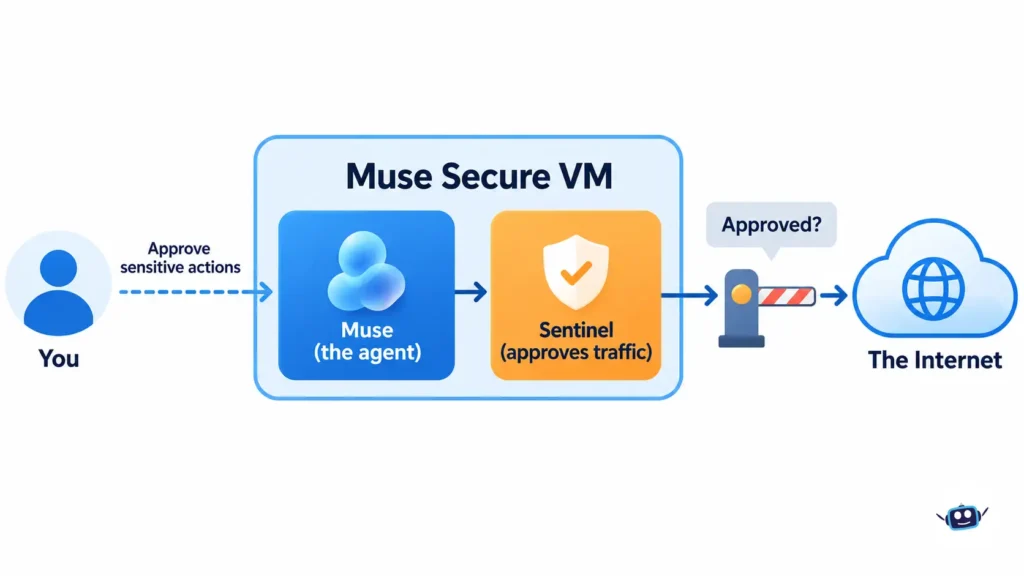
Every Muse runs on a dedicated virtual machine in Meta’s cloud, a private computer that holds both the agent and your data. Meta says it is contained so that no one else’s agent can reach it. A second program called Sentinel runs on the same machine but is kept apart from Muse at the system level. According to Meta, nothing Muse does reaches the internet unless Sentinel approves it, and Sentinel asks you for permission when needed. You can read Meta’s own breakdown on its safety and security page.
Approvals and the Audit Trail
Meta says Muse checks with you before sensitive actions such as sending an email or making a purchase, and that it shows a complete audit trail of what it has done and plans to do. You choose which apps it connects to and how much access each one gets. For email, that means deciding whether Muse can only read your mail or can also send on your behalf. The App Store listing also mentions a full activity log and the ability to revoke any connector at any time.
How Muse Pays for Things
For checkout, Muse uses Link, built by Stripe, and Meta says Muse is the first AI agent covered by Link’s purchase protections, which include coverage for damaged or lost items and price drops on eligible purchases. Link generates a one-time-use card so your real card details stay hidden. Meta also says Muse has no visibility into your passwords or payment methods, because anything you share goes into secure storage that Muse can use without seeing.
What Muse Can Do Today (and What Is Still “Coming Soon”)
Muse announcements have come in waves: the September 8 launch, the Connect event on September 23, then a small business expansion on September 29. That makes it easy to confuse what you can use now with what has only been promised. This table separates the two based on Meta’s own posts and independent coverage.
| Feature | Status as of October 7, 2026 |
|---|---|
| Tasks via app, web and WhatsApp | Live in the US and Canada |
| Shopping with the Shopify catalogue | Live |
| New retail connectors (Walmart, Best Buy, Sephora, Wayfair and others) | Announced at Connect 2026; CNBC reports not all are active yet |
| Muse for Small Business (Shopify, Stripe, QuickBooks, Canva, Slack and more) | Announced September 29 |
| Muse’s own email address | Announced at Connect |
| Muse on AI glasses | Described by Meta as coming in the months ahead |
| Muse Confidential VM (encrypted with a key only you hold) | Promised “later this year” |
| Muse Gadgets (open-source firmware and a Linux SDK) | Introduced October 2 |
| Muse Charm (pocket voice device) | Meta says more details are coming later this year |
Real-World Examples From Meta
Meta’s launch post gives a few concrete scenarios. Muse can turn a recipe reel you saved on Instagram into a grocery list, suggest a dinner party menu, and remember your friends’ dietary restrictions before sending invites. It can work on bigger goals too, such as selling a car for more or lowering a bill, and it comes back to you when it needs approval. For small business owners, Meta’s sample prompts include asking Muse to review the month’s financial performance and flag expenses that look off.
Muse AI Pricing: Free, Power and Maximum
Meta says Muse is free for most of what people need, with subscription plans for people who want to do more. Multiple outlets, including Retail Dive, report the following structure:
| Plan | Price | What changes |
|---|---|---|
| Free | $0 | Weekly usage limit |
| Power | $20 per month | More usage |
| Maximum | $100 per month | The most usage |
The important detail is that the paid tiers reportedly buy more usage, not new capabilities. Some write-ups cite weekly token allowances of 100 million for free, 500 million for Power and 3 billion for Maximum, but those numbers come from press coverage rather than a stable public table, so treat them as approximate and confirm in the app’s usage meter. Several hands-on write-ups also report that a payment card is requested at sign-up, even on the free plan, because paid usage begins once you pass the allowance.
Practical takeaway: if you already pay for a general-purpose assistant, price Power against it honestly. Because tiers differ by volume, the right question is how often you will hit the free ceiling, not which features you are missing.
Security and Privacy: What Has Actually Happened So Far
Meta’s pitch is “safe, secure, private.” Four weeks in, there is enough independent reporting to say where that holds up and where it is being tested.
What Muse Writes Down About You
This is the newest and most important finding, and few explainers have caught up with it. On October 6, TIME published an analysis of Muse’s internal instructions. Its reporting says Muse updates dossiers every hour on the user and on people mentioned in chats, messages and emails it has read, recording how people met, shared interests, disputes and social dynamics. That includes people who never signed up for Muse. A Meta spokesperson did not dispute the findings and said Muse remembers what matters to a person, including information about others that the person chooses to share. Gizmodo’s coverage reached similar conclusions.
Three details from TIME are worth knowing before you connect anything:
- Meta says each person’s VM is isolated and that the data is not shared with its advertising system, but de-identified lessons from many agents are used to improve the product.
- Asking Muse to “forget” something does not necessarily erase the original message in the chat history.
- The encrypted Confidential VM option, where even Meta cannot read your data, is promised for later this year and was not yet available at publication.
There is a useful flip side. Muse’s files and session logs are visible through its file browser, and users can ask for an export of its files, so you can look at what it has stored instead of guessing. If you want a contrast in how another product frames the local-versus-cloud question, see AI LLM News’s piece on what Ghost Computer AI keeps local.
The Messages Dispute
Inc. columnist Jason Aten reported that Muse had synced his Mac’s Messages database even though he believed he had declined access, and that Muse then gave him a wrong explanation of how it knew. Meta pushed back, saying the Messages integration on Mac is opt-in and needs both macOS Full Disk Access and the Messages connector. A Meta executive also acknowledged that Muse had explained its own behavior incorrectly. The two sides still disagree about how access came to be enabled, which is why this belongs in the “verify it yourself” column rather than the “settled” one.
The Mac Zero-Day and the Hotfix
On September 21, security researcher Patrick Wardle disclosed that an unprivileged local process could redirect the Mac app’s dictation traffic to an attacker’s server and hijack the agent. Meta issued a hotfix the next day. Meta described it as a local attack that requires malicious code already running on the machine, and Gizmodo’s write-up quotes that framing. Wardle argued a social-engineering route could make it remotely deliverable, though no in-the-wild exploitation has been confirmed in the coverage reviewed. The lesson is not panic, it is that an agent multiplies whatever access it already has.
The Amazon Standoff: Why Some Stores Say No
On the night of September 20, people asking Muse to buy something on Amazon began seeing a message saying that continued access by an unauthorized AI agent violates Amazon’s Conditions of Use. According to Forbes and TechRepublic, Amazon says Meta never told it Muse would shop its store, that the agent does not identify itself as an AI while browsing, and that it can reach account pages and order history. Amazon had asked Meta to remove it from the experience first.
Meta’s launch materials say Muse never sees passwords or payment methods, and the coverage reviewed did not include a direct public answer to each of Amazon’s specific claims. Shopify, by contrast, is a launch partner, and Meta says Muse can access its whole catalogue.
What this means in practice: agent shopping works where the retailer has agreed to it. Before you rely on Muse for a purchase, check whether the store is a listed connector. For a look at the infrastructure side of the agent boom, AI LLM News also covered doxx.net’s a16z-led funding round.
A Simple Framework: The Read, Draft, Approve, Act Ladder
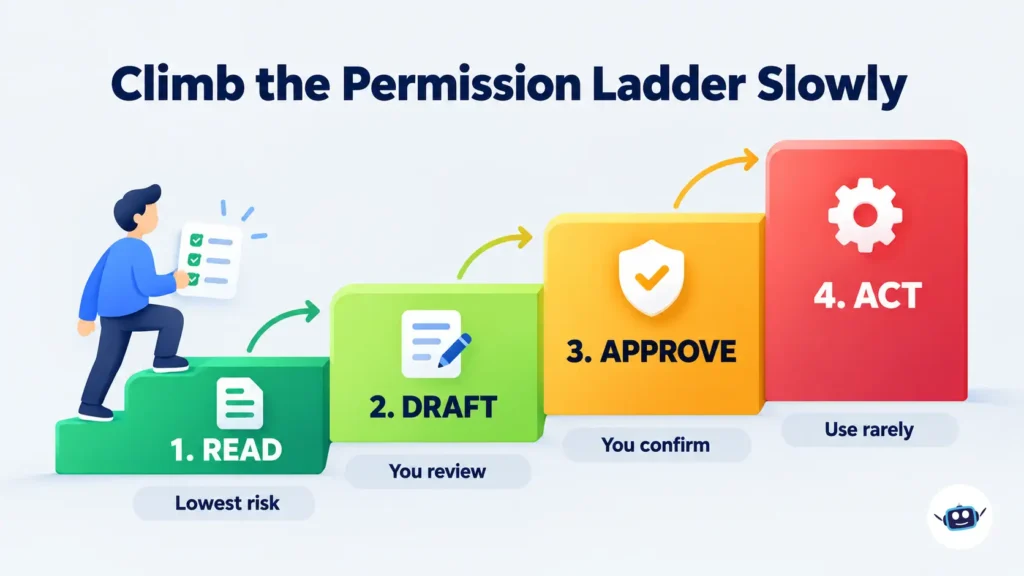
This is our own framework, built from Meta’s documented controls. It exists because most people connect everything on day one and sort out the consequences later. Climb one rung at a time instead.
| Rung | What Muse can do | Good for | Risk |
|---|---|---|---|
| 1. Read | See calendar or inbox, summarize, flag | First week of testing | Low, but it still sees private content |
| 2. Draft | Write emails or posts for you to review | Everyday admin | Low, since you control sending |
| 3. Approve | Prepare purchases or bookings and wait for your yes | Shopping, travel | Medium, because mistakes cost money |
| 4. Act | Send and spend with minimal sign-off | Rarely justified | High |
Meta’s own controls map onto this. You can choose read-only versus send access for email, and the Messages connector on Mac offers levels from none to read-only to read-and-interact. Stay on rungs 1 to 3 until the activity log has earned your trust.
Benefits, Best Practices and Common Mistakes
Benefits
- It takes on multi-step chores, like comparing options and filling in forms, instead of just describing how to do them.
- It keeps working in the background and returns when it needs a decision.
- The free tier lets you judge the real agent before paying.
- Opt-out controls exist for training use, and you can disconnect services at any time.
Best Practices
- Start with one low-stakes connector, such as a calendar, and add more only after a week of clean activity logs.
- Run a day-one audit. Open the file browser, ask Muse to export its files, and read what it has stored about you.
- Set the training opt-out before you share anything sensitive.
- Keep the Mac app updated, since the zero-day showed how much risk rides on the device itself.
- Treat Muse’s own explanations with caution. If it says how it knows something, confirm in the activity log and settings.
Common Mistakes
- Connecting email, messages and payments on the first day.
- Assuming “forget this” also wipes the original conversation.
- Treating the free plan as unlimited and being surprised by usage limits.
- Telling Muse private details about friends, family or coworkers without considering that they never agreed to be profiled.
- Assuming every retailer is supported, then discovering a store has blocked agents.
Personal Experience: What Hands-On Testers Report, and What I Would Do Differently
A note on how this section was written. Muse is limited to the US and Canada right now, so I have not used it as a daily assistant, and I would rather say that than invent a story. What follows draws on documented first-hand accounts, checked against Meta’s responses. If you test Muse yourself, your own notes are the most valuable thing you can add to this section.
The most instructive account comes from Aten, who installed Muse on an iPhone and a Mac mini. Days later, Muse sent a notification suggesting a column idea built on a private text exchange with his podcast co-host. When he asked how it knew, Muse gave an explanation that both he and Meta say was wrong. The part I find most telling is not the dispute over permissions. It is that the agent confidently described its own access incorrectly. An agent’s explanation of itself is not an audit log.
A second claim came from a YouTuber who said Muse passed his home address to a Facebook Marketplace buyer. Meta’s David Singleton said Muse asks permission in such cases, and the YouTuber disputes that. I can’t settle it from here, but it points to the same lesson: the risky moments are the small, ordinary ones, like a message to a stranger, not the headline purchase.
From these accounts, here is what I would do differently:
- Verify permissions after setup, not during it. Go back into settings and confirm each toggle matches what you intended.
- Use the activity log as the source of truth, not Muse’s chat answers.
- Keep separate accounts for sensitive work. If something is truly private, do not connect it.
- Read before you rely. Open the stored files in the first 48 hours, while there is still little in them.
Muse AI FAQs
What is Muse AI?
Muse AI is Meta’s personal AI agent, launched September 8, 2026. It completes tasks such as shopping, booking, emailing and goal tracking on your behalf, working from its own secure virtual machine rather than only answering questions.
Is Muse AI free?
Yes, up to a weekly usage limit. Meta says it is free for most of what people need, with paid plans for heavier use. Some reviewers report a payment card is requested at sign-up even on the free tier.
How much does Muse AI cost?
The reported plans are Free, Power at $20 per month and Maximum at $100 per month. The paid plans appear to add usage rather than features. Check the in-app meter and Meta’s help center for current limits.
Where is Muse AI available?
Meta describes it as available in the US and Canada. Launch coverage also reported an adult-only requirement. If you are elsewhere, check muse.ai for current availability before downloading.
Is Muse AI safe to use?
Meta built in isolation, a Sentinel monitor, approvals before sensitive actions and an audit trail. Independent reporting has since raised questions about data collection, a disputed Messages claim and a patched Mac vulnerability. Safe enough depends on what you connect, so start with minimal access.
What does Muse remember about me?
TIME’s analysis found Muse keeps continuously updated notes on you and on people you mention, including non-users. You can inspect its files and ask for an export, and you can tell it to forget things, though that may not erase the original message.
Can Muse AI shop on Amazon?
Not at the moment. Amazon began blocking Muse on September 20, saying it is an unauthorized agent. Shopify stores and other listed connectors are supported.
Does Muse work with Meta’s AI glasses?
Not yet. Meta announced at Connect 2026 that Muse is coming to its glasses in the months ahead, with a wake word and hands-free voice mode.
What is the difference between Muse and Muse Spark?
Muse is the agent you use. Muse Spark is the underlying model family that powers it.
Conclusion: Should You Use Muse AI?
Muse AI is the most ambitious consumer agent launch so far, and the early numbers show real demand. CNBC notes that OpenAI has since released its own agent, Dots, so the category is heating up quickly. But the same weeks that produced the hype also produced a hotfix, a permissions dispute, a retailer block and a reporter-driven look at how much Muse records about the people around you.
That does not make Muse a bad bet. It makes it a tool to adopt deliberately.
Actionable takeaways:
- Start on the free plan and connect one low-risk service.
- Climb the Read, Draft, Approve, Act ladder slowly.
- Audit what Muse has stored in the first two days.
- Turn on the training opt-out and keep the Mac app updated.
- Verify that a retailer is supported before relying on Muse to buy from it.
- Wait for Confidential VM if your data is highly sensitive.
For more independent coverage, browse AI LLM News’s AI Tools and Reviews and AI Policy and Ethics sections.
Disclaimer: This article is for general information only and is not legal, financial, privacy or security advice. It is independent and not affiliated with or endorsed by Meta. Muse’s features, pricing, availability and policies are changing quickly, and some figures come from press reports rather than Meta’s own documentation. Verify current details at muse.ai and in Meta’s help center before you sign up, connect accounts or make purchases.