

Introduction
On October 5, 2026, a 19-year-old founder walked out of stealth with $11 million and a stainless-steel box that has no screen, no power button, and a very bold promise. Ghost Computer AI, the company Ghost and its first product, Core, wants your personal AI agent to live on hardware sitting on your table instead of on someone else’s servers.
Most early coverage repeated the headline: $3,499, a16z-backed, “your AI belongs to you.” I read Ghost’s own product page, setup guide and privacy policy line by line, then compared them with TechCrunch’s launch report. The interesting story isn’t the slogan. It’s the gap between “everything runs locally” and what the fine print says about web search, phone calls, memory and remote access.
This guide covers what Ghost Computer AI is, how Core works, a data-flow map you won’t find in most write-ups, and a bandwidth calculation I ran to show what the GPU can realistically do. For fast-moving coverage of local AI hardware, AI LLM News is worth following alongside this article.
What Is Ghost Computer AI? (Quick Answer)
Ghost Computer AI is Ghost, a San Francisco startup, and its first product, Core: a $3,499 screenless desktop designed to run personal AI agents continuously, using models stored on the device. Ghost says the first batch ships October 31, 2026.
You control Core from a phone or the Ghost app. It connects to your email, calendar, files, browser, wearables and smart-home gear, builds a memory of your routines, and can act without being prompted.
Quick facts
| Item | What Ghost / TechCrunch say |
|---|---|
| Company | Ghost (legal entity: ZMJ, Inc.) |
| Founder & CEO | Zain Javaid, 19 |
| Funding | $11M seed led by Andreessen Horowitz; Abstract, Audacious Ventures, SV Angel and Nova also invested |
| Product | Core, a personal AI computer |
| Price | $3,499, listed as excluding VAT |
| Ship date | October 31 per Ghost; “last week of October” per TechCrunch |
| GPU | NVIDIA RTX PRO 4000 Blackwell SFF Edition, 24 GB GDDR7 ECC, 432 GB/s |
| CPU / RAM / storage | AMD Ryzen 5 7600 (6 cores) / 64 GB DDR5 / 1 TB NVMe |
| Claimed AI compute | 770 AI TOPS (Ghost’s figure) |
| Warranty / returns | 1-year warranty, 30-day returns, free shipping for batch 1 |
Everything above comes from Ghost’s Core page and TechCrunch’s report. I haven’t seen independent benchmarks, because nobody outside Ghost has shipped units yet.
Don’t confuse it with other “Ghost” products
Searchers often land on the wrong thing. The publishing platform Ghost is unrelated. There’s also a small open-source project, ghost.ai on GitHub, described as a local-first “second brain” that captures your screen, runs OCR, and defaults to Ollama for local models. It’s still in beta and installs via Cargo. It’s a software hobby project, not the Core hardware.
How Ghost Core Works
The hardware: a “brain in a box”
Core is a tower with no display. Javaid called it a “brain in a box,” and you reach it through a phone or the app. Voice mode exists, but you speak into the app, not the box. Ghost’s setup guide says there’s no power button: it boots when power arrives, and a white strip on the front edge confirms it’s on.
The GPU is the centerpiece. TechCrunch notes it’s bundled into the price, so you aren’t buying a graphics card separately. Ghost also stresses that the hardware and software were designed together. Javaid told TechCrunch that’s the difference from a Mac Mini, which is a general-purpose machine you configure for AI.
The models
Ghost’s pages list four models: Qwen 3.8-Next, Qwen 3.8-27B, Gemma 4-31B and Muse-Glimmer-30B. TechCrunch lists only the first three as preinstalled. That’s a small discrepancy, so treat the fourth as “listed by Ghost, not confirmed by press.” Javaid says you can also pull models from Hugging Face or load your own weights, and Ghost plans over-the-air updates similar to Tesla’s. It asks before switching you to a new model generation, unless you turn on auto-updates.
Setup: roughly 32 to 47 minutes
Ghost’s setup guide splits setup into four phases: connecting to the device (about 5 minutes), picking a model and connecting apps (about 10), Core building its memory (15 to 30), and saying hello (about 2). Adding those up gives 32 to 47 minutes. Progress is saved, so you can stop and resume.
The proactive agent
Ghost’s pitch is that Core doesn’t wait to be asked. Its own example is a nudge that you might be getting sick, based on an elevated resting heart rate, a late night on your computer, and flu season in San Francisco. Ghost also says users can set how much autonomy their agents get.
The Part Most Coverage Skips: A Data-Flow Map
Ghost’s homepage says no data ever leaves your home. That’s the marketing sentence. The support page, setup guide and privacy policy are more precise, and the precision matters if you’re deciding whether to put your inbox and health records on this box.
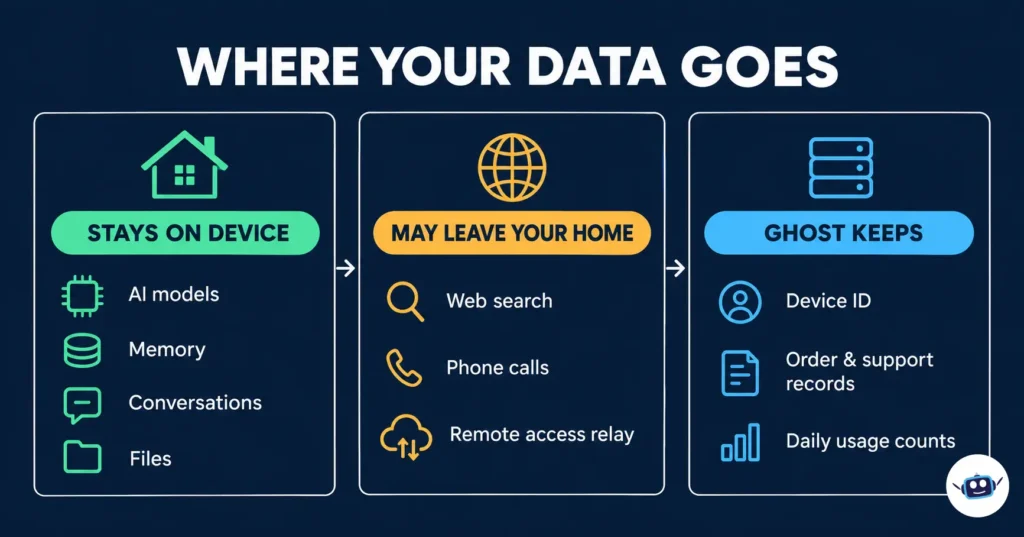
I rebuilt the policy into a three-column ledger.
What stays on the device
According to Ghost, Core stores and processes conversations, files, connected-app content and memories on-device. The policy states that Core doesn’t use a remote AI model as a fallback for its local conversational AI or memory processing. Ghost also says it doesn’t automatically collect product telemetry, usage analytics or diagnostic reports from Core.
What can leave your home
Online features can still send task information to external services. Web search and phone calls are the named examples. With Ghost-managed services, the request goes from Core to Ghost’s gateway, then to a third-party provider. Ghost says its gateway doesn’t save that content. But the policy openly adds that this is “not a guarantee that the provider does not store it.” Whatever you search for or dictate to a call goes to a company Ghost doesn’t control.
The same applies to remote access. Reaching Core while away from home uses Ghost’s encrypted relay, which Ghost says doesn’t retain what it forwards. You can swap in your own connection, such as Tailscale. Ghost notes that replacing the relay and using your own API keys are separate choices, and doing both removes Ghost’s gateway and relay from those paths.
What Ghost itself keeps
Ghost says it doesn’t keep cloud copies of your on-device content, but it does retain operational records: device identifiers, authorization records, connection credentials and per-day service-usage counts. It also keeps purchase and support records. The no-storage promises cover forwarded content only, not everything.
One detail I haven’t seen elsewhere: those usage counts exist to enforce daily usage limits on Ghost-managed services. So “no subscription” describes the hardware, but managed web search and calls have limits. Ghost’s pages I read don’t state what those limits are, so ask before you buy if heavy search is central to your plan.
Memory That Doesn’t Forget: Five Quirks Worth Knowing
The privacy policy is unusually candid about how Core’s memory behaves. These are the five points that surprised me.
- Screen history is opt-in, but private browsing isn’t respected. It’s off by default. Once enabled, it captures screen images and recognized text, and the policy says private browsing doesn’t pause capture. It doesn’t record audio, and records expire seven days after the content was last observed.
- Deleting a source doesn’t delete the memory. A memory can exist separately from the file or conversation it came from. If the source stays connected, Core can learn it again.
- Pausing isn’t deleting. Disconnecting an app stops new collection but doesn’t erase what’s saved.
- Importing a browser profile hands over keys. Imported passwords and signed-in sessions are stored on Core and can let it act through your accounts. That’s powerful, and it’s also the biggest risk surface.
- Phones keep their own copies. A paired phone or computer may save local copies of conversations and files, and those can land in device or cloud backups. Erasing Core doesn’t wipe them.
Javaid also told TechCrunch the team is building a firewall that watches outgoing network requests and flags suspicious ones. The wording matters: it was described as work in progress, so I wouldn’t assume it ships on day one.
Hardware Reality Check: What 24 GB at 432 GB/s Actually Means
Spec sheets say “770 AI TOPS,” which is impressive and nearly useless for predicting how a chat feels. For language models, what usually limits speed when generating text is memory bandwidth. A rough ceiling is bandwidth divided by the bytes of model weights read for each token.
I ran the numbers using Ghost’s published 432 GB/s figure.
| Model size (dense) | Precision | Weights | Fits in 24 GB? | Speed ceiling at 432 GB/s |
|---|---|---|---|---|
| 27B | 4-bit | 13.5 GB | Yes | ~32 tokens/sec |
| 31B | 4-bit | 15.5 GB | Yes | ~28 tokens/sec |
| 27B | 8-bit | 27 GB | No | n/a |
| 31B | 8-bit | 31 GB | No | n/a |
Real-world speed is lower than the ceiling. If you assume roughly 60% efficiency (my assumption, not a measured value), a 27B model at 4-bit lands near 19 tokens per second. That’s perfectly usable for chat, and it’s far from the headline-grabbing numbers people quote.
Three caveats keep me honest. Ghost hasn’t published quantization settings or benchmarks. Some listed models may use architectures where only part of the network is active per token, which would be faster than my dense-model estimate. And I can’t verify the model details beyond Ghost’s list. Treat my table as a sanity check, not a promise.
How it compares with NVIDIA’s DGX Spark
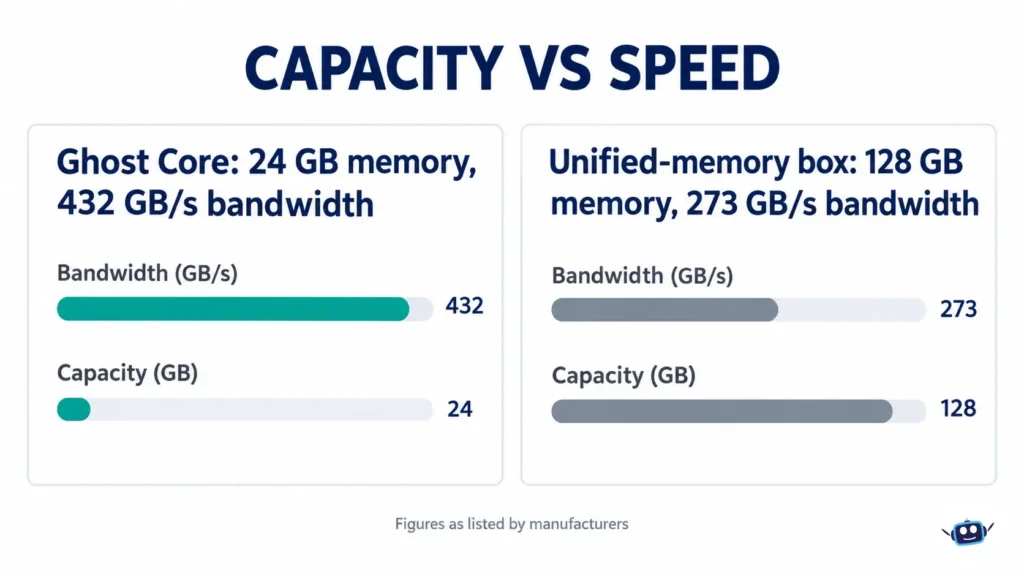
The closest “personal AI box” many readers know is NVIDIA’s DGX Spark, which has 128 GB of unified memory at about 273 GB/s and launched at $3,999. Reports say NVIDIA raised its price to $4,699 in February 2026.
Seen side by side, the trade-off is clear. Core has less capacity (24 GB versus 128 GB, about 5.3 times less) but higher bandwidth (about 1.6 times more). A 70-billion-parameter model at 4-bit needs roughly 35 GB, so it fits a Spark but not a Core. Core should feel snappier on mid-sized models, while the Spark can load much larger ones. Which is “better” depends on whether you want responsiveness or headroom. You’d also be buying Core mainly for its software layer, not raw specs, which is exactly Ghost’s argument.
Benefits of Ghost Computer AI
- Ownership. Ghost says weights, source code and logic live on the device and that Core keeps working if Ghost shuts down. That claim comes from the founder, so verify it after launch.
- Predictable costs. There’s no subscription for the hardware and no per-token inference fee for local models.
- A single home for context. Email, calendar, files, wearables like Whoop and Oura, and smart-home devices can feed one memory.
- Open-ended model choice. Pull models from Hugging Face instead of waiting for a vendor.
- Low telemetry by default. No automatic analytics from Core, per the policy.
Tips and Best Practices (Before and After You Buy)
- Read the privacy policy first. It’s long but plain-spoken, and it answers most “is it really private?” questions.
- Use your own keys where possible. Bring-your-own-key connections route requests straight to the provider, and Tailscale can replace Ghost’s relay.
- Start small. Connect one source (say, your calendar) and watch what Core remembers before adding email, finances or health data.
- Leave screen history off at first. Turn it on only when you understand the seven-day window and the private-browsing behavior.
- Skip the browser import on day one. Add credentials gradually, ideally for low-risk accounts.
- Lock down your phone. Anyone with an unlocked paired device may see what it copied.
- Ask about limits. Email support@ghost.ai about daily caps on managed services before relying on them.
Common Mistakes to Avoid
- Taking “no data leaves your home” literally. It describes where the AI and memory run, not every feature.
- Assuming deleting a file deletes the memory. Remove the memory too.
- Expecting cloud-model quality. Local 27B-to-31B models are capable, but they aren’t the largest frontier systems.
- Forgetting VAT and shipping. Ghost lists $3,499 excluding VAT. If a UK-style 20% VAT applied, that would be about $4,199 before currency conversion, duties and shipping. I couldn’t confirm Ghost sells to the UK, so check checkout.
- Buying for the specs. Ghost itself says its edge is software cohesion, which nobody can judge until real units ship.
Who Should and Shouldn’t Consider It
Core suits privacy-minded people who already live inside many connected apps and want a dedicated, always-on agent, plus developers who’ll value an OpenAI-compatible local endpoint. Ghost’s support page, as summarized by FourWeekMBA, says Core provides an endpoint compatible with the OpenAI Responses API. It’s a weaker fit if you want to run 70B+ models, if you need a monitor-and-keyboard workstation, or if you dislike buying first-generation hardware from a seed-stage startup.
Personal Experience: What I Did and What I Learned
I want to be upfront: I haven’t used a Core unit. As of October 6, 2026, one day after the announcement, no shipped hardware or independent reviews exist, and I won’t invent hands-on impressions. What I can offer is my actual research process and what it taught me.
What I did. I read Ghost’s privacy policy, setup guide, product page and support pages directly, then cross-checked claims against TechCrunch. I built a ledger of every statement about where data goes, and I ran the bandwidth math above so the speed discussion rests on arithmetic, not vibes. I also added up the setup phases myself to get the 32-to-47-minute range, since Ghost lists the steps separately.
What I learned.
- The three Ghost documents each describe the privacy line at a different scope. The homepage speaks in absolutes, the support page admits internet-dependent features, and the policy lays out the actual routes. Reading only the first leaves you with the wrong picture.
- The most important details were buried in the retention sections: memories outliving sources, copies on paired phones, and daily usage limits.
- Every comparison that matters (speed, reliability, how good the proactive agent really is) is currently unverifiable. That’s why I’d treat this launch as a promising bet rather than a settled product.
If you receive a unit, the first things I’d test are the real tokens-per-second on each preinstalled model, what traffic leaves the network when web search is on, and whether deleting a source truly removes related memories. I’ll update this article when credible hands-on data exists.
FAQs
What is Ghost Computer AI?
It’s the company Ghost and its product Core, a $3,499 screenless computer built to run personal AI agents continuously on local models, controlled from a phone or app.
How much does Ghost Core cost, and when does it ship?
Ghost lists $3,499 (excluding VAT), with the first batch shipping October 31, 2026. TechCrunch reports shipping in the last week of October.
Does Ghost Core work without the internet?
Ghost says the AI and memory run locally, but web search, email and over-the-air software updates need a connection.
Is Ghost Core really private?
Ghost says conversations, files and memories stay on the device and that it collects no automatic telemetry. Online features can send task details to third-party providers, and the policy says Ghost can’t guarantee those providers don’t store them.
What AI models does Core run?
Ghost lists Qwen 3.8-Next, Qwen 3.8-27B, Gemma 4-31B and Muse-Glimmer-30B. TechCrunch names the first three as preinstalled and says you can add others from Hugging Face or load your own.
Does Core have a screen or keyboard?
No. It’s screenless, and you use it through a phone or the Ghost app. Voice mode works through the app, not the box.
Is Ghost Core better than a Mac Mini for local AI?
Ghost argues its purpose-built hardware and software beat a general-purpose Mac Mini you configure yourself. That’s the company’s claim, and there are no independent comparisons yet.
Does Core require a subscription?
Ghost says no subscription is required for the device. Its privacy policy mentions daily usage limits on Ghost-managed services such as web search and calls, though I found no published limit figures.
Is Ghost Computer AI the same as the Ghost publishing platform or the ghost.ai GitHub project?
No. Those are separate products. The GitHub project is an open-source, local-first screen-memory tool, while Ghost Core is commercial hardware.
Conclusion and Actionable Takeaways
Ghost Computer AI is an ambitious, genuinely interesting bet that personal AI agents deserve their own always-on hardware. Core’s specs are respectable for mid-sized models, the ownership pitch is compelling, and the privacy policy is more transparent than most. But “everything stays local” is a simplification, memory is stickier than you’d expect, and nothing about real-world performance has been independently verified.
What to do next:
- Read Ghost’s privacy policy before ordering, especially the retention section.
- Decide whether 24 GB of VRAM fits your model needs, or whether you’d rather have a 128 GB machine.
- Confirm VAT, shipping and availability for your country at checkout.
- If you buy, start with one connected source, keep screen history off, and use your own API keys and Tailscale where you can.
- Wait for first independent reviews if you’d rather not be an early adopter, and follow AI LLM News for updates on local AI hardware.
Disclaimer: This article is for informational purposes only. Product details, pricing, shipping dates and privacy terms come from Ghost’s website and policy and from TechCrunch’s reporting as of October 5–6, 2026, and may change. Ghost Core had not shipped when this was written, so performance and privacy claims are the company’s own and haven’t been independently tested. Speed estimates are my own calculations, not benchmarks. Nothing here is purchase, legal or financial advice. Check current terms with Ghost before buying.