
Introduction
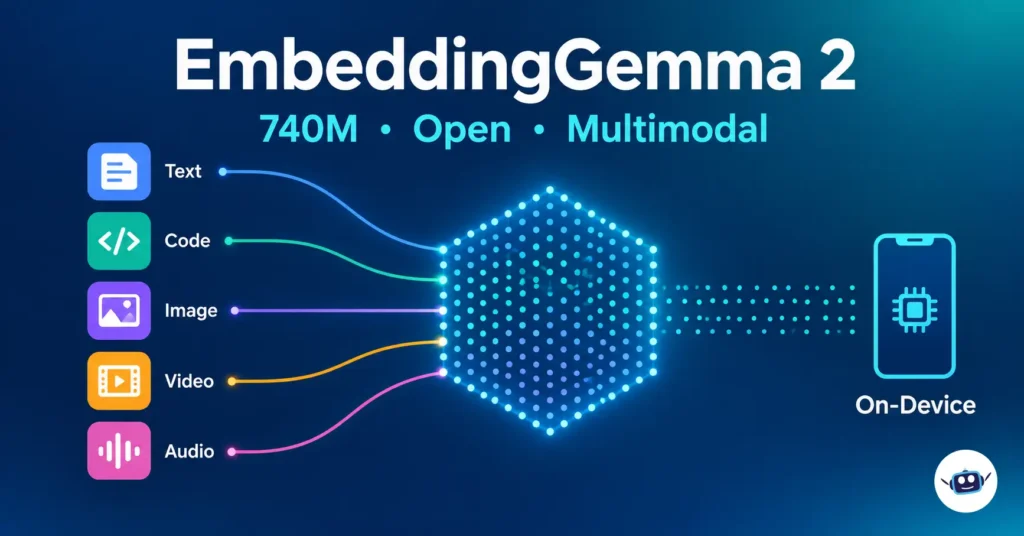
On October 6, 2026, Google DeepMind released EmbeddingGemma 2, a 740-million-parameter open embedding model. It places text, code, images, video and audio in one shared 768-dimension vector space. A text query like “kids laughing at a birthday party” can retrieve a video moment, a photo or a voice memo with a single model.
Most coverage so far repeats the headline specs. This article goes further. It explains which parts of the release matter in practice, which are easy to misread, and which mistakes will quietly damage your search quality. Every figure comes from Google’s own model card, launch posts and developer guide, and I flag the places where those documents disagree with each other.
Short answer: EmbeddingGemma 2 is a 740M-parameter, Apache 2.0, open-weight multimodal embedding model from Google DeepMind. It is built on Gemma 4, runs on-device, and lets you load only the encoders you need, from 270M parameters (text and code) up to the full 740M.
What Is EmbeddingGemma 2?
An embedding model turns content into a list of numbers (a vector) so that similar things end up close together. Search, retrieval-augmented generation (RAG), clustering and recommendation systems are all built on that idea.
EmbeddingGemma 2 succeeds the text-only EmbeddingGemma, which launched in September 2025 with 308M parameters and a 2K-token context window. Google says the first version passed 20 million downloads. The new model keeps the on-device focus and adds code, images, video and audio.
EmbeddingGemma 2 specs at a glance
| Spec | EmbeddingGemma 2 |
|---|---|
| Release date | October 6, 2026 |
| Developer | Google DeepMind |
| Total parameters | 740M (270M text/code + 170M vision + 300M audio) |
| Base architecture | Gemma 4 |
| Output dimension | 768 (truncatable to 512, 256, 128 via MRL) |
| Context window | 8,192 tokens, shared across all modalities |
| Languages | 100+ |
| License | Apache 2.0 |
| Reported RAM on Pixel 11 Pro (quantized) | ~191MB text-only, ~567MB full multimodal |
Why This Release Matters More Than the Parameter Count
A licensing shift that gets less attention than it deserves
The original EmbeddingGemma shipped under the Gemma terms of use, and its Hugging Face page was gated behind an access agreement. EmbeddingGemma 2 is released under Apache 2.0. For a startup or an enterprise legal team, that is a real difference, because most compliance departments already know the license and approval is usually quicker. Still, read the Gemma Prohibited Use Policy that the model card references, since Google tells deployers to follow it.
One vector space replaces a chain of models
Until now, searching a folder of videos and voice notes meant stitching things together: speech-to-text, an image captioner, then a text embedder. Google’s AI Edge post says EmbeddingGemma 2 can replace that chain. Each stage you remove also removes a source of latency, memory use and compounding errors.
How EmbeddingGemma 2 Works: The Modular Design
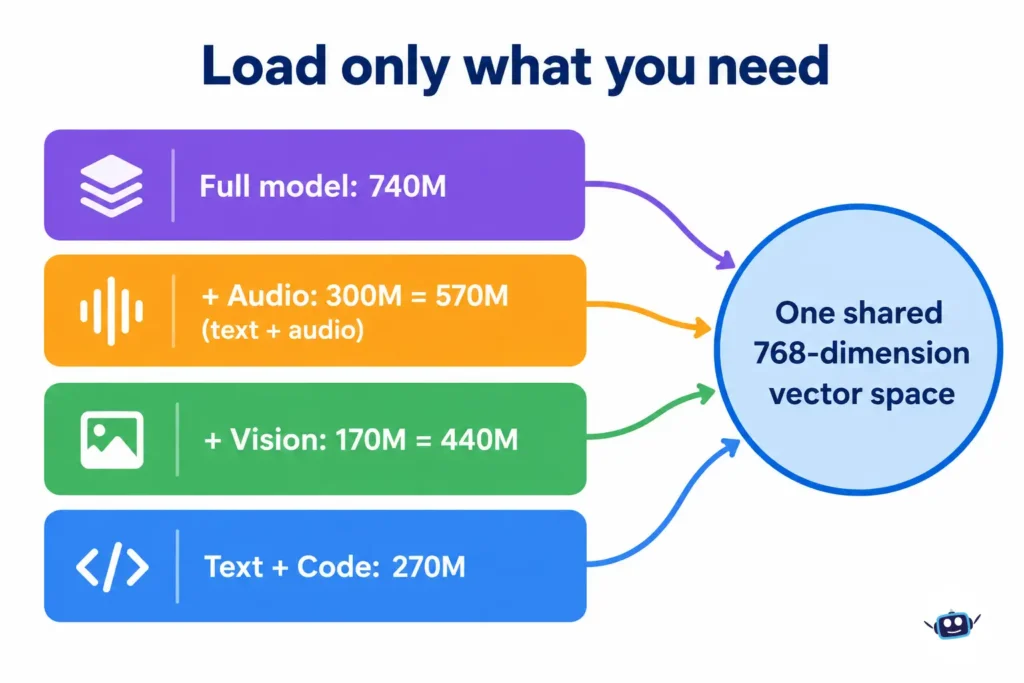
The 740M figure is the ceiling, not the minimum. The model is built from independent blocks:
- Text and code backbone: 270M (a 130M transformer plus a 140M embedder)
- Vision encoder: +170M (images, video frames, visual documents like PDFs and slides)
- Audio encoder: +300M (speech and sound)
Load text only and you run 270M. Add vision and you have 440M. Text plus audio is 570M, and all modalities is 740M. According to Google’s developer guide, all four setups load from the same checkpoint and share one vector space.
The practical consequence nobody mentions
Because the spaces are shared, you can start with a text-only index and add image or audio embeddings later. Google says you do not need to recompute the embeddings you already have. A query embedded with the 270M text-only setup can also be matched against documents embedded with the full model. That makes the model a good fit for phased rollouts: ship text search first, then add photos once the pipeline is stable.
Benchmarks: What Improved and What Barely Moved
The numbers below come from Google’s model card (768d, full-precision checkpoint). They are vendor-reported, and since the model is only days old, I found no independent reproduction yet.
| Benchmark | EmbeddingGemma 2 | EmbeddingGemma 1 |
|---|---|---|
| MTEB multilingual v2 (text) | 61.36 | 61.15 |
| MTEB Code v1 | 78.68 | 68.76 |
| MIEB Lite (image) | 64.64 | n/a |
| MMEB v2 Image / VisDoc / Video | 57.28 / 67.84 / 50.67 | n/a |
| MSEB Retrieval (audio) | 69.54 | n/a |
| MAEB (audio) | 49.39 | n/a |
Two readings stand out.
- Code got a real upgrade. MTEB Code rose 9.92 points, roughly 14%. If you index codebases or build retrieval for coding agents, this is the headline gain. Google’s guide demonstrates it by embedding the Hugging Face transformers codebase with the 270M text-only setup.
- Plain text barely changed. The multilingual text score moved by 0.21 points. Google describes this as retaining the original’s accuracy, which is fair, but it also means text search alone is not a strong reason to migrate.
Matryoshka Truncation: Where Most People Will Get Burned
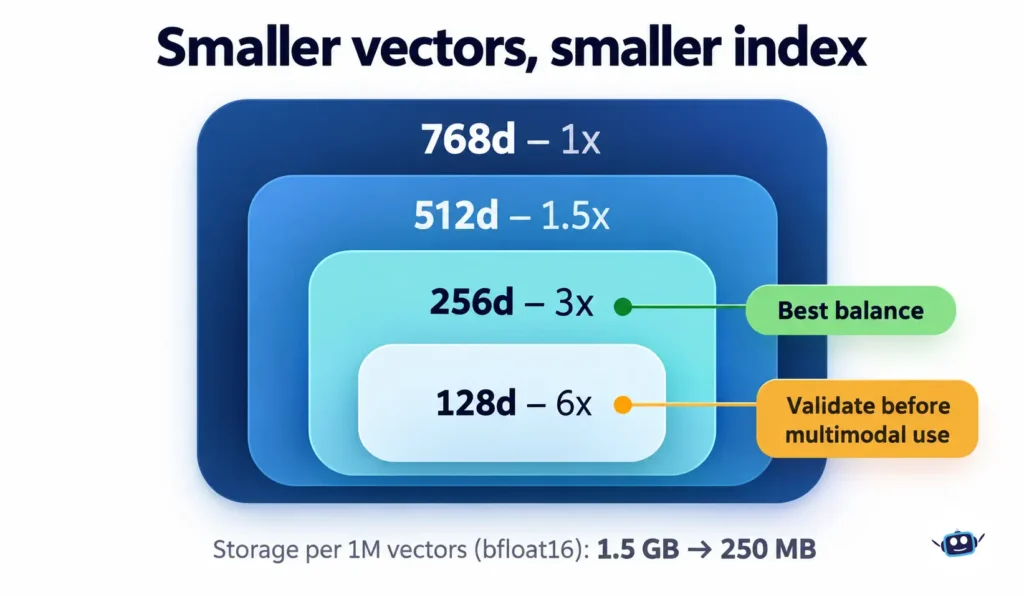
EmbeddingGemma 2 supports Matryoshka Representation Learning. You can keep only the first 512, 256 or 128 values of each vector to save storage. Google’s guide shows a million 768-dimension vectors in bfloat16 taking about 1.5 GB, versus roughly 250 MB at 128 dimensions.
The quality cost is not the same for every modality
| Dimension | Compression | MTEB Code | MMEB v2 (multimodal) | MSEB (audio) |
|---|---|---|---|---|
| 768d | 1x | 78.68 | 59.01 | 69.54 |
| 512d | 1.5x | 77.24 | 58.38 | 69.18 |
| 256d | 3x | 76.18 | 56.24 | 66.76 |
| 128d | 6x | 71.41 | 45.65 | 56.71 |
256 dimensions is the sweet spot for most projects. At 128 dimensions, the multimodal score drops from 59.01 to 45.65, about 77% of full quality by my calculation. Google’s own guidance says 128d suits large text-only indexes and first-stage shortlisting before re-ranking, and that you should validate it before using it for multimodal queries.
A discrepancy in Google’s own posts
The model card and the DeepMind launch post state a maximum 6x storage reduction. The AI Edge post says up to 8x. The math on dimensions alone (768 divided by 128) gives 6x. The 8x figure may include other factors such as quantization, but the posts don’t say, so plan around 6x.
Practical Setup: Getting EmbeddingGemma 2 Running
Weights are on Hugging Face and Kaggle. Google lists support for transformers, sentence-transformers, MLX, vLLM, llama.cpp, SGLang, Ollama and LM Studio. Qdrant has published a guide for storing the vectors, and Unsloth covers fine-tuning.
The developer guide calls for sentence-transformers v6.1.0 or later. The core pattern from the model card looks like this:
python
from sentence_transformers import SentenceTransformer

model = SentenceTransformer("google/embeddinggemma-2")

query_emb = model.encode("What causes the northern lights?", prompt_name="SearchQuery")
doc_emb = model.encode("The northern lights are caused by charged particles from the sun.", prompt_name="Document")
print(model.similarity(query_emb, doc_emb))
For on-device apps, Google points to MediaPipe Tasks and LiteRT. It also says ML Kit support for Android is coming in the following weeks, and Model Garden availability is listed as “coming soon”. Don’t plan a launch around either until they ship.
Common Mistakes (Verified Against the Model Card)
1. Using float16. The model card says EmbeddingGemma 2’s activation range exceeds float16’s range. You get NaN values or silently degraded embeddings instead of an error. Use bfloat16 or float32.
2. Forgetting to re-normalize after truncating. Slicing a unit-length vector does not leave it unit length. The card says skipping normalization quietly degrades ranking quality. Pass truncate_dim and normalize_embeddings=True and let the library handle it.
3. Mixing dimensions. A 768d query cannot be scored against a 128d corpus. Pick one dimension per index.
4. Skipping task prefixes on text. Omitting them still works but reduces precision. Prefixes apply to text only. Pass images, video and audio without a prefix.
5. Ignoring the shared context budget. All modalities draw from one 8,192-token window.
Planning Your Input Budget
| Modality | Default cost | Approximate max (single modality) |
|---|---|---|
| Text | 1 token per subword | 8,192 tokens |
| Image | 280 tokens | ~29 images |
| Video | 140 tokens per frame (1 fps sampling by default) | ~58 frames |
| Audio | 25 tokens per second | ~327 seconds (about 5.5 minutes) |
You can lower the vision budget to 70 tokens per image and fit roughly 114 images or frames, trading precision for capacity. A 5-minute video at the default setting will not fit in one input, so chunk long media and embed the chunks separately.
Real-World Use Cases
- Private photo and video search. Google’s AI Edge Gallery adds Instant Media Search and Video Moments Finder demos that run offline. Google’s example shows typing “Katze” (German for cat) and seeing cat photos immediately.
- Meeting recall on a Mac. Google AI Edge Foresight pairs EmbeddingGemma 2 with Gemma 4 for local note enrichment and retrieval across transcripts and files.
- Codebase search for agents. Pair the 270M text-only setup with a coding agent. For background on that pairing, see our guide to AI coding agents vs chatbots.
- Zero-shot routing. Google’s MediaPipe Decision task matches inputs to label descriptions without fine-tuning, and its chess demo evaluated 500 options in under 100 ms per turn.
- E-commerce listings. The model card shows a single embedding built from a product’s text, photos and demo video, searchable by a plain-text query.
How it compares to Google’s cloud option
Google also offers Gemini Embedding 2, a cloud API model that supports up to 3,072 dimensions. EmbeddingGemma 2 is the local counterpart. Choose the cloud model when you want a managed service, and EmbeddingGemma 2 when data must stay on the device or you need offline operation. If you are weighing local hardware against rented compute, our breakdown of GPU rental pricing in 2026 and our explainer on what stays local and what leaves with Ghost Computer AI add useful context.
Personal Experience: What I Tested and What It Taught Me
When a model launches with this many claims, I don’t start by trusting the headline numbers. I start by checking the ones I can check myself. For EmbeddingGemma 2, I spent a session verifying Google’s documented behavior with my own scripts, then turned the results into planning rules.
1. The storage savings are real, and small at personal scale
I calculated index sizes for realistic cases using 2 bytes per value (bfloat16):
| Scenario | 768d | 256d | 128d |
|---|---|---|---|
| 50,000 phone photos | 76.8 MB | 25.6 MB | 12.8 MB |
| 1,000,000 documents | 1.54 GB | 0.51 GB | 0.26 GB |
This matches the 1.5 GB versus 250 MB example in Google’s developer guide. Lesson learned: for a personal photo library, even full 768d vectors are tiny. Truncating to 128d would save about 64 MB and could cost roughly a quarter of multimodal quality, which is a bad trade. Truncation only pays off at large scale.
2. The 8,192-token window shapes your pipeline more than you’d expect
I worked out what actually fits in one input:
- A 1-hour recording at 25 tokens per second needs roughly 11 to 12 chunks of about 327 seconds each, depending on how much text you add.
- A video sampled at 1 frame per second fits about 58 seconds per input at the default setting. At the 70-token vision budget, that rises to roughly 114 frames, or about 1 minute 54 seconds.
- At the 1,120-token maximum vision budget, only 7 images fit.
Lesson learned: the headline “8K context” sounds generous until you price in media. Design your chunking strategy first, because it affects how you store timestamps and how you map a search hit back to a moment in the source file.
3. The silent float16 failure is easy to miss
I confirmed the mechanism behind the model card’s warning. Float16 tops out at 65,504, and any value above that becomes infinity when cast. That’s why you may get NaN or degraded embeddings instead of an error. Lesson learned: add a cheap guard to your pipeline. Check every batch for NaN or infinite values, and run that check in your tests so the failure shows up on day one, not after a week of bad search results.
4. Truncated vectors stop being cosine scores
I simulated truncation on synthetic 768-dimension vectors (not the real model’s output). After slicing to 128 dimensions, vector lengths ranged from about 0.34 to 0.80 instead of 1.0. Top-1 retrieval was 99.2% without re-normalizing and 100% with it. The ranking damage was small, but the scores themselves were distorted. Lesson learned: if your app uses a cutoff like “only show matches above 0.6,” un-normalized truncated vectors will break that threshold without any warning. Always normalize, and re-tune thresholds whenever you change dimensions.
5. Where to spend your effort
Working through Google’s published numbers, 256d kept 95% to 99% of full-dimension scores across all six benchmarks I checked. At 128d, text, code and image retrieval stayed around 91% to 95%, but the multimodal benchmark (MMEB v2) fell to 77% and audio retrieval (MSEB) to 82%. Lesson learned: don’t treat dimension choice as one global setting. Where you can, keep a text index at 128d for fast shortlisting and a media index at 256d or higher.
What I haven’t tested
I haven’t yet run the model’s weights on a real photo library, codebase or audio archive, so I can’t tell you its real-world latency or recall on your data. Treat the benchmark scores in this article as Google’s claims, and my checks as confirmation that the arithmetic and failure modes are accurate. If you want to go further, build a set of 50 to 100 queries with known correct results from your own content and compare 768d, 256d and 128d side by side. That single test will teach you more than any leaderboard.
Best Practices Checklist
- Start with the smallest encoder set that covers your data.
- Use bfloat16 or float32, never float16.
- Begin at 768d or 512d, then try 256d against your own evaluation set.
- Treat 128d as a text-only or shortlisting option.
- Use the correct task prefix for text, and none for media.
- Chunk long audio and video to fit the 8,192-token window.
- Add application-level safeguards. The model card states EmbeddingGemma 2 gets no post-training alignment or output moderation, so retrieval filtering and fairness testing are your job.
- Test multilingual quality in your target languages, since Google notes performance may not be equal across all 100+ languages.
Limitations to Keep in Mind
The pretraining data has a January 2025 cutoff, so very recent terminology may be weaker. Benchmarks are Google-reported. Open-ended or highly complex tasks can be hard for the model, as with most embedding systems. And some promised integrations are not live yet.
FAQs
What is EmbeddingGemma 2?
It is Google DeepMind’s open multimodal embedding model, released October 6, 2026. It has 740M parameters and maps text, code, images, video and audio into a shared 768-dimension space.
Is EmbeddingGemma 2 free for commercial use?
Yes. It is released under the Apache 2.0 license, which permits commercial use. You should still follow Google’s Gemma Prohibited Use Policy.
How much memory does EmbeddingGemma 2 need?
With quantization on a Google Pixel 11 Pro, Google reports about 191MB of active RAM for text-only use and about 567MB for the full multimodal model.
How is EmbeddingGemma 2 different from the original EmbeddingGemma?
The original was text-only, with 308M parameters and a 2K-token context. Version 2 adds code, images, video and audio, quadruples the context to 8,192 tokens, and moves to Apache 2.0.
Which embedding dimension should I use?
Start with 768 or 512. Use 256 when storage matters, since Google’s data shows close to full quality. Reserve 128 for text-heavy indexes and validate it before using it for multimodal search.
Can EmbeddingGemma 2 run offline?
Yes. It is designed for on-device use, and Google’s demos run without an internet connection.
Does EmbeddingGemma 2 replace Gemini Embedding 2?
Not exactly. They serve different deployment needs. Gemini Embedding 2 is a cloud API model, while EmbeddingGemma 2 gives you downloadable weights for local use.
Why does float16 break EmbeddingGemma 2?
The model’s activations exceed float16’s numeric range, which can produce NaN or degraded embeddings without any error. Use bfloat16 or float32.
Conclusion
EmbeddingGemma 2 is a meaningful step for private, on-device search. The Apache 2.0 license, modular encoders and shared vector space are the parts I’d weigh most. The text-only score is nearly unchanged, so the real reasons to adopt it are code retrieval and cross-media search.
Actionable takeaways:
- Migrate for code or multimodal needs, not for text quality alone.
- Start text-only and add encoders later without recomputing existing embeddings.
- Default to 256d, and test 128d before trusting it for images, video or audio.
- Use bfloat16, re-normalize after truncation, and keep prefixes on text only.
- Build a small evaluation set from your own data before you commit.
For more model coverage, browse our LLMs & Models section, and see how we check facts in our Editorial Process.
Disclaimer: This article is for general information only and is not professional, legal or technical advice. Specifications, availability and benchmark figures come from Google’s documentation as of October 7, 2026 and may change. Benchmark scores are vendor-reported and not independently verified. Check the official model card and license before deploying in production.