
Introduction
On October 7, Microsoft and NVIDIA stood on a stage in San Francisco and made a bet that is easy to say and hard to verify. The next important AI computer might be the one in your bag, not a rack in a data center.
The product at the centre is the Surface Laptop Ultra, a 15-inch machine that starts at $2,599. The software idea behind it is what Microsoft calls agentic Windows. It’s an operating system that can run AI agents locally, keep them fenced in, and decide when to use a cloud model instead.
Most coverage so far has repeated the spec sheet. This article tries to answer three questions the launch material doesn’t answer in one place:
- How much memory do you need to run the headline local model?
- Which agentic Windows features are available today, and which are still “coming soon”?
- What should you check before spending $2,599 or more?
Everything below is based on Microsoft’s and NVIDIA’s own announcements plus independent reporting from the first 24 hours. The laptop ships on October 16, so no independent full review exists yet.
Quick answer: what are the Surface Laptop Ultra and agentic Windows?
The Surface Laptop Ultra is Microsoft’s most powerful Surface laptop. It’s a 15-inch machine built on NVIDIA’s RTX Spark chip, which pairs an Arm-based Grace CPU with a Blackwell RTX GPU and up to 128GB of unified memory. Microsoft’s pre-order announcement lists it from $2,599, shipping October 16.
Agentic Windows is the set of Windows 11 features that let AI agents work on your PC. They can open files, run code and take actions, all under operating-system controls. The main new piece is Microsoft Execution Containers (MXC), which became generally available on Windows 11 on October 7.
What Microsoft announced on October 7
The hardware
The Surface Laptop Ultra is built around NVIDIA’s RTX Spark platform. In the top configuration, that means a Blackwell GPU with up to 6,144 cores and a Grace CPU with up to 20 cores, linked at 600GB/s, according to NVIDIA’s event write-up. NVIDIA quotes up to one petaflop of FP4 AI compute.
The physical details, as reported at the event, are:
- A 15-inch PixelSense Ultra mini-LED touchscreen in 3:2, with up to 2,000 nits of peak HDR brightness
- Less than 18mm thick and under 4.5 pounds
- USB-C, USB-A, HDMI, a headphone jack and a full-size SD card reader
- A cooling system with 2.5 times the thermal capacity of the 15-inch Surface Laptop 7th Edition
- A touchpad more than 30% larger than the previous generation’s
- Platinum and Nightfall finishes
Gizmodo’s hands-on adds a detail that matters for daily life. The new magnetic USB-C port accepts up to 140W and still takes ordinary USB-C cables. Microsoft also claims the laptop keeps 99% of its GPU performance on battery. That is a vendor claim that independent testing has not yet confirmed.
The price and the configuration maze
The $2,599 starting price is official. The rest of the pricing is less clear. Gizmodo reported that the base model has 24GB of unified memory and 512GB of storage. A 32GB, 1TB version lands around $3,300, and the 20-core versions with 64GB or 128GB could approach $6,000. Microsoft’s own post gives only the starting price and the “up to 128GB” ceiling, so treat the higher prices as press estimates until the store pages show final numbers.
For context, MacRumors notes that Apple’s 16-inch MacBook Pro starts at $2,999. Microsoft is also offering up to $1,000 back for trading in an eligible MacBook.
What “agentic Windows” means in practice
Microsoft Execution Containers: the fence around the agent
If you remember one thing from this launch, make it MXC. An agent that can open files and run code is useful, but it’s also a risk if it gets tricked or simply makes a bad call.
According to the Windows Developer Blog, MXC is a policy-driven execution layer for untrusted or dynamically generated code. Organizations define which files and networks an agent can reach, and Windows enforces that at runtime. Unite.AI’s summary adds that the policy sits outside the agent’s control, so the agent can’t grant itself extra access.
The isolation levels vary:
- Process containers work on Windows, macOS and Linux.
- Session containers are Windows-only. They give the agent its own session, desktop and clipboard.
- WSL containers cover Linux tooling.
- A microVM mode is still experimental.
One Windows-only feature is especially practical. MXC process containers can produce an agent activity report showing which resources a workload tried to use. That helps you write a least-privilege policy based on what the agent does, not on guesses.
Support is already broad. As Unite.AI reported from Microsoft’s announcement, OpenAI’s Codex, GitHub Copilot, OpenClaw, Replit, LM Studio, NVIDIA’s OpenShell and Unsloth AI already support MXC. Claude Code, Perplexity and Raycast are among those planning to. Pavan Davuluri, who leads Windows and devices at Microsoft, framed the goal as agents that can be “secured, observed and governed” on the PC itself.
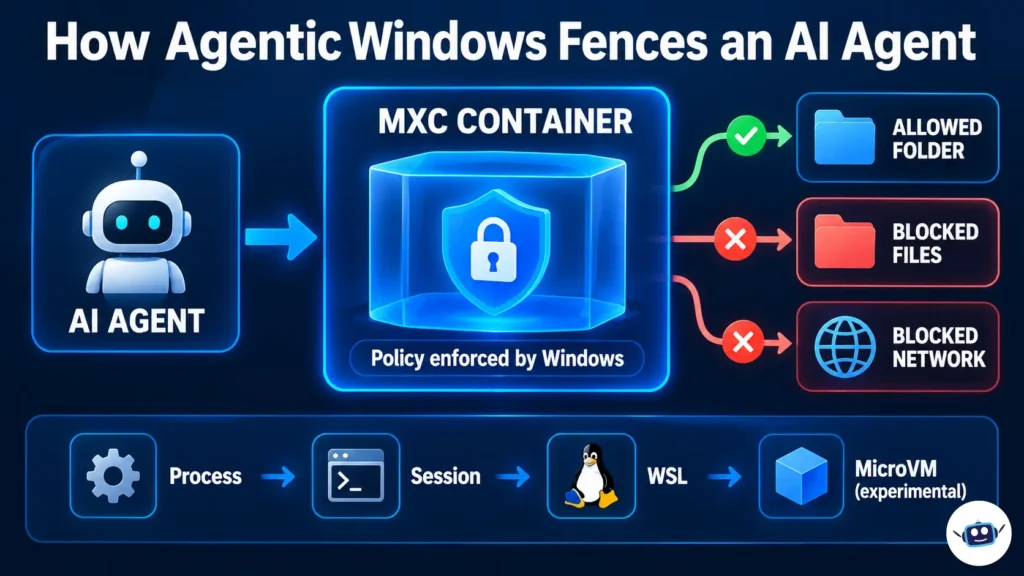
Microsoft Execution Containers (MXC) illustrate how Windows security policies can restrict AI agent access to files, folders, and network resources.
Hybrid intelligence: local when it makes sense, cloud when it doesn’t
The second pillar is what Microsoft calls hybrid intelligence. In the Windows Experience Blog, Microsoft describes three local capabilities for Copilot on Copilot+ PCs:
- Local context. With your permission, Copilot can see your files and recent activity.
- Local actions. Copilot can organize files, run diagnostics and troubleshoot.
- Local models. Copilot can use models running on the device.
On the developer side, Microsoft is bringing a local build of its MAI Code 1.1 Flash model, which has 137 billion total parameters and 6.8 billion active. It’s squeezed to 3-bit precision, and Microsoft says that cuts its size by nearly 80% while supporting a 256K-token context window locally. Technology.org reports that local calls through GitHub Copilot carry no inference charges. For teams watching their token bills, that is the real selling point.
Actions in Windows Search
A smaller but more visible change is a new Windows Search experience with thousands of actions from the taskbar. These include switching to dark mode, turning on Do Not Disturb, muting audio and sending a text. It began rolling out to Windows Insiders in the experimental channel on October 7.
The memory math nobody is showing you
Here is the part I couldn’t find anywhere else, so I worked it out myself. The size of a model’s weights is simple arithmetic: parameters multiplied by bits per weight, divided by eight.
A 137-billion-parameter model at 16-bit precision would need about 274GB for the weights alone. At roughly 3.3 bits per weight (the effective figure IT-Connect’s detailed report gives), that falls to about 56.5GB. That is a 79% reduction, which matches Microsoft’s “nearly 80%” claim, so the numbers are consistent.
The same report says the model peaks at 75.5GB on a Surface Laptop Ultra with the full 256K context. The roughly 19GB gap between weights and peak is working memory for the context window and runtime. That peak figure comes from a single report, so treat it as indicative until independent testing confirms it.
Put that against the configurations Gizmodo described:
| Configuration | Unified memory | Fits MAI Code 1.1 Flash at full 256K context? | Memory left over (my calculation) |
|---|---|---|---|
| Base | 24GB | No | Doesn’t fit |
| Mid | 32GB | No | Doesn’t fit |
| High | 64GB | Not at full context | Weights (~56.5GB) fit, but the peak (75.5GB) doesn’t |
| Top | 128GB | Yes | About 52GB for Windows, apps and games |
Assumes ~3.3 bits per weight and the reported 75.5GB peak. Microsoft’s own wording is “3-bit precision,” so exact figures may differ slightly.
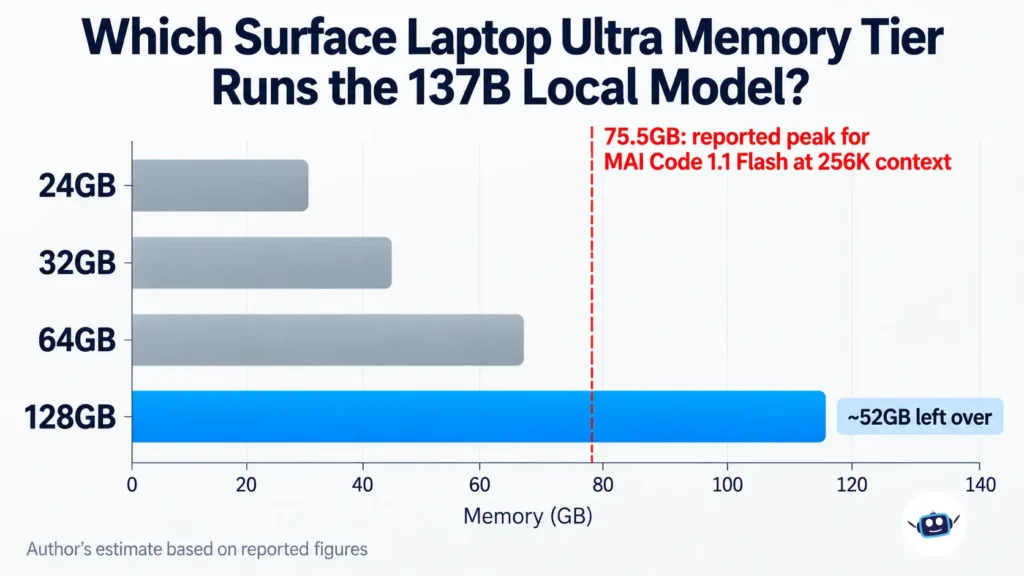
This changes how I’d read the launch. The $2,599 laptop is a very good creator and gaming machine. The laptop that does the thing in the keynote, running a 137B coding model locally with a long context, is the 128GB model. Event reporting says Microsoft claims the laptop can run models above 120 billion parameters locally, which is consistent with the math. A 120B model at 4-bit is about 60GB.
What’s ready now vs. what’s coming soon
This is the table I wish Microsoft had published. I built it from the company’s own blog posts and the reporting on them.
| Feature | Status as of October 8, 2026 |
|---|---|
| MXC process, session and WSL containers | Generally available on Windows 11 |
| MXC microVM mode | Experimental |
| Windows 365 support for MXC | Generally available |
| Entra distinguishing agent activity from user activity (Agent 365) | Coming soon |
| Intune policy for MXC process containers | Coming soon |
| Windows Search actions | Windows Insiders, experimental channel |
| Hybrid intelligence in GitHub Copilot app, CLI and VS Code | Experimental preview, later in October |
| Copilot local context, actions and models on Copilot+ PCs | Rolling out over the “coming months” |
| Surface RTX Spark Dev Box | Ships to US customers in November |
The pattern is clear. The containment layer is real and shipping. The enterprise management layer, meaning identity and policy through Entra and Intune, is not there yet. That matters if you’re an IT admin rather than an individual developer.
Real-world examples: who benefits and how
A developer on a token budget. You use GitHub Copilot daily and your team keeps hitting cloud usage limits. A local model that handles routine tasks, like investigating a failing build and proposing a fix, moves some of that work off the meter. Microsoft’s own announcement describes exactly this kind of GitHub Copilot task.
A creator who also games. In a demo clip, Microsoft showed the laptop running Gears of War: E-Day, GitHub Copilot and DaVinci Resolve at the same time. Gizmodo played the game at about 60 fps on medium settings with DLSS, running through Microsoft’s Prism x86 emulation. For a creator, the SD card slot and bright display may matter more than the agent features.
An IT admin evaluating agents. MXC lets you write a policy such as “this agent can read this folder and reach these domains.” That is a better starting point than trusting an agent with a whole user profile. You’ll still need the Intune and Entra pieces before you can manage it at scale.
Personal experience: what I learned digging through the launch material
I want to be straightforward here. I haven’t held a Surface Laptop Ultra, and this isn’t a hands-on review. What I can share is what I learned working through the launch documentation and the first wave of coverage, and four lessons stood out.
Lesson 1: “Up to 128GB” is the headline, and it isn’t the product most people will buy. I started out assuming the local-agent story applied to the whole laptop family. Once I put the memory table together, the picture narrowed fast. Only the top configuration runs the flagship model comfortably. If you read the keynote and then order the base model, you’ll have a fast laptop, not the machine Microsoft demoed.
Lesson 2: “Generally available” doesn’t mean “ready to manage.” MXC is shipping, and that’s good news. But when I lined up the feature statuses, every governance feature, from Entra to Intune, was “coming soon.” A lot of headlines blur this. If you’re deploying to a team, the safe plan is to pilot MXC with a few developers and wait for the management tools.
Lesson 3: Sources disagree on the details. I found differing reports on memory ceilings per configuration, and on prices. I used Microsoft’s figures where they exist and flagged the press estimates. Check the store page before you buy.
Lesson 4: “Local” isn’t “offline.” Gizmodo’s reporter noted that both Microsoft and NVIDIA keep implying some tasks will still use cloud models. That fits Microsoft’s own “hybrid” wording. If privacy is your reason for wanting local AI, find out which features stay on the device before you rely on them.
If you want a related read on this tension, our piece on what Ghost Computer AI keeps local and what leaves covers the same question for a different product.
Benefits worth caring about
- Lower marginal cost for agent work. Local model calls through GitHub Copilot don’t carry inference charges, so heavy users may save money over time. If you’re comparing this with renting GPUs, our GPU rental pricing guide shows how fast cloud costs add up.
- A real security boundary. MXC enforces rules at the OS level, outside the agent’s control.
- One machine for several jobs. NVIDIA says the same RTX Spark platform handles AI, creative work and gaming, with full CUDA support.
- A better charging port. The 140W magnetic USB-C connection fixes a long-standing Surface complaint.
Common mistakes to avoid
- Buying the base configuration for local agent work. 24GB can’t run the flagship local model.
- Assuming “local” means “private by default.” Hybrid routing can send work to the cloud.
- Treating MXC’s general availability as a finished enterprise story. Identity and policy management are still coming.
- Trusting vendor benchmark multipliers. Microsoft claims 4.3x faster AI image generation and 6.2x faster video generation than a MacBook Pro with an M5 Pro chip, as Yahoo Finance reported. These are Microsoft’s tests, not independent results.
- Skipping an app compatibility check. This is an Arm laptop that runs x86 apps through emulation. Test your critical tools and drivers during the return window.
Best practices and tips
- Decide on memory first. If local agents are the point, price the 64GB and 128GB tiers. Everything else is secondary.
- Start in MXC’s Learning mode. This is my suggestion, based on how Microsoft describes the modes and the activity report. Run a new agent in Learning mode, read the report, then tighten the policy before switching to Enforcement.
- Give agents the narrowest folder access that works. One project directory beats your whole Documents folder.
- Keep the cloud as a fallback. Microsoft’s own design uses both, so plan for the same.
- Read independent reviews before judging performance. Battery life, fan noise under load and sustained performance are still unproven.
For a broader view of when to use autonomous tools versus chat assistants, see our guide to AI coding agents vs chatbots. If you’re thinking about the network side of agent security, our look at agentic defined networking is a useful companion.
Surface Laptop Ultra vs MacBook Pro: what we can and can’t say
Microsoft is openly aiming at the MacBook Pro. The facts we can state are the starting prices ($2,599 against $2,999 for the 16-inch model), Microsoft’s claim of 25% higher peak HDR brightness than the M5 MacBook Pro, and the trade-in offer. The performance claims all come from Microsoft’s own tests. Until independent reviewers run both machines side by side, nobody knows who wins on battery life or sustained load.
Frequently asked questions
When does the Surface Laptop Ultra come out and how much is it?
Pre-orders opened October 7, and it goes on sale October 16. It starts at $2,599 (US MSRP). Higher memory and storage tiers cost more. Regional pricing outside the US wasn’t published in the sources I checked.
What chip does the Surface Laptop Ultra use?
It uses NVIDIA’s RTX Spark, which combines a Grace CPU (up to 20 cores) with a Blackwell RTX GPU (up to 6,144 cores) and up to 128GB of unified memory. It’s Arm-based, so Windows runs x86 apps through Microsoft’s Prism emulation.
What is agentic Windows?
It’s Microsoft’s direction for Windows 11 features that let AI agents run on your PC and act on files and apps, with OS-level controls. Microsoft Execution Containers are the main security piece.
What are Microsoft Execution Containers (MXC)?
MXC is a policy-driven sandbox for code that agents run. You declare which files and networks an agent can access, and Windows enforces it at runtime. It became generally available on Windows 11 on October 7.
How much memory do I need to run local AI agents on the Surface Laptop Ultra?
For the 137B MAI Code model at full context, my calculation says 128GB. At 64GB the weights fit but the reported peak doesn’t, and 24GB and 32GB can’t run it. Smaller models run fine on the lower tiers.
Can the Surface Laptop Ultra run AI without the cloud?
Partly. Microsoft says it can run large models locally, above 120 billion parameters on the top configuration. Its design is also hybrid, so some tasks may still use cloud models.
Does the Surface Laptop Ultra run all Windows apps?
It runs Windows 11 on Arm and uses Prism to run x86 apps. Performance is good in reported demos, but compatibility depends on the app, so test yours during the return window.
Is the Surface Laptop Ultra better than a MacBook Pro?
There’s no independent verdict yet. Microsoft claims advantages in AI performance and display brightness. Independent side-by-side reviews will give a clearer answer on battery life and sustained performance.
Which AI agents work with MXC?
According to Microsoft’s announcement as reported by Unite.AI, Codex, GitHub Copilot, OpenClaw, Replit, LM Studio, NVIDIA OpenShell and Unsloth AI support it today, with more planning support.
Conclusion
The Surface Laptop Ultra is a serious piece of hardware, and agentic Windows is a serious attempt to make agents safer to run. But the launch is easier to love in a keynote than to evaluate in practice. The containment layer is shipping. The management layer is coming. The headline local model needs the 128GB configuration. And the performance claims are still Microsoft’s own.
Actionable takeaways:
- If you want local agents, budget for 64GB at minimum and 128GB for the flagship model.
- If you’re an IT admin, pilot MXC now and wait for Intune and Entra support before rolling it out widely.
- If you’re a creator or gamer, the base model may be all you need. Check independent reviews for battery and fan noise before you commit.
- Check the final store page for configurations and prices before ordering.
- Test your essential apps on Arm during the return window.
Disclaimer: This article reflects information published by Microsoft, NVIDIA and independent outlets as of October 8, 2026. The Surface Laptop Ultra had not shipped at the time of writing, so specifications, configurations, pricing and software availability may change. Performance and battery claims are the manufacturers’ own and have not been independently verified. Memory calculations are the author’s estimates based on publicly reported figures. This is general information, not purchasing, financial, security or technical advice. All product names and trademarks belong to their respective owners.