
Last verified: October 8, 2026, against Beam AI’s own website, pricing page, product documentation and public changelog.
Search for Beam AI and you won’t land on one company. You’ll land on at least four: an enterprise agent platform, a construction takeoff tool, a serverless GPU cloud, and a UK social-care product. Plenty of articles blur them together, which is how a funding round raised by one company ends up attached to another.
This guide is about the enterprise platform at beam.ai, the one that builds AI agents for back-office work. We went through its documentation, pricing page, case studies and 2026 release notes, and we point out where those sources disagree with each other or with third-party listings. That’s the part most reviews skip, and it’s the part that can cost you money or credibility if you get it wrong.
We have not run a production workflow on Beam AI ourselves, and we say so again in the personal experience section. What follows is a verified reading of what the company publishes, plus a practical way to test it yourself.
What Is Beam AI? (Quick Answer)
Beam AI is an agentic automation platform for mid-market and enterprise teams. You build AI agents as visual flows, connect them to business tools like email, CRMs and spreadsheets, and let them handle high-volume, rule-bound work such as claims intake, invoice processing, candidate screening and customer support. The company describes itself as a provider of production-grade AI agents, with offices in Berlin, Abu Dhabi, New York and Karachi. The CEO and co-founder is Jonas Diezun, and the Chief AI Officer is Aqib Ansari, according to the company’s founders page.
If you’re still sorting out how an agent differs from a chatbot, our comparison of AI coding agents vs chatbots explains the distinction in plain terms. The short version: a chatbot answers, an agent acts.
The Four “Beams” People Confuse
Before anything else, make sure you’re evaluating the right product.
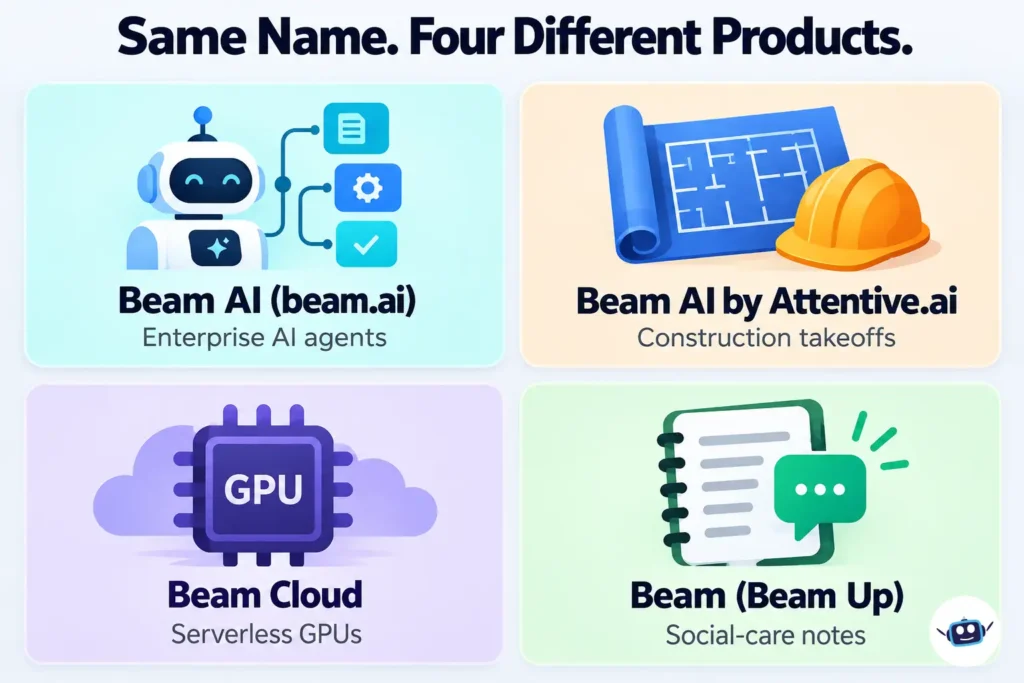
- Beam AI (beam.ai): the enterprise agent platform covered in this article. Workflows, integrations, human approval steps, analytics.
- Beam AI by Attentive.ai: an AI takeoff product for construction estimating. Attentive.ai announced a $30.5 million Series B in November 2025, bringing its total funding to $48 million, according to its Business Wire press release. That money belongs to the construction company, not to the agent platform.
- Beam Cloud (beam.cloud): a serverless infrastructure platform for running AI inference and training on GPUs, as described in its G2 profile. Developers use it; operations teams don’t.
- Beam (Beam Up Ltd): a UK social enterprise whose Magic Notes product transcribes case meetings for social workers, per a funding database listing.
Why this matters for the platform in this article: third-party databases disagree wildly about its funding. One tracker (Caplight) lists a $7.13 million seed round, another shows far smaller totals, and a revenue-estimate site lists none at all. Since we couldn’t confirm any of these from a primary source, we’re not quoting a funding number. If you need one for due diligence, ask the company directly.
How Beam AI Works
Workspaces, agents and Flows
Beam’s core concepts documentation lays out the building blocks. You work inside a workspace, where you create agents. Each agent has its own chat, task list, Flow, Learning area, configuration and analytics. A Flow is the graph that tells the agent how to do the job: it starts with a trigger and can contain tool steps and condition steps that branch the process.
A task is simply one run of an agent. That sounds trivial, but it matters because Beam’s plans are measured in tasks (more on that in the pricing section).
Seven ways to fill a variable
Every step in a Flow needs inputs, and Beam gives you seven methods for supplying them: auto fill, prompt fill, linked fill, static fill, user fill, memory fill and attachment fill. In practice this is where much of your design effort goes. Let the AI infer a value when the context is rich, link it to an earlier step’s output when you need consistency, and hard-code it when it should never change.
Memory, triggers and the Code node
Agents can hold reference documents in a memory module, which a step can draw on through memory fill. Triggers start a Flow from events such as an incoming email. In April 2026 Beam also added a code execution node that runs JavaScript or Python for exact calculations and data cleanup without involving an AI model, which is a sensible escape hatch when you need arithmetic to be right every time.
Templates and guided onboarding
On September 29, 2026 the company rebuilt its template library and added guided onboarding. New users now answer a few questions about their industry and role, then a chat builds a first agent and runs a test task on sample data. Earlier, in July, Beam added the ability to describe an agent in plain language and have the platform assemble the steps, tools and trigger.
The Control Layer: Where Beam AI Is Most Interesting
Most automation tools are judged on what they can do. With agents, the more important question is what stops them doing the wrong thing. Beam’s documentation spends real effort on this, and it’s the section worth reading twice before you sign anything.
Human approval, node by node
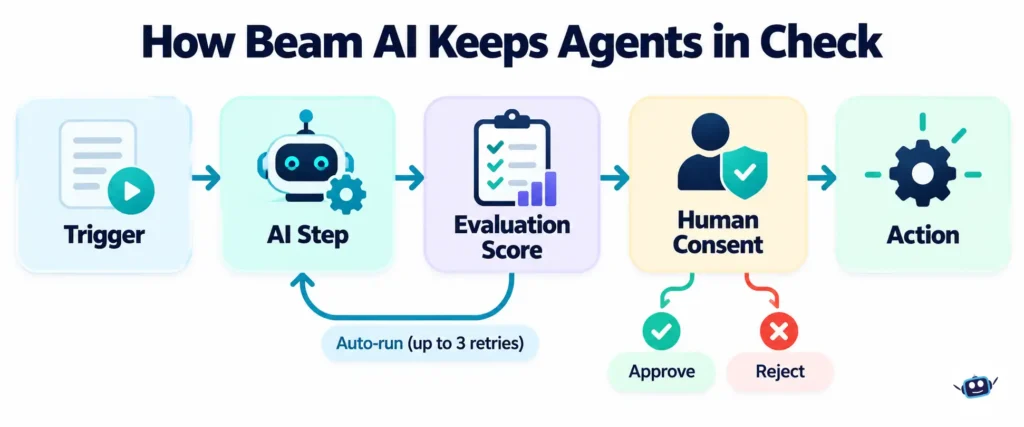
You can mark any tool step as requiring consent. The task then pauses and waits for a person to approve or reject. A separate status, input required, appears when a step is missing a value it needs. Beam’s automation modes guide recommends consent checkpoints for anything that touches the outside world: sending external emails, financial transactions, deleting data, publishing content, or updating critical records.
Evaluation criteria and auto-run
Every step can carry plain-language evaluation criteria, scored from 0 to 100 percent. Beam’s evaluation framework documentation suggests criteria that check one field at a time, for example that a currency field holds a valid three-letter code. If a score falls below your threshold, auto-run can retry the step, up to three times.
Two details are easy to miss. First, the documentation advises against using accuracy-based auto-run on deterministic operations, integration API calls, steps that fail because data is missing, and final output nodes. Second, it treats frequent retries as a warning sign: if more than 30 percent of tasks need them, the prompt is probably the problem. As of August 2026, a task can also fail outright if its accuracy stays below the threshold even after retries, rather than quietly passing a weak answer downstream.
A gradual path to autonomy
The most practical advice in the docs is a staged rollout. Start with consent required on every action for the first couple of weeks, then remove approvals only on actions that are consistently accepted, then run autonomously with exceptions. The guidance treats an approval rate of roughly 95 percent or higher as a signal that a checkpoint can come off. Tracking approval rate by action type is the metric that makes this decision defensible.
Test mode, monitoring and Fix with AI
Three 2026 releases round out the picture:
- Test mode (June 9): run a Flow against data from past executions in a sandbox where no live records are created, changed or deleted.
- Fix with AI (September 15): when an integration step fails, a copilot explains the error, proposes one repair, and applies it only after you approve.
- Monitoring (September 15): per-agent rules that alert Slack, Microsoft Teams or email when a task ends in a status you choose, a score drops, or failures pile up.
Add role-based access control, released September 1, and you have a reasonable governance story. Owners and admins keep full control, while custom roles decide who can create, run or delete each agent.
Beam AI Pricing in 2026: Why the Numbers Disagree
This is the clearest example of a gap between what you’ll read online and what the vendor publishes.
The current Beam AI pricing page lists four tiers: Free with 20 tasks per month, Pro at $50 per month with 200 tasks, a Scale plan at $3,990 per month, and a Custom plan with pricing on request. Pro includes unlimited steps per workflow, premium AI models and output evaluation. Scale adds frontier models, enterprise-grade security, high-volume execution and three base integrations.
Now compare that with a software-listing site (Toolradar), which still shows plans at $990 and $1,990 per month and states there is no permanent free plan. Those figures look like an earlier pricing structure. Both can’t be current, and the vendor’s own page is the better authority. Still, take a screenshot and date it, because enterprise pricing often moves after a sales conversation.
Two practical notes. Plans are task-based, so check how credits are counted during your trial before you scale up. And the June 2026 release notes say API keys became available on the Free plan, which makes a no-cost technical evaluation possible.
This kind of cross-checking is the habit behind our guide to what’s verified and what contradicts itself for another AI product. The lesson transfers: when two sources disagree, go to the vendor, then date-stamp what you find.
Real-World Use Cases and Reported Results
Beam’s case studies page claims more than 10 million agent tasks processed for large companies and scale-ups. Individual results include:
- Recruitment (Booth): screening time per candidate reported down from around six to seven minutes to about 90 seconds, a 70 percent reduction.
- Insurance (a Dutch provider): 91 percent of motor claims automated, processing 46 percent faster, and a 9 percent NPS improvement.
- Healthcare (Avi Medical): 81 percent of patient inquiries automated and a 93 percent drop in cost.
- Chemicals: a BPO relationship replaced with agents, with costs reported down 63 percent.
These are vendor-published numbers and none comes with an independent audit. Read them as proof that these use cases are plausible, not as a forecast for your company. The pattern is useful though: high volume, repetitive, policy-driven work with clear right answers. That’s where agents earn their keep.
A note on hiring workflows
Candidate screening is one of Beam’s published use cases, and it is also one of the most regulated. The EU AI Act classifies recruitment and candidate-screening AI as high-risk, and New York City’s Local Law 144 requires independent bias audits and candidate notices for automated employment decision tools. Rules differ by country and state, so check which ones apply to you, keep a person responsible for final hiring decisions, and ask any vendor, Beam included, for bias-audit documentation before you automate screening.
What’s Documented vs. What’s Claimed
Vendor marketing and vendor documentation don’t always say the same thing. Here is how to read the claims that matter most before a demo:
| Topic | What Beam’s documentation and changelog show | What to ask in a demo |
|---|---|---|
| Learning | A per-agent Learning area and, since August 2026, a Learning Hub that groups recurring issues and drafts fixes you approve before they go live | Accuracy before and after feedback, measured on your own data |
| Self-healing | Auto-run retries a step up to three times when its evaluation score is too low; failed integration steps get a suggested fix you approve | How often retries trigger and how often they actually improve results |
| Integrations | The changelog announced 1,500 new integrations in August 2025, and counts differ from page to page | A written list of the integrations your stack needs, tested in your trial |
| Security | The platform page lists ISO 27001, SOC 2 Type II, EU hosting and a US region | The audit reports themselves, under NDA |
| Results | Case studies report figures such as 91 percent of motor claims automated | The dataset, the task and the time frame behind each number |
Treat each row as a question to answer in your own trial, not a conclusion.
Connecting Beam AI to Claude and Other MCP Clients
Here’s something almost no review mentions. Beam documents a Model Context Protocol connection that lets MCP-compatible assistants, including Claude Desktop and Cursor, work with your Beam workspace using an API key.
The exposed tools cover listing agents, creating and monitoring tasks, reading analytics, and approving, rejecting or retrying tasks that need consent. In plain terms, you could ask an assistant for the status of running tasks, or approve a paused one, without opening the Beam dashboard.
That convenience comes with a caution. An API key that can approve tasks is a powerful credential. Use separate keys for testing and production, rotate them, and avoid giving an assistant approval rights on anything financial until you trust the workflow. If you’re interested in how agent tooling is attracting infrastructure investment more broadly, our piece on the doxx.net round for agent networking is a useful companion.
Security, Data Residency and Compliance
Beam says its platform is hosted in the EU and GDPR-compliant, and lists ISO 27001 and SOC 2 Type II certifications on its platform page. It also supports cloud deployments on Azure or AWS and on-premises options. In January 2026 the company added a dedicated US region with US data residency for enterprise customers, according to its changelog.
We couldn’t verify the certification documents themselves, because the company’s Trust Center loads dynamically and returned no readable content. Ask for the SOC 2 report under NDA and confirm its scope and date before relying on it. Vendor risk can shift quickly in this industry, as our review of what the Mercor data breach changed shows.
Benefits of Using Beam AI
- Governance built into the design. Consent steps, evaluation scores and audit trails are first-class features, not add-ons.
- Wide integration reach. The platform connects to tools such as Gmail, Outlook, HubSpot, SharePoint, Airtable, ServiceNow and Slack, and supports custom integrations from an OpenAPI spec.
- Visible improvement loop. The Learning Hub groups recurring problems and drafts prompt fixes that you approve before they go live.
- Fast releases. The 2026 changelog shows a major feature roughly every two weeks.
- Entry-level access. A free tier and a $50 plan make small pilots practical.
Common Mistakes to Avoid
- Judging the wrong Beam. Confirm the domain is beam.ai before you trust any review, price or funding claim.
- Going autonomous on day one. Keep consent on for the first weeks, especially for anything customer-facing or financial.
- Writing vague evaluation criteria. The docs themselves flag that vague rules cause pointless retries. Check one field per criterion.
- Treating example metrics as benchmarks. The documentation’s analytics example shows a completion rate near 99 percent, but that’s an illustration, not a promise.
- Assuming memory syncs with your drive. The current core concepts page says Google Drive and SharePoint sync for agent memory is planned but not yet available, even though older release notes mentioned storage syncing. Upload files manually and verify.
- Ignoring task counts. Confirm how credits are counted before you run a workflow over large batches.
Best Practices and Tips
- Pick one narrow workflow first. Something repetitive, rule-based and low-risk, like sorting inbound email by category.
- Build a test set before you build the agent. Collect 20 to 30 real examples with the correct answers, then use test mode against them.
- Use rules where rules work. A condition node can use plain logic instead of a language model. The code node is better for arithmetic.
- Pair automated scoring with human spot checks. The docs describe criteria as good at catching format problems and humans as better at judging meaning.
- Set up monitoring on day one. Route failures and low scores to a channel someone actually reads.
- Review monthly. Watch which nodes score lowest and which retry most.
Personal Experience: What We Checked, and What We Couldn’t
We want to be straightforward here, because this section is where a lot of articles invent a story. We haven’t built or run a live agent on Beam AI, so we won’t pretend to have accuracy numbers, uptime impressions or a support anecdote. What we can offer is what happened while researching it, which taught us a few things.
The name collision hit us immediately. Our first searches returned construction takeoff pages and GPU hosting pages mixed in with the agent platform. If you research this product yourself, add “agents” or the beam.ai domain to every query.
The pricing mismatch surprised us. We expected small differences between review sites and the vendor. Instead we found an entire earlier price structure still circulating, with entry plans roughly twenty times higher than the current $50 Pro tier. Anyone budgeting from a comparison site could have ruled the product out for the wrong reason.
The docs and the changelog tell slightly different stories. The memory sync discrepancy is small, but it’s a reminder that documentation lags releases. When something matters to your project, test it rather than trusting either page.
The documentation is unusually candid about limits. It tells you where auto-run shouldn’t be used and when retries signal a deeper problem. That’s a good sign, though it isn’t proof of how the product will perform for you.
What we’d do next. If you evaluate Beam, spend one week on a free account with a single workflow and 25 real examples. Measure three things: how many outputs pass evaluation unaided, how many need a human correction, and how many credits it burns per task. Those three numbers will tell you more than any case study.
Beam AI vs Traditional Rule-Based Automation
Beam markets itself as a step beyond classic robotic process automation (RPA), and its partner listings call the layer that runs agents its Agent Operating System, or Agent OS. The practical difference is how each approach handles messy input and judgment calls. Here is how Beam’s documented features compare with a typical trigger-and-action tool:
| Factor | Typical rule-based tool | Beam AI |
|---|---|---|
| Messy input (emails, documents, images) | Usually needs separate parsing steps | AI steps read emails and attached documents; the docs list common office files and images as supported inputs |
| Decision logic | Fixed if-then rules | Condition steps can use an AI model or plain rules, with AND/OR logic |
| Human review | Often added by hand | Consent and input-required pauses are built into steps |
| Quality control | Mostly pass or fail | Evaluation scores with up to three automatic retries |
| Safe testing | Varies | Test mode runs against past data in a sandbox |
| Entry price | Third-party reviewers say general tools start well under $100 a month | Free tier, $50 Pro, $3,990 Scale, custom above that |
| Setup effort | Low for simple jobs | Higher; works best when the process is already documented |
If your workflow is a clean “when X happens, do Y” job, a simpler tool will likely be cheaper. Beam earns its price when inputs are unstructured and decisions need judgment plus a paper trail.
Who Should Consider Beam AI, and Who Shouldn’t
Beam fits operations, finance, HR or support teams with high-volume, rule-based processes and a need for audit trails. It’s less obviously suited to a solo founder who just wants to connect two apps; third-party reviewers point out that general automation tools like Zapier or Make start well under $100 a month, so the comparison depends on how much judgment your workflow needs. Beam’s own guidance for comparing platforms is to score vendors on security, orchestration depth, integrations, data controls, deployment options, total cost and support, then validate with a time-boxed pilot. That’s good advice for any vendor, including this one.
If you’re weighing it against consumer-style assistants, our explainer on Meta’s Muse personal agent shows how different an individual-focused agent is from an enterprise workflow platform.
Frequently Asked Questions
What is Beam AI?
Beam AI is an enterprise agentic automation platform at beam.ai. Teams build AI agents as visual flows, connect them to business systems, and add human approval and evaluation steps for controlled automation.
How much does Beam AI cost in 2026?
The vendor’s pricing page lists a Free plan with 20 tasks a month, Pro at $50 a month with 200 tasks, Scale at $3,990 a month, and custom pricing for larger deployments. Some third-party sites show older prices, so confirm on beam.ai before budgeting.
Is Beam AI free?
There is a free tier with a limited monthly task allowance. Whether it suits your evaluation depends on how many tasks your test workflow needs.
Is Beam AI the same as Beam Cloud or Attentive.ai’s Beam AI?
No. Beam Cloud is a serverless GPU platform for developers. Attentive.ai’s Beam AI automates construction takeoffs. They are separate companies with separate products and funding.
Can I connect Beam AI to Claude?
Yes. Beam documents an MCP connection that works with MCP-compatible clients such as Claude Desktop and Cursor, using an API key generated in your Beam settings.
Is Beam AI GDPR compliant and secure?
Beam states that it hosts in the EU, is GDPR-compliant, and holds ISO 27001 and SOC 2 Type II certifications. It also offers a US region. Request the audit documentation and check its scope before you rely on it.
Do I need to code to use Beam AI?
Not for most workflows. You can build with templates, a visual canvas or a plain-language description. Coding becomes useful for custom integrations and the code execution node.
What kinds of work is Beam AI used for?
Published examples include claims processing, candidate screening, patient inquiries, customer support, finance reporting, order management and debt collection.
How do I keep Beam AI agents from making costly mistakes?
Turn on consent for sensitive steps, write specific evaluation criteria, test against past data in test mode, and monitor failures. Remove approvals gradually as approval rates prove the workflow is reliable.
Is Beam AI an RPA tool?
Not in the classic sense. Traditional RPA follows scripted steps. Beam combines workflow steps with AI models that read unstructured input like emails and documents and choose between actions, and it adds approval, evaluation and testing controls around them.
Who founded Beam AI?
Jonas Diezun is co-founder and CEO. According to his Beam bio, he previously co-founded Razor Group and helped build Konux. Aqib Ansari is Chief AI Officer, according to the company’s founders page.
Is Beam AI safe to use for screening job candidates?
Beam publishes a candidate-screening case study, but hiring is a regulated area. Keep a person responsible for final decisions, check local rules such as the EU AI Act and New York City’s Local Law 144, and ask for bias-audit documentation before you automate screening.
Conclusion and Actionable Takeaways
Beam AI is a serious attempt at making AI agents governable: approvals, scoring, sandbox testing, monitoring and access roles all ship in the product. Its public record is thinner on independent proof, so treat its case studies as promising rather than conclusive.
What to do next:
- Confirm you’re looking at beam.ai, not one of the other three Beams.
- Use the vendor’s pricing page, dated and screenshotted, rather than a review site.
- Start with one low-risk workflow and 20 to 30 real test cases.
- Keep consent on until approval rates justify removing it.
- Ask for the SOC 2 report and a clear explanation of how tasks and credits are counted.
- Re-check Beam’s public changelog before you commit, since the platform changes every few weeks.
For more independent reviews of tools like this one, browse our AI Tools & Reviews section.
How We Verified This Article
- Sources: Beam AI’s about, platform, pricing and case studies pages, its product documentation, and its public changelog through September 29, 2026. Third-party listings were compared against these, and where they disagreed we treated the vendor’s page as the authority.
- Limits: we could not verify the company’s total funding or the audit documents behind its security certifications, and Beam’s customer results are vendor-reported and unaudited.
- Corrections: our Editorial Process describes how we review and correct articles. If you find an error, tell us through Contact Us and we will correct it visibly.
Disclaimer
This article is for general information only and is not professional, financial, legal or technical advice. Pricing, features, certifications and company details were checked on October 8, 2026 and can change without notice; confirm them with the vendor before making decisions. Customer results cited here are reported by Beam AI and were not independently audited. Product names mentioned belong to their respective owners, and AI LLM News has no commercial relationship with any company discussed. Read our Editorial Process for how we verify and correct our reporting.