
Introduction
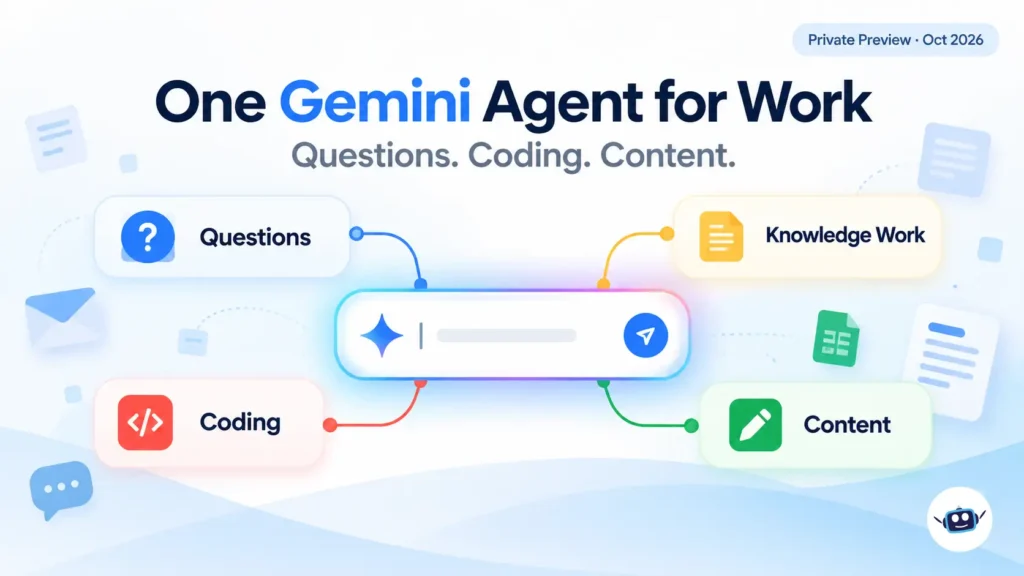
On October 8, 2026, Google Cloud CEO Thomas Kurian stood on stage at the Gemini at Work 2026 event and announced the Gemini agent. Google describes it as a single, universal agent for work: one system that answers questions, does knowledge work, creates images and media, and writes and runs code.
Most coverage so far repeats the same headline. This article does something different. It separates what Google has confirmed from what it hasn’t, flags where reports disagree, and shows what a team should do before the wider rollout.
Three things are easy to miss. The product is in private preview, with no general-availability date. The impressive customer numbers in the launch post describe Gemini Enterprise, not the new agent. And “Gemini agent” is a confusingly similar name to a consumer feature Google shipped last year. I cover all three below.
What Is the Google Cloud Gemini Agent?
The Gemini agent is Google Cloud’s enterprise AI agent that takes a goal, plans the work, uses connected tools and company data, and returns finished output inside the documents, inboxes and developer environments employees already use. Google’s own launch post on the Google Cloud Blog calls it one agent behind a single prompt box and a single API.
Kurian’s framing was that work now begins in the prompt window. The pitch is delegation: you describe an outcome, and the agent works out the steps.
It sits inside the Gemini Enterprise platform. Google introduced that platform in April, folding Vertex AI into it. The Gemini agent is the layer on top that employees actually talk to.
Gemini agent vs. the consumer “Gemini Agent”: don’t mix them up
Google’s consumer app has had a feature called Gemini Agent since the Gemini 3 launch in November 2025. A PR-industry guide citing Google’s Gemini Apps help documentation says it requires a personal account and a Google AI Ultra subscription, and isn’t available on work or school accounts. The enterprise Gemini agent is a different product with a similar name. If you search for “Gemini agent” and land on consumer instructions, you’re in the wrong place.
Key Features of the Gemini Agent
Google’s architecture post lists six principles. Here they are in plain language.
One agent, many surfaces
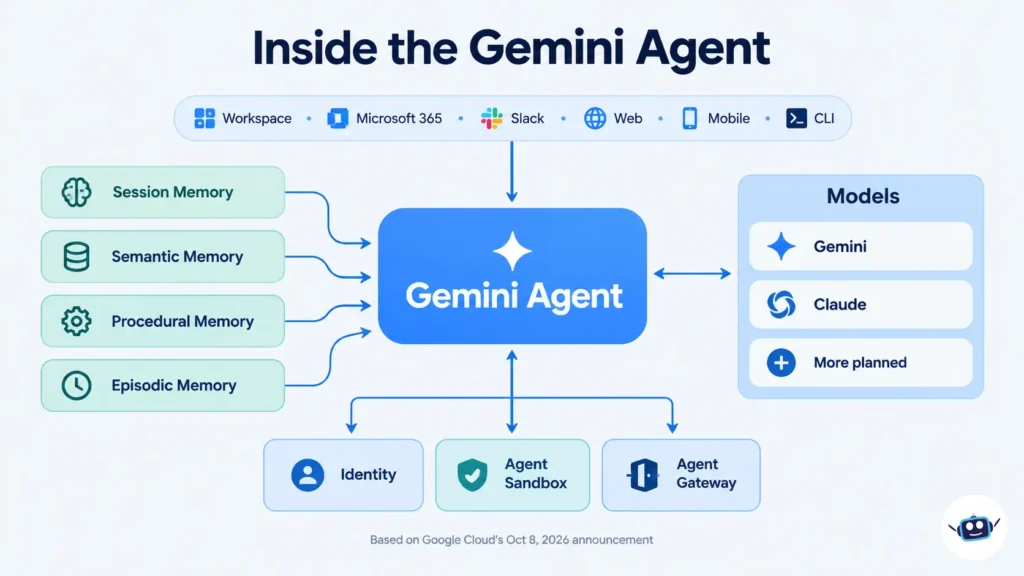
It runs on web, iOS, Android, Windows and Mac, and from the command line. It also works through Google Workspace, Microsoft 365 and Slack. Through an API it can run “headless” inside third-party apps, with no interface of its own. Inside Workspace, you can call it with an @Gemini mention in Gmail, Docs, Sheets, Slides and Chat.
Cloud-based persistence
Because it runs in the cloud, it keeps one set of memory and context across devices. Google says work lasting hours or days continues after you close your laptop.
Sub-agents and coworker agents
For multi-step jobs, the agent can create temporary, job-specific sub-agents, each with its own identity. It can also act as a coworker agent: a persistent team member with its own @agents.company.com email address, its own storage, and access only to what you share with it. In Workspace, that coworker can get its own account, calendar and Drive, and shows up under its own name in version history.
Four types of memory
| Memory type | What it holds | Everyday analogy |
|---|---|---|
| Session | The task in front of it, even over days | Your open notebook |
| Semantic | Knowledge built from documents, people and other agents | Company wiki in its head |
| Procedural | How a job gets done, including skills it writes itself | A playbook |
| Episodic | A record of everything it has done before | Work diary |
Google says the agent “onboards” itself like a new hire, learning the user, tools and team before starting.
Model choice
Google’s post says the agent runs each job on the model that fits best, orchestrating across Gemini models and Anthropic’s Claude models today, with other private and open models planned. The post names Google’s own model families: Argon for frontier reasoning, Flash for speed and volume, Omni for generative media, and Gemma for lightweight open-weights work. The practical point is that your context, skills and data stay in place when the “best” model changes.
How the Gemini Agent Handles Work, Coding and Content
Knowledge work
Google’s examples include setting up a meeting with “the usual team” without naming anyone, then researching market trends, building a model in Sheets and drafting a deck without re-briefing at each step. It also proposes tasks proactively. If your manager emails asking for a slide deck, Workspace can offer a one-click handoff.
Coding
The agent can generate and run code, and it connects to tools such as Git and Jira. For data teams, Google says it can write PySpark, supply notebooks to edit and test, train models and troubleshoot pipeline issues. If you’re deciding how much to trust any coding agent with a real repository, our guide to AI coding agents vs chatbots offers a simple reversibility test that applies directly here.
Content creation
Google lists images and media alongside documents and decks. The “Omni” model family is positioned for generative media, though the launch material gives few specifics on output quality or limits.
Data and analytics
Business users can ask for operational reports in plain language. Google says the agent saves the generated query so teams can rerun it without further token costs. The post also credits Bloomberg Media with a 63% improvement in SQL query accuracy after grounding its data agents in Google’s Knowledge Catalog.
The Governance Question: Four Things to Ask
The most useful part of the launch post isn’t a feature. It’s a framework. Google says agent governance comes down to four questions:
- Who is the agent, and what identity does it have?
- What is it allowed to do?
- What did it do, and where can I see it?
- What should it never touch?
Google’s answers: each agent gets a cryptographically attested identity and least-privilege permissions. Actions are written to an audit trail attributed to the agent, not a person. Code runs in an Agent Sandbox, and all traffic passes through an Agent Gateway, which Google describes as an AI network firewall enforcing policy in real time.
This echoes a lesson from our coding-agent guide: instructions are not permissions. A rule written in a prompt is a request, while a rule enforced by the environment is a control. Google’s design points at the second approach, though it has not yet been independently tested at scale.
Cost Controls: What’s New and What Isn’t
Google says per-token prices have fallen 98% since 2024 while enterprise volume has exploded. Its answer includes multi-model orchestration, Smart Routing and real-time spend caps that pause an agent when a project’s limit is reached.
Here is the detail most articles skip. VentureBeat noted that hard spend caps were already announced in August. Google’s billing post from August 26 describes the rest of the toolkit:
- Flexible Savings Plans: 10% off for a one-year commitment, 20% off for three years.
- Pay-as-you-go edition: no base subscription, billed at model API rates, for select customers and rolling out broadly soon.
- Deferred execution pricing (coming soon): off-peak runs for up to half the inference cost.
- Alerts at 50%, 80% and 100% of a project’s spend limit.
A quick calculation I ran
Using only Google’s published percentages and a hypothetical $10,000 monthly token budget:
- One-year savings plan: $9,000. Three-year plan: $8,000.
- If 40% of the workload qualifies for deferred pricing and gets the full “up to half” discount, the best case is $8,000.
- With a $10,000 project cap and an agent loop burning $400 an hour, the 50% alert fires after 12.5 hours and the cap after 25 hours. At $100 an hour, those become 50 and 100 hours.
Google hasn’t said whether the savings plan and deferred discounts stack, so I did not add them together. The takeaway is that a spend cap is a backstop, not a monitor. A runaway loop can burn through half your budget before the first alert if nobody is watching.
Pricing and Availability: What’s Confirmed
- Status: private preview for selected customers. Google says broad availability is coming “soon” for Workspace customers on select Business and Enterprise plans. No date has been given.
- Price: reports conflict. TIKR reports that Google confirmed the agent will be included at no extra charge where Gemini Enterprise is available. VentureBeat’s analysis says Google hasn’t announced a separate price or said whether every capability is included, and that Google plans to share more pricing details closer to wider release. Treat pricing as unconfirmed until Google publishes terms.
- Open questions: licensing for persistent coworker accounts and charges for long autonomous tasks.
What the Big Customer Numbers Actually Mean
Google’s post cites nearly 90% of the Fortune 100 using Gemini Enterprise and nearly 80% of Google Cloud customers using its AI products. It also shares results such as Bradesco cutting document review from one hour to five minutes and Commerzbank cutting review work from 20 hours to one.
These are results from Gemini Enterprise deployments. VentureBeat points out that they don’t necessarily represent adoption of the new universal agent, and it adds that Google hasn’t supplied independent benchmarks on how reliably the agent completes long, cross-application tasks. Read the numbers as evidence of a maturing platform, not proof the new agent delivers them.
How It Compares With Rival Enterprise Agents
According to VentureBeat, the launch landed in a crowded two weeks. Microsoft introduced an updated Copilot on September 25, OpenAI introduced its Dots agents on September 29, and Anthropic announced Claude integration with Google Docs, Sheets and Slides on October 6. SpaceXAI’s Grok Bot launched in August.
What sets Google apart is the combination of an agent that lives inside rival suites (Microsoft 365 and Slack) and runs on competitors’ models. It sells the agent layer and not the suite. For readers tracking the same trend elsewhere, see our pieces on Meta’s Muse personal agent and agentic Windows on Surface Laptop Ultra. On the cost side, our explainer on Claude Haiku 5.5 pricing shows why routing simple jobs to cheaper models matters.
Personal Experience: What I Could and Couldn’t Verify
I want to be straight about this section. The Gemini agent is in private preview, and I have not used it. Anything claiming hands-on results this week would be guesswork. What I can offer is what I learned doing the research.
The coverage disagrees more than it appears. Across about ten articles, headlines looked identical. The details weren’t. Pricing was reported three different ways, and some outlets treated spend caps as new when Google had announced them in August. The fix was reading Google’s primary posts first and treating secondary coverage as commentary.
Customer statistics are the easiest trap. It’s tempting to attach “cut review time from 20 hours to 1” to the new agent. Checking the source showed those results belong to the broader platform. I kept them out of any claim about the agent itself.
Back-of-envelope math changed my view of spend caps. Running the numbers above made it clear that alert timing matters as much as the cap. If I were piloting this, I would set a cap per project and also assign a person to watch daily spend during the first weeks.
My lesson: with any new agent product, the useful question isn’t “what can it do?” It’s “what has the vendor confirmed, in writing, about availability, price and controls?” Ask it before you plan a rollout.
Benefits for Enterprise Teams
- Less app-switching: one entry point for answers, documents and code.
- Persistent context, so people don’t re-explain projects.
- Governance designed in: identity, audit trail, sandboxing and a policy gateway.
- Model flexibility, so you aren’t tied to one vendor’s model.
- Fits mixed environments, since it works in Microsoft 365 and Slack, not only Workspace.
Common Mistakes to Avoid
- Treating a preview as a product. No date and no price means no budget line yet.
- Assuming coworker agents inherit your permissions. Google says they see only what you share, so plan sharing deliberately.
- Skipping per-project spend caps and relying on one company-wide limit.
- Letting the agent touch irreversible actions (sending external email, changing records) without approval steps.
- Judging it on demos. Test it on your own messy documents.
Best Practices: A Practical Readiness Checklist
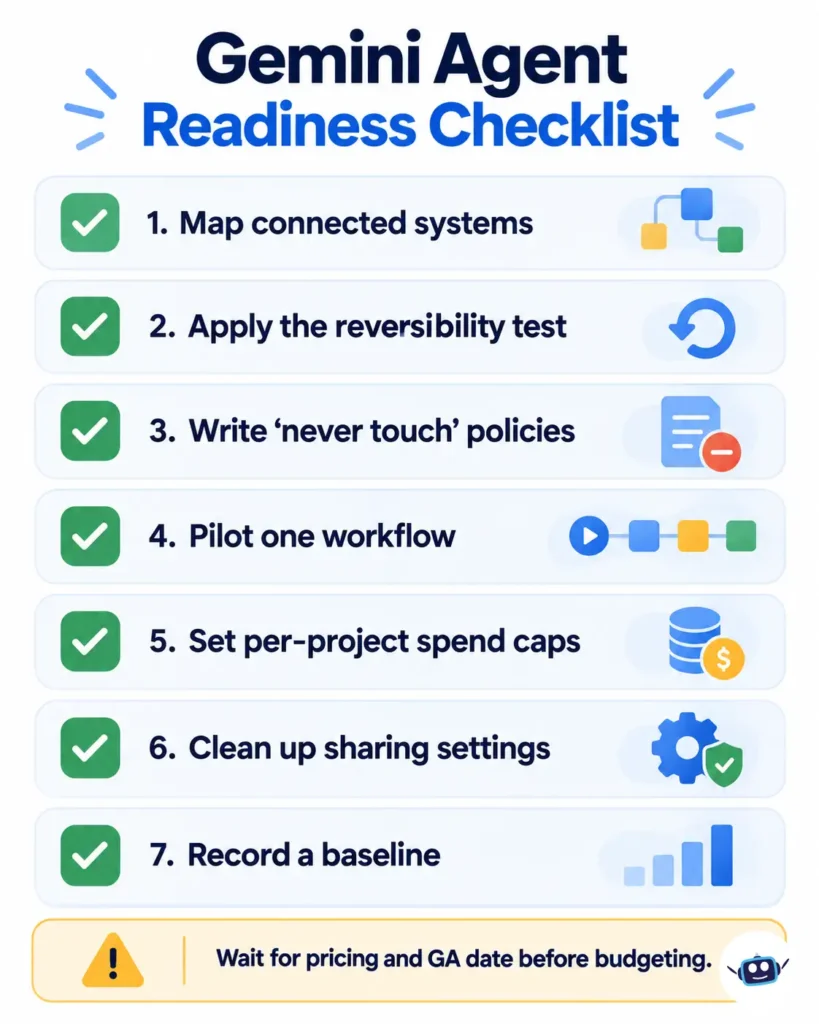
- Inventory what an agent would connect to. Rank systems by sensitivity, and start with low-risk ones.
- Use the reversibility test. Easy to undo and easy to verify? Delegate it. Hard to undo? Add approval gates.
- Define “never touch” policies first. Google’s gateway is built for exactly this.
- Pilot one workflow with a named owner, such as weekly reporting or meeting coordination.
- Set a per-project cap and a human reviewer for the first month.
- Clean your sharing settings. An agent with access exposes every over-shared folder.
- Record a baseline. Measure time spent before the pilot so results are real.
Frequently Asked Questions
What is the Google Cloud Gemini agent?
It’s Google’s enterprise agent announced October 8, 2026. It handles questions, knowledge work, content creation and coding from one interface and one API, using a company’s tools and data.
Is the Gemini agent available now?
Only in private preview for selected customers. Google says broad availability is coming soon for Workspace customers on select Business and Enterprise plans, with no date announced.
How much does the Gemini agent cost?
Not confirmed. One report says Google said it will be included at no extra charge where Gemini Enterprise is available, while another analysis says no separate price has been announced. Google plans to share more pricing details closer to wider release.
Does the Gemini agent only use Google’s models?
No. It currently uses Gemini and Anthropic’s Claude models, with other private and open models planned.
Does it work with Microsoft 365 and Slack?
Yes. Google says it operates across Workspace, Microsoft 365 and Slack, plus web, mobile, desktop and the command line.
What is a coworker agent?
A persistent, role-based agent with its own identity, including an email address and storage. It can access only the context you or your team give it.
How is it different from the consumer Gemini Agent?
The consumer feature launched in November 2025 and is tied to a personal Google AI Ultra subscription. The enterprise Gemini agent is a separate Google Cloud product for organizations.
Is it safe for sensitive company data?
Google describes attested identities, least-privilege access, audit logs, sandboxing and an Agent Gateway. These are vendor claims, and independent testing at scale isn’t yet available. Pilot with low-risk data first.
Can it replace developers or analysts?
Google positions it as delegation to a team member, not replacement. For coding, human review stays essential.
Conclusion
The Gemini agent is a serious attempt to make one agent the front door for enterprise work. The strongest parts are the governance design, the model flexibility, and the willingness to run inside rival suites. The weak spots are the ones Google hasn’t filled in: price, availability date, and independent evidence that long, cross-app tasks work reliably.
Actionable takeaways:
- Don’t budget yet. Wait for published pricing and a general-availability date.
- Start preparing now: audit sharing permissions and list your “never touch” rules.
- Pick one low-risk workflow for a future pilot.
- Set per-project caps and name a human who watches spend.
- Treat vendor customer stats as platform evidence, not agent proof.
- Follow AI LLM News for updates when Google publishes terms.
Disclaimer: This article is for general information and isn’t professional financial, legal, security or procurement advice. The Gemini agent is in private preview, and features, pricing and availability may change. Figures in the cost example are hypothetical, built from Google’s published percentages. Customer results cited by Google relate to Gemini Enterprise. We are not affiliated with Google. See our editorial process.