
You open Google AI Studio expecting a chatbot. Instead you get a model picker, a “system instructions” box, a “Get code” button and a tab called Build. Meanwhile the Gemini app you already use looks nothing like it.
Google AI Studio is a free, browser-based workspace where developers test Google’s Gemini models, tune prompts and turn them into working apps. It is not the Gemini chatbot. Using it costs nothing, but the models behind it can cost money, and on the free tier Google can use what you type to improve its products. This guide covers what is inside, what is free, what changed in 2026 and who should skip it. Pricing and policy details are as of November 2026.
Google AI Studio at a glance
| Question | Short answer (as of November 2026) |
|---|---|
| What is it? | A web workspace for prototyping with Gemini and other Google models, plus a Build mode that generates apps from prompts |
| Who is it for? | Developers building for professional or business purposes. Google’s terms say it is not for consumer use |
| Is it free? | Yes, using AI Studio is free in supported regions. Some models, agents and the API beyond free quota are not |
| Does Google train on my prompts? | On the free tier, yes, and human reviewers may read them. Paid terms say no |
| Minimum age | 18 |
| Biggest surprise | Linking a paid API key can make your AI Studio usage billable |
What is Google AI Studio, exactly?
Google AI Studio is a web-based development environment for building with Google’s generative AI models. Google’s own docs describe it as the place to try models, experiment with prompts and, when ready, click “Get code” to move into the Gemini API.
It launched on December 13, 2023, as the successor to MakerSuite, the tool Google introduced at I/O in May 2023 for its earlier PaLM models.
The name is where most confusion starts. Here is how it differs from the products it gets mixed up with.
| Name | What it is | Who it is for |
|---|---|---|
| Google AI Studio | Web workspace for prompts, API keys and app building | Developers and technical creators |
| Gemini app | Google’s consumer chatbot | Everyday users |
| Gemini API | The programming interface your code calls, with keys created in AI Studio | Developers |
| Gemini Enterprise Agent Platform | Google Cloud’s enterprise AI platform, announced April 22, 2026 as the evolution of Vertex AI | Companies needing enterprise controls |
| Google AI Pro / Ultra | Subscription plans that raise your quota inside AI Studio | Heavier individual use |
| MakerSuite | The 2023 predecessor | Historical only |
The Vertex AI rename matters if you read older tutorials. Google’s Cloud release notes list “Vertex AI Studio” as now “Agent Studio,” so older guides that tell you to graduate from AI Studio to Vertex AI are using a retired name. For how Google is positioning that enterprise side, see our look at Google Cloud’s Gemini agent for enterprise work.
What can you actually do inside it?
You can do three main things: test prompts in the Playground, build and publish apps in Build mode, and run agents. Each has different cost and privacy behavior, so it helps to know which one you are in.
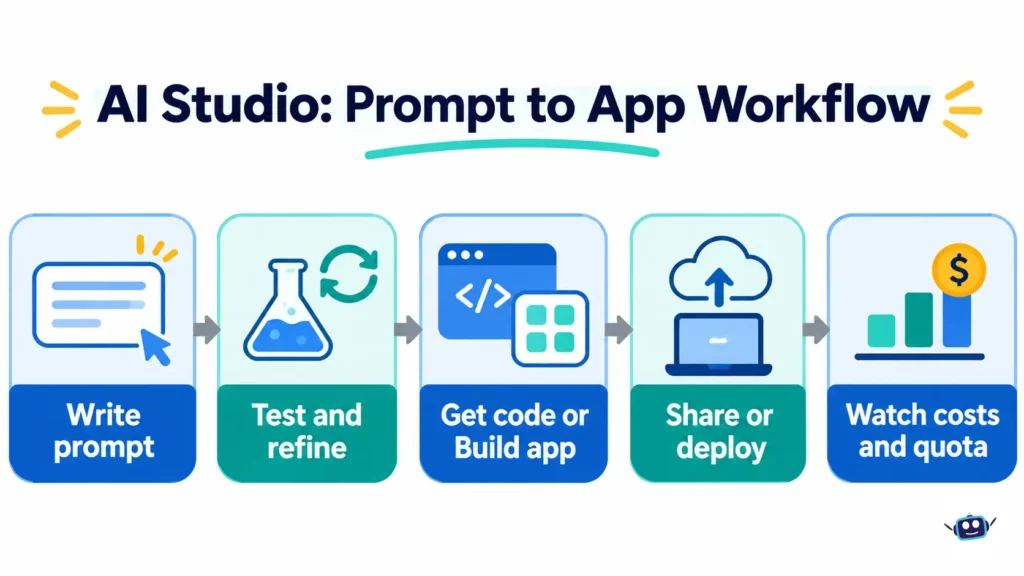
The Playground. A new chat prompt opens by default. A Run settings panel lets you adjust model parameters and safety settings, and toggle tools such as structured output, function calling, code execution and grounding. The System Instructions field is the most useful control for beginners. Google’s quickstart shows how one line of instructions turns a generic model into a character with a fixed tone and length. When a prompt works, “Get code” gives you the matching code in your chosen language. If prompt structure is new to you, our context engineering guide explains why what you feed a model matters as much as how you phrase the request.
Build mode. You describe an app, and AI Studio generates the code with a live preview beside it. Web apps get a React front end and a Node.js server runtime. You can also build native Android apps in Kotlin and Jetpack Compose. Google says the Antigravity Agent, the agent harness behind Google Antigravity, manages multiple files across the project. You can edit code directly, sync two-way with GitHub, download a ZIP, or deploy to Cloud Run. If the difference between an agent that edits files and a chatbot that answers questions is unclear, our explainer on AI coding agents versus chatbots covers it.
Agents and media. The Playground has an Agents toggle for prototyping managed agents in a sandbox. Pricing pages also list image (Nano Banana), video, music, speech and live voice models you can try from AI Studio.
Is Google AI Studio free?
Yes. Google’s pricing page states that AI Studio usage is free of charge in all available regions. The free tier covers some models, including Gemini 3.8 Flash, with free input and output tokens, at rate limits that vary by model.
Three things the “free” label hides:
- Some models are not on the free tier. Gemini 4 Argon, Google’s flagship reasoning model, is not available on the Free tier. Neither is Gemini 3.1 Pro Preview.
- A paid key can end the free ride. Google’s billing FAQ says AI Studio usage stays free unless you link a paid API key. Once you link one as part of a paid project, you are charged for AI Studio usage on that key.
- Agents need a paid key. Google’s AI plans documentation says agent access in AI Studio (Deep Research and Antigravity Preview) is not covered by Pro or Ultra plans and requires a paid API key.
Google AI Pro and Ultra raise your daily allowance inside the AI Studio web interface only. They do not cover direct API use, which is billed separately, and Google One AI credits do not work in AI Studio.
What does it cost once you start building?
Costs start when your code, or a shared app, calls a paid model through the Gemini API. Billing is per million tokens, and tokens include the model’s “thinking,” which is billed as output.
Here are the standard-tier paid prices for a few models, per million tokens, from Google’s pricing page.
| Model | Input | Output | Notes |
|---|---|---|---|
| Gemini 4 Argon | $2.00 until Nov 30, 2026, then $4.00 | $10.00 until Nov 30, 2026, then $20.00 | Not on free tier |
| Gemini 3.8 Flash | $0.75 until Dec 31, 2026, then $1.50 | $3.75 until Dec 31, 2026, then $7.50 | Free tier available |
| Gemini 3.5 Flash-Lite | $0.30 | $2.50 | Free tier available |
What most people miss: both Argon and 3.8 Flash carry introductory prices that double on a set date. Argon’s doubles on December 1, 2026, and 3.8 Flash’s on January 1, 2027. A budget built on today’s rates will be wrong within weeks.
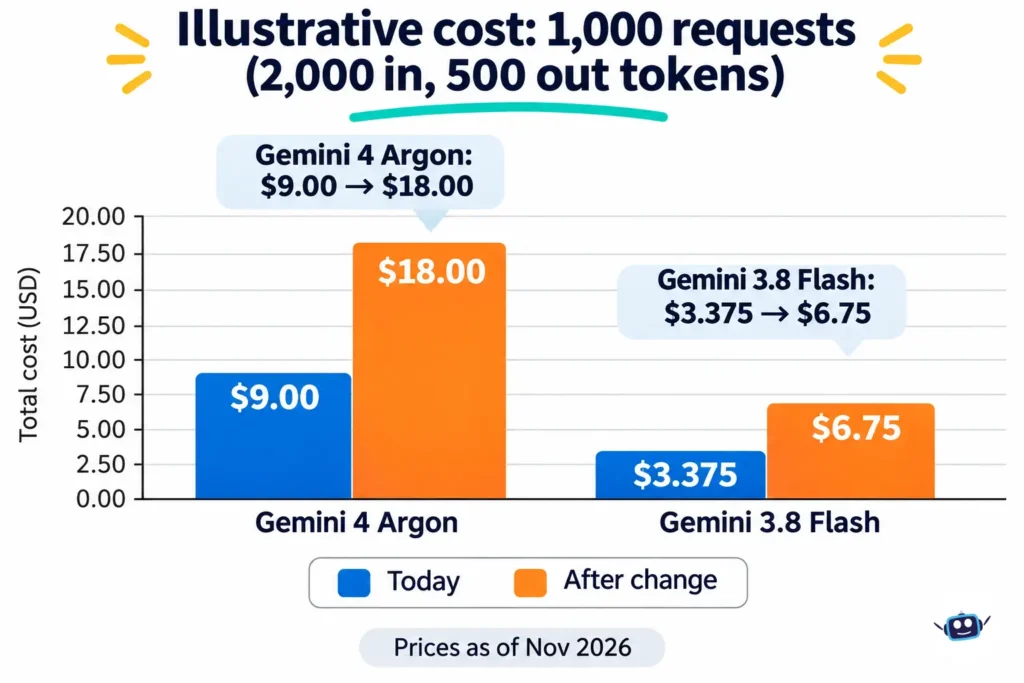
Here is the cost math with an illustrative workload I chose: 1,000 requests, each with 2,000 input tokens and 500 output tokens. That totals 2 million input and 0.5 million output tokens.
| Model | Cost today | Cost after the price change |
|---|---|---|
| Gemini 4 Argon | $9.00 | $18.00 (from Dec 1, 2026) |
| Gemini 3.8 Flash | $3.375 | $6.75 (from Jan 1, 2027) |
| Gemini 3.5 Flash-Lite | $1.85 | No change listed |
Batch and Flex tiers are priced at roughly half of Standard on the models above. Grounding with Google Search on Gemini 3 and newer models includes 5,000 free requests per month, shared across models, then $14 per 1,000. At 6,000 requests in a month, that adds $14. Google also applies a default cap of 1,500 search requests per day per project. To compare how per-token pricing reads on another vendor’s model family, see our Claude Haiku 5.5 pricing explainer.
Does Google use your prompts? The privacy catch
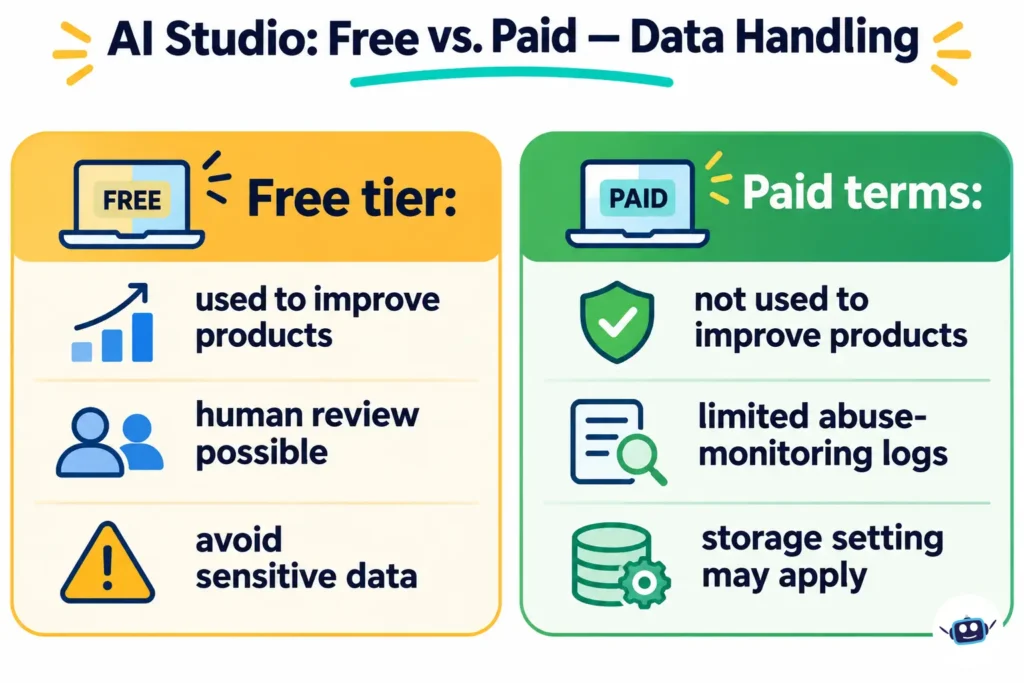
On the free tier, yes. Google’s Gemini API terms say that for unpaid services, including AI Studio, Google uses the content you submit and the responses to provide, improve and develop its products and machine learning technologies. Human reviewers may read, annotate and process your input and output. Google says it disconnects that data from your Google Account, API key and Cloud project first. The terms also say plainly: do not submit sensitive, confidential or personal information to the unpaid services.
Paid terms differ. For paid services, Google says it does not use your prompts or responses to improve its products. It still logs prompts and responses for a limited period to detect and prevent violations of its Prohibited Use Policy and to meet legal requirements.
Three edge cases are worth knowing:
- Billing-enabled accounts. The terms treat AI Studio as a paid service, even when free, if your account has access to a Cloud project with active billing, or is a Workspace enterprise account. Google’s billing FAQ says the same applies if at least one API project has billing enabled. Check the “Plan” column on your API keys page to see which of your projects are paid.
- EEA, Switzerland and the UK. The paid-service data terms apply to all services there, including free AI Studio. Separately, if you make an app available to users in those regions, you may use only paid services.
- Stored requests. Since October 26, 2026, new paid-tier projects using the Generate Content API store requests by default. You can opt out per request or in the Logs and Datasets settings. Paid does not automatically mean nothing is stored.
Who can use Google AI Studio?
You must be 18 or older, in a supported region, and have accepted Google’s terms. Google’s docs list the United States and the United Kingdom among supported countries and territories, and say the Gemini API and AI Studio are available in 180+ countries.
A 403 Access Restricted error usually means an unsupported region or a terms violation. An age error means your Google Account’s birthday is under 18 or unverified.
Workspace accounts have their own rules. AI Studio is on by default for all Workspace editions, and administrators can switch it off for users or organizational units. Education accounts for users under 18 stay blocked even when the setting is on.
One more restriction most guides skip: the terms prohibit using the services in clinical practice or to provide medical advice.
How do you get started?
You can run a first prompt in a few minutes, and it costs nothing on a free model. The steps below follow Google’s quickstart and Build mode documentation.
- Go to aistudio.google.com and sign in with a Google Account that meets the age and region requirements.
- Accept the terms when prompted.
- Open the Playground, which starts with a new chat prompt.
- Pick a model. If you want to stay on the free tier, check that the model is listed as free before running it.
- Open Run settings and add one or two sentences under System Instructions, such as a role and a length limit.
- Type a message and press Run. Edit the instructions and run again to see how behavior changes.
- When the prompt works, click “Get code” to export it for your language of choice.
- To build an app, open Build mode, describe what you want, and review the generated code in the Code tab.
Keep prompts free of private data while you are on the free tier.
What happens when you share or deploy an app?
Sharing is not free of consequences. Google’s docs say that when you share an app, its API calls count toward your usage limits, and costs may apply if you use paid models. By default an app is private. Anyone you share it with can see its code and fork it.
For apps in Build mode, your Gemini API key is set up as a server-side secret and is not exposed in the browser. Google says apps built before May 14, 2026 are upgraded to this approach the next time you modify their Gemini features.
Deploying creates a service in Cloud Run. The Google Cloud Starter Tier lets eligible accounts publish up to two full-stack apps without setting up a Cloud project or billing account. Your account may not qualify if you sign in with a Workspace account, have an active or prior paid Cloud billing account, or lack enough account history. Google says its AI Studio support team cannot override eligibility. Everyone else deploys through a billing-enabled Cloud project, and Cloud Run pricing may apply.
You also own the consequences. Google’s docs say app owners are responsible for the app’s behavior and the data it handles, and apps that violate policy are removed from AI Studio.
What changed in 2026?
| Date | Change |
|---|---|
| Mar 2, 2026 | Accounts opened after this date cannot spend the $300 Google Cloud welcome credit on Gemini API or AI Studio usage |
| Mar 23, 2026 | Prepay and Postpay billing plans began rolling out; the current Gemini API terms took effect |
| Apr 22, 2026 | Vertex AI announced as evolving into Gemini Enterprise Agent Platform |
| May 14, 2026 | Build mode’s server-side key handling applied to newer apps |
| Sep 18, 2026 | Google limited Gemini 2.5 model access to users who have actively used them; the models are not deprecated |
| Oct 8, 2026 | Gemini 3.7 Flash and 3.5 Flash deprecated; requests are rerouted to 3.8 Flash and 3.6 Flash |
| Oct 13, 2026 | Gemini 4 Argon became generally available |
| Oct 26, 2026 | Request storage on by default for new paid-tier Generate Content projects |
What are the hidden costs and common traps?
| Symptom | Cause | Fix |
|---|---|---|
| Unexpected charges while “just testing” | A paid API key is linked to the project you are using | Use a Free Tier project and key for casual work; check the Plan column |
| All keys suddenly return HTTP 402 | Prepay balance hit $0, which stops every key on that billing account | Add credits or set up auto-reload with a monthly limit |
| Prepaid money gone | Credits expire after 12 months and are non-refundable, except on switching to Postpay | Buy small amounts; minimum purchase is $5 |
| Gemini API stops despite credit | A missed payment on another Cloud service can suspend access | Resolve the billing issue in the Cloud console |
| Agent bill larger than expected | One prompt can trigger unbounded token use; templates can call the Gemini API from the sandbox | Give clear stop conditions and press Stop if it drifts |
| Shared app drains your quota | Calls from people you share with count against your limits | Share deliberately; review costs before sharing |
| “No Content” response | A safety setting or terms issue blocked the output | Hover over the message and check the Safety detail |
| 403 Access Restricted | Unsupported region or a terms violation | Check the available-regions list and your account age |
What are the rate limits?
Google does not publish fixed per-model numbers in its documentation. Your actual limits appear in your AI Studio rate-limit dashboard, and Google says specified limits are not guaranteed. Limits are measured per project, not per key, across requests per minute, input tokens per minute and requests per day. Daily quotas reset at midnight Pacific time. Preview and experimental models have tighter limits.
Paid usage moves through tiers based on spending:
| Tier | Qualification | Monthly spend cap |
|---|---|---|
| Free | Active project | Not applicable |
| Tier 1 | Linked, active billing account | $250 |
| Tier 2 | Paid $100 and 3 days since first payment | $2,000 |
| Tier 3 | Paid $1,000 and 30 days since first payment | $20,000 to $100,000+ |
Which Google tool fits your situation?
This decision table is my own framing, built from the verified facts above. Treat the “best fit” column as a starting point, not a rule.
| Your situation | Best fit |
|---|---|
| Chatting, writing emails, everyday questions | Gemini app |
| Testing prompts and comparing models without code | AI Studio Playground, free models |
| Turning a prompt idea into a working prototype | AI Studio Build mode |
| Prototype is public and used by many people | Paid project, Cloud deployment, billing caps |
| Need enterprise controls and compliance features | Gemini Enterprise Agent Platform |
| Handling sensitive or client data | Paid terms or the enterprise platform, not the free tier |
Who should use it, and who should skip it?
Use it if you build or evaluate AI features, want first access to newer models and tools, or need to turn a prompt into code quickly.
Skip it if you only want a chat assistant, you are under 18, you work with confidential information on the free tier, or you need on-premises processing or custom model training beyond what Google offers.
Common mistakes
- Treating the free tier as private. It is not.
- Budgeting on introductory prices without checking the date they change.
- Sharing an app before checking whose quota pays for its calls.
- Following a tutorial that still says “Vertex AI.”
- Assuming an AI Pro subscription covers API calls or agents. It does not.
- Using generated code without review. Google’s terms tell you to use discretion before relying on generated content, including code.
FAQs
Is Google AI Studio free forever?
Google does not promise that. Its pricing page says AI Studio usage is free of charge in available regions today, and that rate limits and model availability can change. Check the pricing page before building a plan around it.
Do I need to know how to code?
No. You can run prompts in the Playground with no code, and Build mode generates code from descriptions. You still need to review what it produces, especially if you publish it.
Is Google AI Studio the same as Gemini?
No. Gemini is the model family and the name of Google’s chatbot app. AI Studio is the developer workspace for working with those models directly.
Can I use it for my business?
Google’s terms describe AI Studio and the Gemini API as for developers building for professional or business purposes. If you make an app available to users in the EEA, Switzerland or the UK, you may use only paid services.
Can I use it for medical or legal advice?
Not for clinical practice or medical advice, which the terms prohibit. The terms also say not to rely on the services for medical, mental health, legal, financial or other professional advice.
What is the difference between AI Studio and the Gemini Enterprise Agent Platform?
AI Studio is the quick start for prototyping. The Agent Platform, formerly Vertex AI, is Google Cloud’s enterprise product for building and managing AI at company scale. Google’s docs say most developers should start with the Gemini Developer API unless they need specific enterprise controls.
What happens if I hit a rate limit?
Requests fail until your quota resets or your tier increases. Spend-based limits return a 429 RESOURCE_EXHAUSTED error, and Google suggests waiting, reducing expensive requests or requesting an increase.
Conclusion: key takeaways
Google AI Studio is a free developer workspace for Gemini, not a chatbot. The workspace is free, but premium models, agents and API usage are not, and linking a paid key changes your bill. On the free tier your prompts can be used to improve Google’s products, so keep sensitive data out. Check prices and dates before you build, because Gemini 4 Argon’s rate doubles on December 1, 2026.
Your next step: open the API keys page in AI Studio and check the Plan column. Then run one prompt with a short system instruction on a free model and click “Get code” to see how it translates.
Related: Context engineering guide
Disclaimer
This article is for informational purposes only. It is not affiliated with, sponsored by or endorsed by Google or any brand mentioned. Prices, features, limits and policies may change, and some prices quoted here change on stated dates. Information last verified on November 1, 2026. AI output can be inaccurate, so review generated content and code before relying on it, and do not enter sensitive or confidential data into free AI services.