
Solvely AI is a study platform from Aignite Inc. that turns a photo, screenshot or typed question into a step-by-step solution. It also builds notes, flashcards, quizzes and mock exams from your own materials. It is free to download, but the free allowance is small. Unlimited use needs a paid plan, which on the US App Store currently costs $6.99 a week, $12.99 a month or $46.99 a year. Most of its headline numbers, including 10M+ users and 97% accuracy, are the company’s own claims. This guide separates those from what can be verified, then covers pricing, cancellation, privacy and school rules.
What is Solvely AI?
Solvely covers math, physics, chemistry, biology, statistics and humanities. It also offers test prep for the SAT, ACT, AP and GRE. It runs on iOS, Android and the web, plus Chrome and Edge extensions.
Aignite Inc. is the publisher, and the Chrome Web Store lists it with a Wilmington, Delaware address. Check the publisher name before you install. Similar names exist. For example, “Solvo: AI Homework Helper” is a different developer’s app that appears in the “You Might Also Like” row on Solvely’s App Store page.
Most reviews describe a photo solver. Today it is closer to a full study suite. The app bundles a note taker, quiz and flashcard tools, a Smart Reader, a Writing Assistant, Focus Mode and calculators. The website adds an exam predictor, essay writer, plagiarism checker, paraphraser, AI detector and “humanizer.”
The claims audit: what is self-reported and what you can check
| Claim | Where it appears | How to treat it |
|---|---|---|
| 10M+ students from 5,000+ universities | Solvely homepage, App Store description | Self-reported |
| 200M+ problems solved | Solvely homepage | Self-reported |
| 97% overall accuracy | Solvely homepage | Self-reported. I found no published method |
| 96% exam-prediction accuracy | Solvely homepage | Self-reported |
| 5M+ students in 120+ countries | Anthropic customer case study | Older figure from a vendor case study |
| 4.8 App Store rating from about 42,000 ratings | App Store | Checkable in the store |
| 4.5 Chrome rating, 204 ratings, 100,000 users | Chrome Web Store | Checkable in the store |
| 2.9 Trustpilot score from 13 reviews | Trustpilot | Checkable, but a very small sample |
| “#1 education app” | Anthropic case study | Dated. The US App Store page showed #20 in Education (top free) in late October 2026, and an analytics snapshot from March 2026 showed #35 |
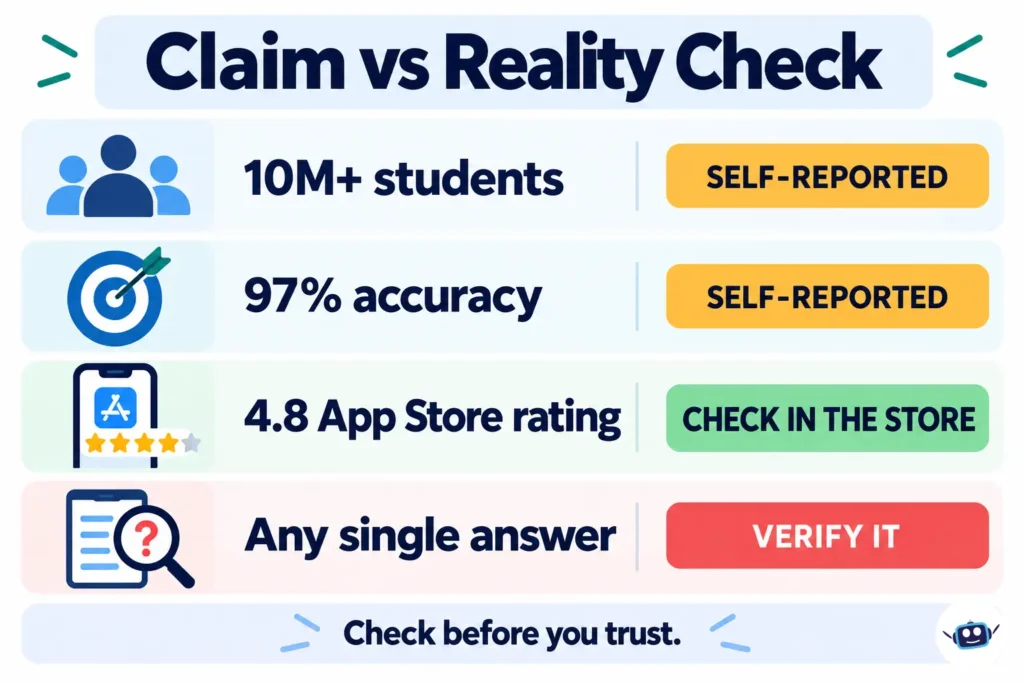
The student count has doubled from 5M to 10M+ between the earlier and later materials. That signals growth, but it is still a company figure.
On accuracy, one third-party review reported about 90–95% on standard math problems. Solvely says 97%. These figures probably measure different things, and none came with a method I could check. I found no independent, peer-reviewed benchmark. Accuracy also depends on the subject and on how clear your input is.
Which AI models power Solvely?
Solvely says each answer is checked by multiple AI models. It does not publish the model list. An older App Store description said the app was built on GPT-4. Anthropic publishes a customer story saying Solvely builds on Claude. That story describes a step-by-step “Study Mode,” interactive visualizations, and study guide, flashcard and quiz generation. The story was written around Claude Sonnet 3.7, so it is dated.
Disclosure: Claude, the AI that helped draft this article, is made by Anthropic. The case study sits in the vendor-claims column above. Treat the exact model mix as something that changes.
Consensus is not correctness
Cross-checking helps, and it is the app’s main selling point. When several models agree, that is a good sign. It is not proof. Models trained on similar data can make the same mistake. This is most likely with ambiguous word problems, unusual notation, or a blurry photo that was misread before any model saw it.
Solvely is open about this. Its Responsible AI page says it does not guarantee accuracy, completeness or suitability, and urges users to verify output themselves. Its Terms say AI output may contain errors or misleading information. Cross-checking reduces errors, and you still need to verify.
Features worth knowing
| Feature | What it does |
|---|---|
| Homework solver | Photo or typed question in, numbered steps out, with follow-up questions |
| AI note taker | Transcribes recordings, pulls key points, and builds quizzes, flashcards and a podcast-style recap |
| Imports | YouTube videos, PDFs, slides, web pages and recordings |
| Exam predictor | Suggests likely topics and builds mock tests from material you upload |
| Browser extension | Screenshot solving, “One-Click Solve All” for a full page, YouTube and webpage summaries |
The extension’s capture shortcuts are Ctrl+Shift+S on macOS and Alt+Shift+S on Windows. The exam predictor only knows what you upload. It cannot see your instructor’s actual exam, so use it as a revision guide.
How much does Solvely AI cost?
These are the in-app purchases on the US App Store listing in October 2026:
| Plan | Price (USD) |
|---|---|
| Weekly (NPro-Weekly) | $6.99 |
| Monthly (Pro-Monthly or Unlimited 1 Month) | $12.99 |
| Six months (Unlimited) | $38.99 |
| One year (All Year Access) | $46.99 |
| Small packs (Voucher, Acceleration Gems) | $0.99 and $2.99 |
- Prices vary by country, platform and promotion. Other App Store pages have shown yearly plans from $57.99 to $79.99 and a $7.99 weekly plan. Review sites quote weekly prices from about $3.92 upward. Trust the number on your checkout screen.
- The yearly plan works out to about $3.92 a month. A weekly plan left running for a year costs about $363.
- The free tier is limited. App Store reviewers describe roughly two free questions. One said the allowance refreshed the next day. Solvely does not publish a fixed number in the pages I checked.
Ratings and complaints
Store ratings mostly reflect the solving experience. Trustpilot mostly reflects billing. On Trustpilot, 62% of 13 reviews are one-star and 38% are five-star. The complaints are about cancellations and refunds. Solvely replied to several reviewers and, in at least two cases, said a refund had been processed. An older review claimed that every Trustpilot review was one-star, and that is no longer true.
Accuracy reviews on the App Store are mixed. Some praise the explanations. Others report errors in calculus, graphing and trigonometry.
How to cancel and avoid surprise charges
Solvely’s Terms say memberships may auto-renew, and fees are charged in advance and are non-refundable, including after cancellation, unless stated otherwise at purchase. Free trials convert to paid plans unless you cancel first. For web subscriptions, the Terms point to the customer support section of the service.
Where you cancel depends on where you paid:
- Subscribed in the iPhone app: go to Settings, tap your name, tap Subscriptions, choose Solvely, then Cancel. Do this at least a day before renewal.
- Not listed under Apple Subscriptions: Apple says to contact the company that bills you. One October 2026 App Store reviewer said their Solvely charge did not appear in Apple’s list, which fits billing outside Apple.
- Subscribed on the website: use the support section in your account, or email support@solvely.ai from your sign-up address with screenshots.
- Still charged: keep receipts and dates, then ask your card issuer about a dispute.
Federal law applies to online subscriptions generally. The Restore Online Shoppers’ Confidence Act requires clear disclosure of material terms, express consent before charging, and a simple way to stop recurring charges. The FTC’s 2024 “click-to-cancel” rule was struck down by the Eighth Circuit in July 2025. The FTC started new rulemaking in 2026 and still enforces the older law.
What happens to the questions you upload?
Solvely’s Privacy Policy (effective January 14, 2026) and Terms say the following:
| Topic | What the documents say |
|---|---|
| Public posting | Questions, photos and AI solutions may be stored and posted publicly. Personal identifiers are not supposed to be shared |
| AI training | Your content may be used to train and improve AI models |
| Tracking | Analytics and advertising tools are used, including session replay and Microsoft Clarity. The App Store privacy label says identifiers may be used to track you |
| Social ads | The Terms say Solvely may create social ads using your name, profile and photo |
| Processing location | Data is processed in the US and Japan. The services are not directed at the EU or EEA |
| Disputes | The Terms include binding individual arbitration, with a 30-day written opt-out |
| Recordings | You are responsible for consent from anyone you record and for following school policy |
The Terms also tell users not to upload documents obtained from their school, instructors, exam boards or publishers without permission.
The Honor Code, school rules, detectors and humanizers
Solvely’s Honor Code (last updated August 8, 2025) says the tools support learning and are not for cheating. It names submitting live exam questions, passing off AI output as your own work on assessments, and sharing restricted material. Solvely says it may investigate and issue warnings or suspensions. Its Privacy Policy lets it disclose information in connection with an Honor Code inquiry.
Your instructor’s policy comes first, and it may be stricter than the app’s.
The same site sells an AI detector and a humanizer. A humanizer used to disguise AI text as your own would conflict with the Honor Code. Detectors are also unreliable. A Stanford study in Patterns (2023) tested seven detectors on 91 essays by non-native English writers. Detectors flagged more than half as AI-written, an average false-positive rate of 61.3%. The authors cautioned against using detectors in educational settings. One Trustpilot reviewer said Solvely’s detector labeled both AI and human text as AI. That is a single report, but it fits the research. Use these tools for editing and self-checking, not as proof either way.
Age and who it is built for
The Terms and Privacy Policy require users to be 13 or older. Solvely’s Responsible AI page says it does not offer services directed at children under 13 and aims at college-bound, post-secondary and professional learners. The App Store age rating is 4+, and the listing says it matches your level from middle school to college. Parents of younger students should read the terms themselves.
The Solve, Verify, Teach-Back workflow
- Try first. Spend five minutes on the problem yourself.
- Solve. Upload a tightly cropped, well-lit photo with units included. Read the steps, not just the answer.
- Verify. Plug the answer back in, check units and signs, and compare the method with your textbook or notes.
- Teach back. Close the app and explain the method on paper or out loud.
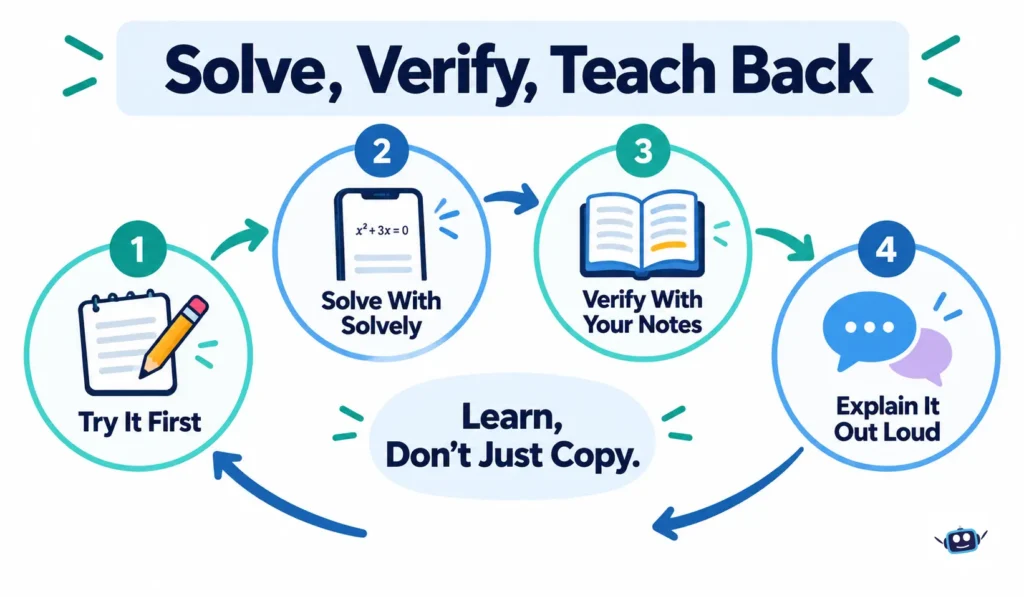
This tracks the research. Dunlosky and colleagues, in Psychological Science in the Public Interest (2013), rated practice testing and spaced practice as high-utility. They rated rereading and highlighting as low-utility. Use the quiz and flashcard tools, not just the solutions.
Give the tool clean input. The same idea underlies context engineering for AI tools: better-organized material beats a dump of everything.
Common mistakes and best practices
Mistakes
- Copying the final answer without reading the reasoning.
- Skipping verification on graded work.
- Using it during live quizzes or exams.
- Subscribing weekly and forgetting to check the renewal.
- Uploading worksheets with names, school details or restricted material.
- Treating an AI-detector score as proof.
- Recording a class without permission.
Best practices
- Read your syllabus for AI rules first.
- Save the free allowance for your hardest question.
- Set a cancellation reminder on the day you subscribe.
- Combine AI tools with real tutoring when you are stuck. Our AI policy and ethics coverage tracks the rules side.
Practical Insights
- Weekly plans cost the most over time. At $6.99 a week, a year costs about $363, against $46.99 on the yearly plan.
- Where you paid decides where you cancel. Apple can only cancel subscriptions that Apple bills.
- Treat uploads as semi-public. The policy allows public posting of questions and solutions. Strip out names and school identifiers.
- Age ratings do not match. The App Store says 4+, while the Terms say 13+.
- Weak spots are likely graphs and proofs. Reviews point to graphing and multi-step problems, so check those twice.
- Vendor stories are curated. The case study’s grade-improvement quotes are selected by the company. Weigh them against Trustpilot’s mixed picture.
Alternatives to compare
Solvely’s own listing names Socratic, Mathway, Microsoft Math Solver and Photomath as similar snap-and-solve apps. Compare free limits, renewal terms, subject coverage and data policy before choosing. If you want a general-purpose assistant for explanations and summaries, our Dola AI explainer shows how one is positioned. More comparisons are in our AI tools and reviews section.
FAQs
What is Solvely AI used for?
It gives students step-by-step homework explanations. It also generates notes, flashcards, quizzes, study guides and mock exams from their own materials.
Is Solvely AI free?
Downloading is free, but the free allowance is small. Reviewers describe about two questions. Regular use needs a paid plan.
How much does Solvely AI cost?
On the US App Store in October 2026: $6.99 weekly, $12.99 monthly, $38.99 for six months and $46.99 yearly. Prices vary by country and platform, so confirm at checkout.
Is Solvely AI accurate?
Solvely claims 97% overall accuracy, but that is a company figure with no published method. One third-party review reported about 90–95% on standard math. Solvely itself tells users to verify answers.
Which AI models does Solvely use?
It says it cross-checks multiple models and does not publish the list. An older listing mentioned GPT-4, and Anthropic’s case study says Solvely builds on Claude.
Does it work on a laptop?
Yes. It has a website plus Chrome and Edge extensions, alongside the iOS and Android apps.
Is using Solvely cheating?
Not by itself. Its Honor Code bans using it on live exams or presenting AI output as your own work on assessments. Follow your instructor’s AI policy.
Is Solvely AI safe for children?
The Terms require users to be 13 or older, and the App Store rating is 4+. Parents of younger students should read the terms and privacy policy first.
Can Solvely predict my exam questions?
It suggests likely topics from the notes and past exams you upload. It is an estimate from your materials, not knowledge of your actual exam.
How do I cancel or get a refund?
Cancel where you subscribed, which is Apple’s Subscriptions screen for App Store purchases. The Terms say fees are non-refundable unless stated at purchase, though Solvely has issued refunds in some Trustpilot cases. Ask promptly and keep receipts.
Conclusion
Solvely AI is a capable homework explainer and study toolkit. Most of its headline numbers are self-reported, pricing varies by store, and agreement between models is not the same as being right. Billing complaints are the main risk.
Actionable takeaways:
- Try the free allowance on one hard problem before paying.
- Confirm the price at checkout and pick the shortest plan that fits your need.
- Cancel where you subscribed, and set a reminder.
- Keep personal details and restricted school material out of uploads.
- Verify every answer you will submit for a grade.
- Follow your school’s AI rules and Solvely’s Honor Code.
You can see how we check our articles on our editorial process page.
Disclaimer
This article is for general information and is not a recommendation to buy or use any product. Prices, features, free limits and policies can change, and several figures here are company-reported, so confirm details with Solvely, Apple or the relevant store before you buy or subscribe. Using AI tools on schoolwork may be restricted by your school or instructor, so follow their rules. Information current as of October 2026.