

One Japanese reviewer on Flova’s $20 Starter plan reported that a single 30 to 40 second video used about 1,000 of the 2,000 monthly credits. Revisions cost extra. That is one person’s account, not a rule, but it points to the question that matters most with this tool: how far do the credits go?
Flova AI is an agent-led video workspace that plans, storyboards and generates a video project using third-party image and video models. As of October 2026 it is worth a trial if you make multi-scene story videos and can absorb retakes. It is a poor fit if you need predictable costs or tight control over your data. This guide covers what it is, what it costs, how credits drain, and what the terms say.
At a glance (as of October 2026)
- What it is: a web-based AI video agent from FLOVA PTE. LTD. (Singapore) that routes work to models such as Seedance 2.5.
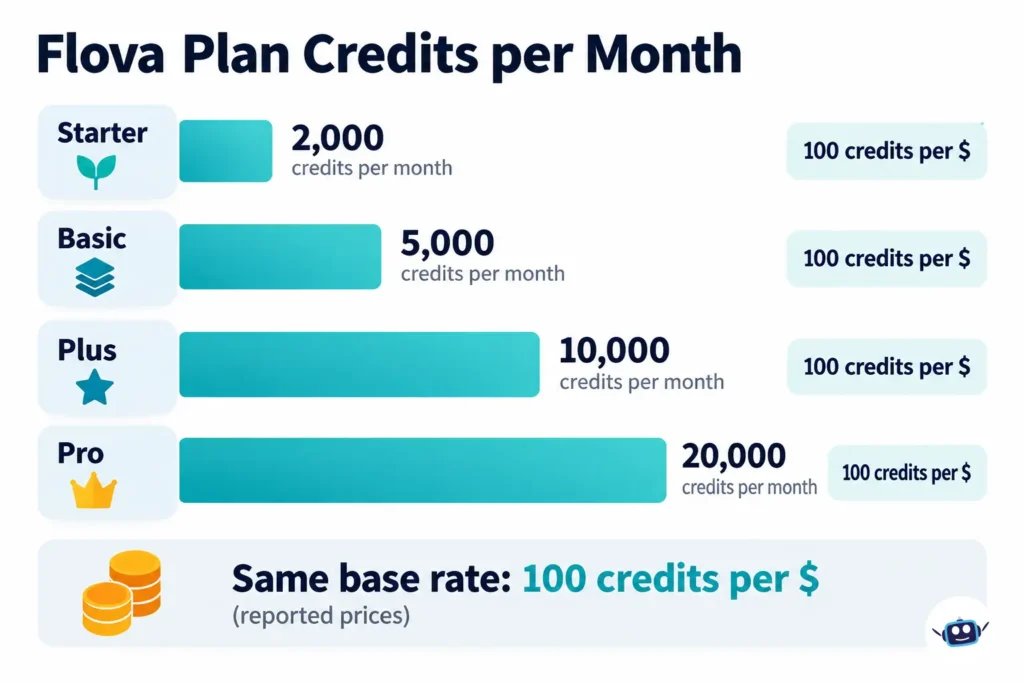
- Cost: four personal tiers with 2,000, 5,000, 10,000 or 20,000 credits per month. Reviewers report $20, $50, $100 and $200 monthly. Annual billing saves 16%.
- Best for: story-driven creators who want an agent to manage storyboards, characters and a timeline.
- Main catches: credits expire after 30 days, video cost varies sharply by model and length, and the terms allow Flova to use your inputs and outputs to train its models.
- Our basis: official pages and terms read on October 29, 2026, plus published third-party testing. We did not generate videos ourselves.
What is Flova AI, and what is it not?
Flova is a project workspace, not a video model. You give its Agent a brief, script or reference images. It drafts a storyboard, calls outside models to generate shots, and places the results on an editable timeline.
According to company announcements, Flova launched globally in October 2025, and “Flova AI 1.0” was announced on May 26, 2026. That release added reusable Skills, which the company describes as production playbooks rather than prompt templates. The company says its Skill Hub holds more than 100 of them. The same materials say you can upload scripts of up to 300,000 characters in one go, so the Agent keeps project context across episodes.
The difference between a chatbot and an agent matters here. If you want the background on why agents behave differently from chat tools, our explainer on AI coding agents versus chatbots covers the general idea. The same logic applies to video: an agent takes many steps, and each step can spend credits.
What most people miss: because Flova sits on top of other companies’ models, the quality of a shot depends on which model it picked. Flova’s own pricing page names Seedance 2.5 and 2.0. Software directories list more models, and the lineup changes often, so treat any list as a snapshot.
Are you looking at the right Flova? (Name confusion)
Several similar names circulate. Mixing them up leads to wrong reviews and wrong prices.
| Name | What it is | Why it matters |
|---|---|---|
| Flova AI (flova.ai) | The AI video agent reviewed here, run by FLOVA PTE. LTD., Singapore | The product this article covers |
| Flova UK (flova.co.uk) | A separate listing on Trustpilot | Its reviews are not about the video tool |
| Flair AI (flair.ai) | A different AI product with its own Trustpilot page | Complaints about its credits are not Flova’s |
| FLORA (flora.ai) | A different creative AI workspace with per-seat pricing | Often compared with Flova, but separate |
| Flova TV | A gallery of creator projects on Flova’s own site | Showcases, not a separate product |
| Flova AI 1.0 | A release name from May 2026 | Same product, not a new app |
The company says its founder previously led ByteDance’s imaging business. Flova itself is a Singapore company, not a ByteDance product. Funding figures in its press release, which the company states as more than $80 million across two rounds, are company claims.
What has changed recently?
| Date | Change | Source type |
|---|---|---|
| Oct 2025 | Global launch | Company press release |
| May 26, 2026 | Flova AI 1.0 announced, introducing Skills | Company’s official social post |
| Aug 24, 2026 | Seedance 2.5 integration announced | Company press release |
| Oct 2026 | Pricing page lists Seedance 2.5 and 2.0 under high-concurrency perks; “Agent chat free for a limited time” banner | Official pricing page, read Oct 29, 2026 |
The limited-time chat promotion is worth noticing. If it ends, chat could start consuming credits. The pricing page also says credit rules and bonus programs may change at any time, with or without notice.
How much does Flova AI cost?
Flova’s personal plans have four tiers. The official page lists the credit allocations and perks below. The page displays prices with animated digits that did not come through in our read. The dollar figures come from independent reviewers: Kingy AI recorded Starter at $20 on October 22, 2026 (region and currency unconfirmed), and other reviews report $50, $100 and $200 for the higher tiers. Check your checkout screen before paying.
| Plan | Credits per month | Seedance 2.5/2.0 concurrency | Single-model concurrency | Authorized users | Reported monthly price |
|---|---|---|---|---|---|
| Starter | 2,000 | 10 | 5 | 2 | $20 |
| Basic | 5,000 | 20 | 7 | 5 | $50 |
| Plus | 10,000 | 50 | 10 | 10 | $100 |
| Pro | 20,000 | 80 | 15 | 20 | $200 |
All four list watermark-free export, commercial use, image and video HD enhancement, and video subtitle erasure. Plus and Pro add “exclusive compliant realistic-style generation.” A separate Team tab exists, and its label mentions realistic-style generation. We could not verify its prices.
Cost math (our calculation, using the reported prices and the official 16% annual discount):
| Plan | Credits per $ (monthly) | Annual equivalent per month | Annual total | Credits per $ (annual) |
|---|---|---|---|---|
| Starter | 100 | $16.80 | $201.60 | 119 |
| Basic | 100 | $42.00 | $504.00 | 119 |
| Plus | 100 | $84.00 | $1,008.00 | 119 |
| Pro | 100 | $168.00 | $2,016.00 | 119 |
What most people miss: the base credit rate is identical across tiers at 100 credits per dollar. Moving up buys more parallel jobs and more authorized users, not cheaper credits. Third-party reviews also report bonus credits that differ by source (for example 400 versus 800 on Starter), which suggests promotions. Do not budget around bonus credits.
Quarterly billing saves 5% according to the pricing page. Subscriptions auto-renew unless you cancel before the renewal date.
How fast do Flova credits disappear?
Quickly, if you pick expensive models or retake often. Flova charges by model, generation duration, resolution and other settings. The exact numbers live in the in-app Model Pricing Table (Account Management, then Pricing Details).
One software directory listing reports ranges of 3 to 25 credits per image, 4 to 135 credits per second of video, and 1 to 5 credits per music or narration generation. We could not confirm these ranges against Flova’s in-app table, so treat them as indicative.
Applying that reported video range to a Starter plan gives this (our calculation):
| Video length | At 4 credits/sec | At 135 credits/sec |
|---|---|---|
| 15 seconds | 60 credits | 2,025 credits |
| 30 seconds | 120 credits | 4,050 credits |
| 60 seconds | 240 credits | 8,100 credits |
At the top rate, Starter’s 2,000 credits cover about 14.8 seconds of finished video, with no room for retakes. At the bottom rate they cover 500 seconds. The gap between those two is the whole story of Flova’s pricing.
A simple Retake Budget check (illustrative)
Before subscribing, estimate: final seconds × credits per second × attempts per shot. Suppose your project is 30 seconds, the model you choose costs 20 credits per second (an assumed figure, not Flova’s), and you expect three attempts per shot. That is 30 × 20 × 3 = 1,800 credits, nearly a full Starter month for one short film. Replace the 20 with the real number from your Model Pricing Table.
Credit expiry adds pressure. Subscription credits last 30 days, invite bonuses 7 days, and exploration bonuses 30 days. When credits have more than seven days left, model-specific credits are used before general subscription credits. Inside the final seven days, the credits expiring soonest go first.
On failures, Flova says credits are automatically refunded when a generation fails because of a system issue. A generation that technically succeeds but looks wrong is not a system failure, so those credits stay spent.
Is Flova AI free?
Partly. Flova’s own blog says new accounts receive 300 experience credits. One reviewer breaks that into 100 at signup and 200 as an exploration bonus. Older reviews mention larger starting amounts and weekly credit refreshes, but the current official credit programs page lists subscription, invite, exploration, and creator or event credits, with no weekly credits. That suggests the programs have changed.
Use the free credits to test one short scene, not a full project. Keep in mind the terms say you may not monetize outputs created when you had no plan that explicitly permits commercial use.
What do the terms say? (The fine print most reviews skip)
We read the Terms of Service on October 29, 2026. Its “Last Updated” line reads August 18, 2025, which predates the 1.0 release and the current plan lineup.
- Training on your content. The terms say inputs, outputs and interactions may be used to train and improve Flova’s models, unless you agree otherwise with Flova. Flova also reserves the right to review inputs and outputs with automated and manual tools.
- Ownership. Flova says it does not claim ownership of your inputs or outputs and assigns you any rights it has in outputs. It also warns that outputs may not be unique and does not guarantee they are protectable or non-infringing.
- Commercial use. Permitted only while you hold a plan that allows it. The pricing page lists commercial use on all paid tiers.
- Uploads you should avoid. Photos of other people without their permission, sensitive personal information such as government IDs, and cloned voices you do not have rights to.
- Third-party models. The terms acknowledge Flova relies on third-party services but do not list which providers receive your data. Read the privacy policy before uploading client material.
- Disputes. Binding individual arbitration through JAMS, with a class-action waiver. You can opt out by written notice within 30 days of registering.
- Service changes. Flova may modify, suspend or discontinue the service with or without notice, and may delete inactive accounts. Export finished work regularly. Our piece on what users should do when an AI company collapses shows why that habit matters for any AI platform.
Rights questions are not unique to Flova. The debate around AI waivers in film contracts is a useful reminder to read AI clauses before you sign or upload.
How do refunds work?
The pricing page says you can request a full refund within 7 days of purchase if you have used no generation features since your latest payment, including chat with the language model, images, video, music or narration. The Terms say payments are otherwise final, with partial refunds at the company’s discretion, based on unused credits. Refunds are processed in 5 to 10 business days to the original payment method.
The practical lesson: the refund window closes the moment you generate anything. Test with free credits first.
What does the evidence say about quality?
Independent evidence is thin and mixed.
- Positive: Pollo AI, a company that sells a competing product, called Flova’s strongest area controlled character consistency across camera angles and a good fit for cinematic and story work. It also said output needs review and that Flova is slower than ad-focused tools.
- Creator demonstration: Kingy AI’s profile describes a video comparing prompt and Skill workflows on one pirate story, including a continuity fix. Kingy notes it is a bounded demonstration on one story, not proof that Skills beat prompting.
- Complaints: As of October 29, 2026, Trustpilot lists four reviews for flova.ai with a TrustScore of 2.6, and all four listed reviews are one-star. Themes include credits expiring, credits consumed by edits that did not produce the requested change, and refund frustration. Flova replied to two of them on September 24, 2026, offering to review billing and generation history. Four reviews is far too few to generalize.
- Cost surprise: the Japanese reviewer mentioned earlier found a roughly 30 to 40 second piece consumed about half a Starter month when the AI chose the models.
None of this proves Flova is good or bad. It says the strongest claim, consistent characters, is plausible, and the strongest risk, unpredictable credit spend, is real.
Who should use Flova, and who should skip it?
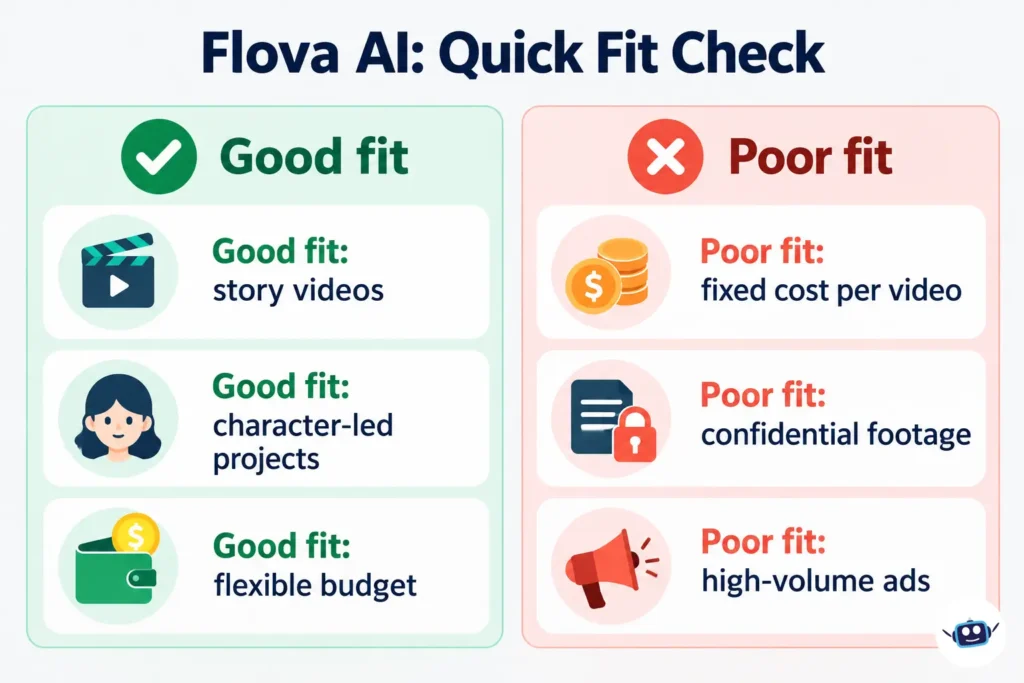
Use it if you:
- make short films, music videos or character-led stories,
- want one workspace for storyboard, assets and timeline,
- can budget two to three times your first estimate for retakes.
Skip it if you:
- need a fixed cost per video,
- produce high volumes of product ads on tight deadlines,
- handle confidential footage, client likenesses or regulated material,
- cannot accept that your inputs may train the vendor’s models.
Common mistakes
- Letting the Agent choose models without a cap. Tell it your credit ceiling first, and lock the storyboard and reference images before expensive generation.
- Testing paid features before the refund check. One generation ends the full-refund window.
- Trusting reviews of the wrong Flova. Check the domain.
- Assuming bonus credits will repeat. Programs change without notice.
- Skipping the Model Pricing Table. It is the only authoritative cost list.
- Publishing raw outputs. Pollo AI and Kingy both point to continuity issues that need human review.
How to check this yourself before paying
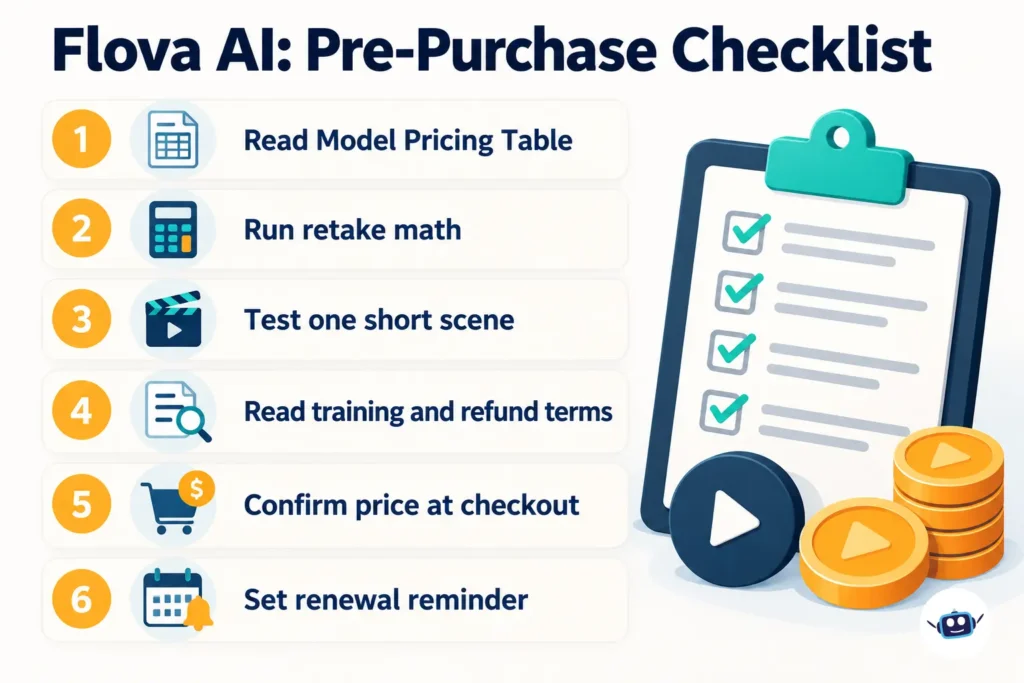
- Open Account Management, then Pricing Details, then the Model Pricing Table, and note the cost per second for the models you would use.
- Run the Retake Budget formula above against your actual project length.
- Spend the free credits on one 5 to 10 second scene and see how many credits it really uses.
- Read the Terms of Service sections on training, commercial use and refunds.
- Confirm the price and currency at checkout.
- Set a reminder before the renewal date.
What are the alternatives?
| Option | Approach | Verified pricing note |
|---|---|---|
| FLORA | Multi-model creative workspace, per-seat plans | Official page lists Starter at $18 per seat per month and Pro at $50 per seat per month; its docs say annual plans save 20% on Starter, Pro and Max |
| Pollo AI | Multi-model suite with marketing, commerce and creative studios, per its own site | Check its live pricing |
| Prompt-first generators (Runway, Pika) | Single-clip generation with credit plans | Check live pricing; we did not verify current plans |
Choose by workflow, not hype. If your core need is ad-style output rather than story continuity, Pollo AI’s own positioning points that way. If you want shared team seats, compare FLORA’s per-seat model against Flova’s authorized-user limits.
FAQs
Is Flova AI legit?
It is a registered Singapore company (FLOVA PTE. LTD.) with an associated Hong Kong entity listed in its terms, an official site and published policies. User feedback on Trustpilot is currently all negative but very small in number.
Does Flova AI have a free plan?
It offers new accounts about 300 experience credits rather than an ongoing free tier, according to Flova’s blog and one reviewer. Programs change, so check your account.
Can I use Flova videos commercially?
Paid tiers list commercial use. The terms bar commercial use of outputs made while you had no plan that permits it. Flova does not guarantee outputs are free of third-party rights.
Do Flova credits roll over?
No. Subscription credits are valid for 30 days, and invite credits for 7 days.
Can I cancel anytime?
Yes. Use Manage Subscription, then Cancel Subscription. You keep benefits until the cycle ends and the plan does not renew.
Does Flova use my content to train AI?
The terms say inputs, outputs and interactions may be used to train and improve its models unless otherwise agreed.
How much does a Flova video cost?
There is no flat price. Cost depends on model, duration, resolution and settings. A directory listing reports 4 to 135 credits per second for video, which we could not confirm against Flova’s own table.
Is Flova better than Pollo AI?
They target different jobs. Pollo’s review says Flova suits story work and Pollo suits ad production, but Pollo sells a competing product, so verify with a free trial of both.
Conclusion
Flova AI is a capable-looking agent workspace for story-driven video, with a real cost-control problem. The base credit rate is the same on every tier, per-second costs span a very wide range, and the terms allow training on your content.
Key takeaways: price your project with the Retake Budget formula, use the free credits for one short scene before paying, and keep sensitive material out. Next step: open the Model Pricing Table in a free account and cost your own project before you subscribe.
Related: Is Vidqu AI down? What happened and alternatives
Disclaimer
This article is for informational purposes only and is not affiliated with, sponsored by or endorsed by Flova, FLOVA PTE. LTD. or any brand mentioned. Prices, features, credit rules and policies may change without notice. Information last verified on October 29, 2026. AI output can be inaccurate, and you remain responsible for checking rights, accuracy and terms before publishing anything you generate.